Case Studies
Brett Shavers posted a fascinating article recently, in which discussed the value of case studies throughout his career, going back to his LEO days. I've thought for some time now that this is one of the great missed opportunities of the DFIR community, that more analysts don't share what they've seen or done. At the same time, I've seen time and again the benefit that comes from doing something like this...we get a different perspective, or we learn a little bit more or new, *OR* we learn that we were incorrect about something, and find out what the real deal is...this can have a huge impact on our future work. Throughout the time I've been involved in the community, I've heard "...but I don't want to be corrected..." more than once, and to be honest, I'm not at all sure why that is. God knows that I don't know everything and if I've gotten something wrong, I'd love to know what it is so that I don't keep making the same mistake over and over again.
Taking Brett's blog post a bit further (whether he knew it or not), Phill Moore shared a post about documenting his work.
Cisco Talos Intelligence - Decoy Documents
The Cisco Talos Intel team recently blogged regarding the use of decoy documents during a real cyber conflict. What I found fascinating about this write-up was the different approach that was taken with the documents; specifically, the payload is base64-encoded and spread across the document metadata. When the document is opened, a macro reportedly extracts the segments from the metadata variables and concatenates them together, resulting in a base64-encoded PE file. The folks at Talos were kind enough to provide hashes for three decoy documents, which were all available on VirusTotal (searching for some of the metadata items returned this Hybrid Analysis link). As such, I took the opportunity to run them through my own tools (wmd.pl, oledmp.pl) to see what I could see.
The first interesting aspect of the documents is that even though the three documents were different in structure, some of the metadata (including time stamps) were identical.
For example, from wmd.pl, the three documents all contained the same information illustrated below:
Authress : Rafael Moon
LastAuth : Nick Daemoji
RevNum : 7
AppName : Microsoft Office Word
Created : 03.10.2017, 01:36:00
Last Saved : 04.10.2017, 14:20:00
From oledmp.pl, even though the first document had markedly different streams from the other two, the root entry and directory entries all had the same time stamp and CLSID:
Root Entry Date: 04.10.2017, 14:20:11 CLSID: 00020906-0000-0000-C000-000000000046
So, given the combination of identical metadata and time stamps, it's possible that the values were modified or manipulated to their values. I'd say that this is support by the fact that some of the metadata values were modified to include the
Remember, you can also use Didier Stevens' oledump.py to extract the compressed VBA macros. For example, to view the complete VBA script from the second document, I just typed the following command:
oledump.py d:\cases\maldoc\apt28_2 -s 8 -v
Shoop*, there it is...the decompressed macro script. Very nice. Maybe Cory and I should do reprise DFwOST, and do a second edition, and include stuff like this, going beyond just tools for forensics, and looking at tools that allow you to parse documents, etc.
Something I've mentioned before are some values that I saw listed in the output of 'strings' run across the documents:
CMG="6B69C77E3682368232863286"
DPB="D6D47AEB8E3DE45AE45A1BA6E55A4B8B26955AAD8AB69D9BB0FF733C04402A5B44526BEF14E0D0"
GC="4143EDEEEEEEEEEE"
Again, I've seen these before in Office documents that contain macros, most times with different values. The definition of these values can be found at the MS-OVA Project page, under the Stream example, and I haven't yet been able to determine how these fields are populated.
LNK Files
I've posted several times over the past couple of months regarding parsing metadata from LNK files that are part of an adversary's toolkit; those either sent to a target as an email attachment, or embedded in another document format, etc. US-CERT posted an alert recently that I found to be very interesting along the same lines, particularly regarding the fact that the adversary modifying Windows shortcut files as a means of credential theft. The big take-away from this information (for me) is that the adversary incorporated something that rudimentary about how the operating system functions and used it as a means for collecting credentials.
Of course, the "elephant in the room" is, why are organizations still allowing out-bound SMB traffic?
USB Devices
There's been a good bit of activity online recently regarding USB devices and Windows 10 systems. Eric Zimmerman blogged about some changes to the AmCache.hve file that include a significant amount of information about devices. Matt Graeber tweeted that "Microsoft-Windows-Partition/Diagnostic EID 1006 gives you a raw dump of the partition table, MBR, and VBR upon drive insertion", and @Requiem_fr tweeted that USB device info can be found in the Microsoft-Windows-Kernel-PnP%4Configuration.evtx Windows Event Log.
A little over 12 years ago, Cory Altheide and I published a paper on tracking USB devices on Windows XP systems, and it's been pretty amazing to see not only how this sort of thing has grown over time, but also to see the number of artifacts that continue to be generated as new versions of Windows have been released.
*Please excuse my taking artistic liberties to work in a Deadpool reference...
Showing posts sorted by date for query wmd.pl. Sort by relevance Show all posts
Showing posts sorted by date for query wmd.pl. Sort by relevance Show all posts
Monday, October 30, 2017


Wednesday, August 02, 2017
Document Metadata
Okay, yeah, so I've been blogging a lot over the past couple of months about extracting document metadata as part of gathering threat intelligence.
This handler diary provided analysis of "malspam pushing Emotet", and this follow up post illustrated how to conduct static analysis of the document itself. I have used several of the tools mentioned, but had not yet heard of "vipermonkey", and open-source VBA emulator. Used in conjunction with oledump.py, you can really get a lot of traction with respect to static analysis of the malicious document.
While the second handler diary post focuses on analysis of the malicious macro, what neither post does is illustrate the document metadata. Below is the output of wmd.pl, run against a sample downloaded from VT:
C:\Perl>wmd.pl d:\cases\maldoc\maldoc
--------------------
Statistics
--------------------
File = d:\cases\maldoc\maldoc
Size = 215040 bytes
Magic = 0xa5ec (Word 8.0)
Version = 193
LangID = Russian
Document has picture(s).
Document was created on Windows.
Magic Created : MS Word 97
Magic Revised : MS Word 97
--------------------
Summary Information
--------------------
Title : sdf
Subject : df
Authress : admin
LastAuth : admin
RevNum : 2
AppName : Microsoft Office Word
Created : 26.07.2017, 11:51:00
Last Saved : 26.07.2017, 11:51:00
Last Printed :
--------------------
Document Summary Information
--------------------
Organization : home
From the Wired article:
Eventually, Ash sent the staffer an email with a Microsoft Excel attachment for a photography survey. She asked him to open it on his office network, telling him that it would work best there. After a month of trust-building conversation, he did as he was told. The attachment promptly launched a malicious macro...
So, this really illustrates the dedication of these threat actors...they establish a persona, including social media "pocket litter", and spend time developing a relationship with their target. As a very small part of her research, Allison took a look at the metadata embedded within the Excel spreadsheet, and found that the user information referred to "Mia Ash". This further illustrated the depths to which the threat actors would go in order to make the persona appear authentic; not only did they populate multiple social media sites and create a "history" for the persona, but they also ensured that the metadata in the documents sent to intended victims included the 'right' contents to support the persona. That's right, it's exactly the way it sounds...the metadata embedded in the spreadsheet specifically referred to "Mia Ash" as the authorized user of the MS Office products.
I know what you're going to say..."yeah, but that stuff can be changed/modified...". Yes, it can...but the point is, how often is that actually done? Look at the above listed output from wmd.pl...does it look as if any effort was put into modifying the metadata that populated the Word97 file?
Something I've said about Windows systems and DFIR work is that as the versions of Windows have been developed, the amount of information that is automatically recorded as malware or an adversary interacts with the endpoint environment has increased significantly. In many cases, this seems to be overlooked when it comes to developing threat intelligence for some reason; in spam and phishing campaigns, a lot of the different artifacts are examined...the contents of the email (headers, body, etc.), attachment macros, second-stage downloads, etc. But what is often missed is document metadata embedded in the attachment; Word docs, Excel spreadsheets, and even LNK shortcut files can all be rich in valuable information. One such example is looking at time stamps...when an email was sent, when a document was created, when a binary was compiled, etc., and lining all of those up to illustrate just how organized and planned out an attack appears to be.
This handler diary provided analysis of "malspam pushing Emotet", and this follow up post illustrated how to conduct static analysis of the document itself. I have used several of the tools mentioned, but had not yet heard of "vipermonkey", and open-source VBA emulator. Used in conjunction with oledump.py, you can really get a lot of traction with respect to static analysis of the malicious document.
While the second handler diary post focuses on analysis of the malicious macro, what neither post does is illustrate the document metadata. Below is the output of wmd.pl, run against a sample downloaded from VT:
C:\Perl>wmd.pl d:\cases\maldoc\maldoc
--------------------
Statistics
--------------------
File = d:\cases\maldoc\maldoc
Size = 215040 bytes
Magic = 0xa5ec (Word 8.0)
Version = 193
LangID = Russian
Document has picture(s).
Document was created on Windows.
Magic Created : MS Word 97
Magic Revised : MS Word 97
--------------------
Summary Information
--------------------
Title : sdf
Subject : df
Authress : admin
LastAuth : admin
RevNum : 2
AppName : Microsoft Office Word
Created : 26.07.2017, 11:51:00
Last Saved : 26.07.2017, 11:51:00
Last Printed :
--------------------
Document Summary Information
--------------------
Organization : home
...and from oledmp.pl:
C:\Perl>oledmp.pl -f d:\cases\maldoc\maldoc -l
Root Entry Date: 26.07.2017, 11:51:59 CLSID: 00020906-0000-0000-C000-000000000046
1 F.. 55949 \Data
2 F.. 7359 \1Table
3 F.. 4148 \WordDocument
4 F.T 4096 \ SummaryInformation
5 F.T 4096 \ DocumentSummaryInformation
6 D.. 0 26.07.2017, 11:51:59 \Macros
7 D.. 0 26.07.2017, 11:51:59 \Macros\VBA
8 FM. 88908 \Macros\VBA\ThisDocument
9 F.. 532 \Macros\VBA\__SRP_2
10 F.. 156 \Macros\VBA\__SRP_3
11 FM. 8137 \Macros\VBA\zjUb2S
12 FM. 8877 \Macros\VBA\cvDTF
13 FM. 4906 \Macros\VBA\FX9UL
14 F.. 15451 \Macros\VBA\_VBA_PROJECT
15 F.. 739 \Macros\VBA\dir
16 F.. 1976 \Macros\VBA\__SRP_0
17 F.. 198 \Macros\VBA\__SRP_1
18 F.. 98 \Macros\PROJECTwm
19 F.. 476 \Macros\PROJECT
20 F.T 114 \ CompObj
We can see that the dates displayed by both tools line up, and we can use oledmp.pl to further list the contents (raw, or hex) of the various streams.
So, how can any of this be of value, and why does any of this matter? Well, at BlackHat last week, Allison Wikoff spent a great deal of her time being interviewed about some really fantastic research that she'd conducted on the "Mia Ash" persona (here is the original SecureWorks posting of the results of her research).
From the Wired article:
Eventually, Ash sent the staffer an email with a Microsoft Excel attachment for a photography survey. She asked him to open it on his office network, telling him that it would work best there. After a month of trust-building conversation, he did as he was told. The attachment promptly launched a malicious macro...
So, this really illustrates the dedication of these threat actors...they establish a persona, including social media "pocket litter", and spend time developing a relationship with their target. As a very small part of her research, Allison took a look at the metadata embedded within the Excel spreadsheet, and found that the user information referred to "Mia Ash". This further illustrated the depths to which the threat actors would go in order to make the persona appear authentic; not only did they populate multiple social media sites and create a "history" for the persona, but they also ensured that the metadata in the documents sent to intended victims included the 'right' contents to support the persona. That's right, it's exactly the way it sounds...the metadata embedded in the spreadsheet specifically referred to "Mia Ash" as the authorized user of the MS Office products.
I know what you're going to say..."yeah, but that stuff can be changed/modified...". Yes, it can...but the point is, how often is that actually done? Look at the above listed output from wmd.pl...does it look as if any effort was put into modifying the metadata that populated the Word97 file?
Something I've said about Windows systems and DFIR work is that as the versions of Windows have been developed, the amount of information that is automatically recorded as malware or an adversary interacts with the endpoint environment has increased significantly. In many cases, this seems to be overlooked when it comes to developing threat intelligence for some reason; in spam and phishing campaigns, a lot of the different artifacts are examined...the contents of the email (headers, body, etc.), attachment macros, second-stage downloads, etc. But what is often missed is document metadata embedded in the attachment; Word docs, Excel spreadsheets, and even LNK shortcut files can all be rich in valuable information. One such example is looking at time stamps...when an email was sent, when a document was created, when a binary was compiled, etc., and lining all of those up to illustrate just how organized and planned out an attack appears to be.
Thursday, June 15, 2017
Analyzing Documents
I've noticed over time that a lot of the write-ups that get posted online regarding malware or downloaders delivered via email attachments (i.e., spear phishing campaign) focus on what happens after the malicious payload is activated...the URL reached to, the malware downloaded, etc. However, few seem to dig into the document itself, and there's a great deal can be gleaned from those documents, that can add to the threat intel picture. If you're not looking at everything involved in the incident, if you're not (as Jesse Kornblum said) using all the parts of the buffalo, then you're very likely missing critical elements of the threat intel picture.
Here's an example from MS...much of the information in the post focuses on the embedded macro and the subsequent decrypted Cerber executable file, but there's nothing available regarding the document itself.
Keep in mind that different file formats (LNK, OLE, etc.) will contain different information. And what I'm referring to here isn't about running through analysis steps that take a great deal of time; rather, what I'm going to show you are a few simple steps you can use to derive even more information from the attachment/wrapper documents themselves.
I took a look at a couple of documents (Doc 1, Doc 2) recently, and wanted to share my process and see if others might find it useful. Both of these OLE-format documents have hashes available (or you can download and compute the hashes yourself), and they were also found on VirusTotal:
VirusTotal analysis for Doc 1
VirusTotal analysis for Doc 2
The VT analysis for both files includes a comment that the file was used to deliver PupyRAT.
Tools
Tools I'll be using for this analysis include my own oledmp.pl and wmd.pl.
Doc 1 Analysis
Running oledmp.pl against the file, we see:
That's a lot of streams in this OLE file. So, one of the first things we see is the dates for the Root Entry and the 'directories' (MS has referred to the OLE file format as "a file system within a file", and they're right), which is 1 Jan 2017. According to VT, the first time this file was submitted was 1 Jan 2017, at approx. 20:29:43 UTC...so what that tells us is that it's likely that one of the first folks to receive the document submitted it less than 14 hrs after the file was modified.
Continuing with oledmp.pl, we can view the contents of the various streams in a hex dump format, but we see that stream number 20 contains a macro. Using oledmp.pl with the argument "-d 20", we can view the contents of the stream in hex dump format. In the output we see what appear to be 2 base64-encoded Powershell commands, one that downloads PupyRAT to the system, and another that appears to be shell code. Copying and decoding both of the streams gives us the command that downloads PupyRAT, as well as a second command that appears to be some form of shell code. Some of the variable names ($Qsc, $zw5) appear to be unique, so searching for those via Google leads us to this Hybrid-Analysis write-up, which provides some insight into what the shell code may do.
Interestingly enough, the same search reveals that, per this Reverse.IT link, both encoded Powershell commands were used in another document, as well.
Moving on, here's an excerpt of the output from wmd.pl, when run against this document:
--------------------
Summary Information
--------------------
Title :
Subject :
Authress : Windows User
LastAuth : Windows User
RevNum : 2
AppName : Microsoft Office Word
Created : 01.01.2017, 06:51:00
Last Saved : 01.01.2017, 06:51:00
Last Printed :
Notice the dates...they line up with the previously-identified dates (see fig.1)
Doc 2 Analysis
Following the same process we did with doc 1, we can see very similar output from oledmp.pl with doc 2:
One of the first things we can see is that this document was created within about 24 hrs of doc 1.
In the case of doc 2, stream 16 contains the data we're looking for...extracting and decoding the base64-encoded Powershell commands, we see that the commands themselves (PupyRAT download, shell code) are different. Conducting a Google search for the variables used in the shell code command, we find this Hybrid-Analysis write-up, as well as this one from Reverse.IT.
Here's an excerpt of the output from wmd.pl, when run against this document:
--------------------
Summary Information
--------------------
Title : HealthSecure User Registration Form
Subject : HealthSecure User Registration Form
Authress : ArcherR
LastAuth : Windows User
RevNum : 2
AppName : Microsoft Office Word
Created : 02.01.2017, 06:49:00
Last Saved : 02.01.2017, 06:49:00
Last Printed : 20.06.2013, 06:27:00
--------------------
Document Summary Information
--------------------
Organization : ACC
Remember, this is a sample pulled down from VirusTotal, so there's no telling what happened with the document between the time it was created and submitted to VT. I made the 'authress' information bold, in order to highlight it.
Summary
While this analysis may not appear to be of significant value, it does form the basis for developing a better intelligence picture, as it goes beyond the more obvious aspects of what constitutes most analysis (i.e., the command to download PupyRAT, as well as the analysis of the PupyRAT malware itself) in phishing cases. Valuable information can be derived from the document format used to deliver the malware itself, regardless of whether it's an MSOffice document, or a Windows shortcut/LNK file. When developing an intel picture, we need to be sure to use all the parts of the buffalo.
Here's an example from MS...much of the information in the post focuses on the embedded macro and the subsequent decrypted Cerber executable file, but there's nothing available regarding the document itself.
Keep in mind that different file formats (LNK, OLE, etc.) will contain different information. And what I'm referring to here isn't about running through analysis steps that take a great deal of time; rather, what I'm going to show you are a few simple steps you can use to derive even more information from the attachment/wrapper documents themselves.
I took a look at a couple of documents (Doc 1, Doc 2) recently, and wanted to share my process and see if others might find it useful. Both of these OLE-format documents have hashes available (or you can download and compute the hashes yourself), and they were also found on VirusTotal:
VirusTotal analysis for Doc 1
VirusTotal analysis for Doc 2
The VT analysis for both files includes a comment that the file was used to deliver PupyRAT.
Tools
Tools I'll be using for this analysis include my own oledmp.pl and wmd.pl.
Doc 1 Analysis
Running oledmp.pl against the file, we see:
 |
| Fig. 1: Doc 1 oledmp.pl output |
That's a lot of streams in this OLE file. So, one of the first things we see is the dates for the Root Entry and the 'directories' (MS has referred to the OLE file format as "a file system within a file", and they're right), which is 1 Jan 2017. According to VT, the first time this file was submitted was 1 Jan 2017, at approx. 20:29:43 UTC...so what that tells us is that it's likely that one of the first folks to receive the document submitted it less than 14 hrs after the file was modified.
Continuing with oledmp.pl, we can view the contents of the various streams in a hex dump format, but we see that stream number 20 contains a macro. Using oledmp.pl with the argument "-d 20", we can view the contents of the stream in hex dump format. In the output we see what appear to be 2 base64-encoded Powershell commands, one that downloads PupyRAT to the system, and another that appears to be shell code. Copying and decoding both of the streams gives us the command that downloads PupyRAT, as well as a second command that appears to be some form of shell code. Some of the variable names ($Qsc, $zw5) appear to be unique, so searching for those via Google leads us to this Hybrid-Analysis write-up, which provides some insight into what the shell code may do.
Interestingly enough, the same search reveals that, per this Reverse.IT link, both encoded Powershell commands were used in another document, as well.
Moving on, here's an excerpt of the output from wmd.pl, when run against this document:
--------------------
Summary Information
--------------------
Title :
Subject :
Authress : Windows User
LastAuth : Windows User
RevNum : 2
AppName : Microsoft Office Word
Created : 01.01.2017, 06:51:00
Last Saved : 01.01.2017, 06:51:00
Last Printed :
Notice the dates...they line up with the previously-identified dates (see fig.1)
Doc 2 Analysis
Following the same process we did with doc 1, we can see very similar output from oledmp.pl with doc 2:
 |
| Fig. 2: Doc 2 oledmp.pl output |
One of the first things we can see is that this document was created within about 24 hrs of doc 1.
In the case of doc 2, stream 16 contains the data we're looking for...extracting and decoding the base64-encoded Powershell commands, we see that the commands themselves (PupyRAT download, shell code) are different. Conducting a Google search for the variables used in the shell code command, we find this Hybrid-Analysis write-up, as well as this one from Reverse.IT.
Here's an excerpt of the output from wmd.pl, when run against this document:
--------------------
Summary Information
--------------------
Title : HealthSecure User Registration Form
Subject : HealthSecure User Registration Form
Authress : ArcherR
LastAuth : Windows User
RevNum : 2
AppName : Microsoft Office Word
Created : 02.01.2017, 06:49:00
Last Saved : 02.01.2017, 06:49:00
Last Printed : 20.06.2013, 06:27:00
--------------------
Document Summary Information
--------------------
Organization : ACC
Remember, this is a sample pulled down from VirusTotal, so there's no telling what happened with the document between the time it was created and submitted to VT. I made the 'authress' information bold, in order to highlight it.
Summary
While this analysis may not appear to be of significant value, it does form the basis for developing a better intelligence picture, as it goes beyond the more obvious aspects of what constitutes most analysis (i.e., the command to download PupyRAT, as well as the analysis of the PupyRAT malware itself) in phishing cases. Valuable information can be derived from the document format used to deliver the malware itself, regardless of whether it's an MSOffice document, or a Windows shortcut/LNK file. When developing an intel picture, we need to be sure to use all the parts of the buffalo.
Sunday, September 11, 2016
OLE...OLE, OLE, OLE!

I recently posted an update blog that included a brief discussion of a tool I was working on, and why. In short, and due in part to a recently publicized change in tactics, I wanted to dust off some old code I'd written and see what information or intel I could collect.
The tactic I'm referring to involves the use of malware delivered via '.pub' files. I wasn't entirely too interested in this tactic until I found out that .pub (MS Publisher) files are OLE format files.
The code I'm referring to is wmd.pl, something I wrote a while back (according to the header information, the code is just about 10 yrs old!) and was written specifically to parse documents created using older versions of MS Word, specifically those that used OLE.
OLE
The Object Linking and Embedding (OLE) file format is pretty well documented at the MS site, so I won't spend a lot of time discussing the details here. However, I will say that MS has referred to the file format as a "file system within a file", and that's exactly what it is. If you look at the format, there's actually a 'sector allocation table', and it's laid out very similar to the FAT file system. Also, at some levels of the 'file system' structure, there are time stamps, as well. Now, the exact details of when and how these time stamps are created and/or modified (or if they are, at all) isn't exactly clear, but they can serve as an indicator, and something that we can incorporate with other artifacts such that when combining them with context, we can get a better idea of their validity and value.
For most of us who have been in the IR business for a while, when we hear "OLE", we think of the Blair document, and in particular, the file format used for pre-2007 versions of MS Office documents. Further, many of us thought that with the release of Office 2007, the file format was going to disappear, and at most, we'd maybe have to dust off some tools or analysis techniques at some point in the future. Wow, talk about a surprise! Not only did the file format not disappear, as of Windows 7, we started to see it being used in more and more of the artifacts we were seeing on the system. Take a look at the OLE Compound File page on the ForensicWiki for a list of the files on Windows systems that utilize the OLE file format (i.e., StickyNotes, auto JumpLists, etc.). So, rather than "going away", the file format has become more pervasive over time. This is pretty fascinating, particularly if you have a detailed understanding of the file structure format. In most cases when you're looking at these files on a Windows system, the contents of the files will be what you're most interested in; for example, with automatic Jump Lists, we may be most interested in the DestList stream. However, when an OLE compound file is created off of the system, perhaps through the use of an application, we (as analysts) would be very interested in learning all we can about the file itself.

Tools
So, the idea behind the tool I was working on was to pull apart one component of the overall attack to see if there were any correlations to the same component with respect other attacks. I'm not going to suggest it's the same thing (because it's not) but the idea I was working from is similar to pulling a device apart and breaking down its components in order to identify the builder, or at the very least to learn a little bit more that could be applied to an overall threat intel picture.
Here's what we're looking at...in this case, the .pub files are arriving as email attachments, so you have a sender email address, contents of the email header and body, attachment name, etc. All of this helps us build a picture of the threat. Is the content of the email body pretty generic, or is it specifically written to illicit the desired response (opening the attachment) from the user to whom it was sent? Is it targeted? Is it spam or spear-phishing/whaling?
Then we have what occurs after the user opens the attachment; in some cases, we see that files are downloaded and native commands (i.e., bitsadmin.exe) are executed on the system. Some folks have already been researching those areas or aspects of the overall attacks, and started pulling together things such as sites and files accessed by bitsadmin.exe, etc.
Knowing a bit about the file format of the attachment, I thought I'd take an approach similar to what Kevin talked about in his Continuing Evolution of Samas Ransomware blog post. In particular, why not see if I could develop some information that could be mapped to other aspects of the attacks? Folks were already using Didier's oledump.py to extract information about the .pub files, as well as extract the embedded macros, but I wanted to take a bit of a closer look at the file structure itself. As such, I collected a number of .pub files that were known to be malicious in nature and contain embedded macros (using open sources), and began to run the tool I'd written (oledmp.pl) across the various files, looking not only for commonalities, but differences, as well. Here are some of the things I found:
All of the files had different time stamps; within each file, all of the "directory" streams had the same time stamp. For example, from one file:
Root Entry Date: 30.06.2016, 22:03:16
All of the "directory" streams below the Root Entry had the same time stamp, as illustrated in the following image (different file from the one with 30 June time stamps):
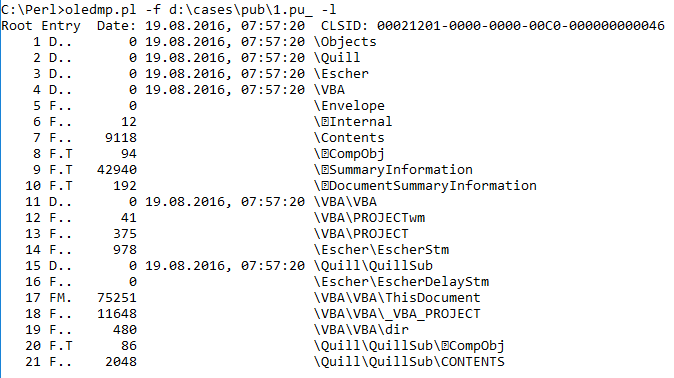 |
| .pub file structure listing |
Some of the files had a populated "Authress:" entry in the SummaryInformation section. However, with the exception of those files, the SummaryInformation and DocumentSummaryInformation streams were blank.
All of the files had Trash sections (again, see the document structure specification) that were blank.
 |
| Trash Sections Listed |
Many (albeit not all) files contained a second stream with an embedded macro. In all cases within the sample set, the stream was named "Module1", and contained an empty function. However, in each case, that empty function had a different name.
Some of the streams of all of the files were identical across the sample set. For example, the \Quill\QuillSub\ \x01CompObj stream for all of the files appears as you see in the image below.
 |
| \Quill\QuillSub\ \x01CompObj stream |
All in all, for me, this was some pretty fascinating work. I'm sure that there may be even more information to collect with a larger sample set. In addition, there's more research to be done...for example, how do these files compare to legitimate, non-malicious Publisher files? What tools can be used to create these files?
Wednesday, September 07, 2016
More Updates
Timelines
Mari had a great post recently that touched on the topic of timelines, which also happens to be the topic of her presentation at the recent HTCIA conference (which, by all Twitter accounts, we very well received).
A little treasure that Mari added to the blog post was how she went about modifying a Volatility plugin in order to create a new one. Mari says in the post, "...nothing earth shattering...", but you know what, sometimes the best and most valuable things aren't earth shattering at all. In just a few minutes, Mari created a new plugin, and it also happens to be her first Volatility plugin. She shared her process, and you can see the code right there in the blog post.
Scripting
Speaking of sharing..well, this has to do with DFIR in general, but not Windows specifically...I ran across this fascinating blog post recently. In short, the author developed a means (using Python) for turning listings of cell tower locations (pulled from phones by Cellebrite) into a Google Map.
A while back, I'd written and shared a Perl script that did something similar, except with WiFi access points.
The point is that someone had a need and developed a tool and/or process for (semi-)automatically parsing and processing the original raw data into a final, useful output format.
.pub files
I ran across this ISC Handler Diary recently...pretty interesting stuff. Has anyone seen or looked at this from a process creation perspective? The .pub files are OLE compound "structured storage" files, so has anyone captured information from endpoints (IRL, or via a VM) that illustrates what happens when these files are launched?
For detection of these files within an acquired image, there are some really good Python tools available that are good for generally parsing OLE files. For example, there's Didier's oledump.py, as well as decalage/oletools. I really like oledump.py, and have tried using it for various testing purposes in the past, usually using files either from actual cases (after the fact), or test documents downloaded from public sources.
A while back I wrote some code (i.e., wmd.pl) specifically to parse OLE structured storage files, so I modified that code to essentially recurse through the OLE file structure, and when getting to a stream, simply dump the stream to STDOUT in a hex-dump format. However, as I'm digging through the API, there's some interesting information available embedded within the file structure itself. So, while I'm using Didier's oledump.py as a comparison for testing, I'm not entirely interested in replicating the great work that he's done already, as much as I'm looking for new things to pull out, and new ways to use the information, such as pulling out date information (for possible inclusion in a timeline, or inclusion in threat intelligence), etc.
So I downloaded a sample found on VirusTotal, and renamed the local copy to be more inline with the name of the file that was submitted to VT.
Here's the output of oledump.py, when run across the downloaded file:
Now, here's the output from ole2.pl, the current iteration of the OLE parsing tool that I'm working on, when run against the same file:
As you can see, there are more than a few differences in the outputs, but that doesn't mean that there's anything wrong with either tool. In fact, it's quite the opposite. Oledump.py uses a different technique for tracking the various streams in the file; ole2.pl uses the designators from within the file itself.
The output of ole2.pl has 5 columns:
- the stream designator (from within the file itself)
- a tuple that tells me:
- is the stream a "file" (F) or a "directory" (D)
- if the stream contains a macro
- the "type" (from here); basically, is the property a PropertySet?
- the date (OLE VT_DATE format is explained here)
Part of the reason I wrote this script was to see which sections within the OLE file structure had dates associated with them, as perhaps that information can be used as part of building the threat intel picture of an incident. The script has embedded code to display the contents of each of the streams in a hex-dump format; I've disabled the code as I'm considering adding options for selecting specific streams to dump.
Both tools use the same technique for determining if macros exist in a stream (something I found at the VBA_Tools site).
One thing I haven't done is added code to look at the "trash" (described here) within the file format. I'm not entirely sure how useful something like this would be, but hey, it may be something worth looking at. There are still more capabilities I'm planning to add to this tool, because what I'm looking at is digging into the structure of the file format itself in order to see if I can develop indicators, which can then be clustered with other indicators. For example, the use of .pub file attachments has been seen by others (ex: MyOnlineSecurity) being delivered via specific emails. At this point, we have things such as the sender address, email content, name of the attachment, etc. Still others (ex: MoradLabs) have shared the results of dynamic analysis; in this case, the embedded macro launching bitsadmin.exe with specific parameters. Including attachment "tooling" may help provide additional insight into the use of this tactic by the adversary.
Something else I haven't implemented (yet) is extracting and displaying the macros. According to this site, the macros are compressed, and I have yet to find anything that will let me easily extract and decompress a macro from the stream in which its embedded, using Perl. Didier has done it in Python, so perhaps that's something I'll leave to his tool.
Threat Intel
I read this rather fascinating Cisco Continuum article recently, and I have to say, I'm still trying to digest it. Part of the reason for this is that the author says some things I agree with, but I need to go back and make sure I understand what they're saying, as I might be agreeing while at the same time misunderstanding what's being said.
A big take-away from the article was:
Where a team like Cisco’s Talos and products like AMP or SourceFire really has the advantage, Reid said, is in automating a lot of these processes for customers and applying them to security products that customers are already using. That’s where the future of threat intelligence, cybersecurity products and strategies are headed.
Regardless of the team or products, where we seem to be now is that processes are being automated and applied to devices and systems that clients are already using, in many cases because the company sold the client the devices, as part of a service.
Mari had a great post recently that touched on the topic of timelines, which also happens to be the topic of her presentation at the recent HTCIA conference (which, by all Twitter accounts, we very well received).
A little treasure that Mari added to the blog post was how she went about modifying a Volatility plugin in order to create a new one. Mari says in the post, "...nothing earth shattering...", but you know what, sometimes the best and most valuable things aren't earth shattering at all. In just a few minutes, Mari created a new plugin, and it also happens to be her first Volatility plugin. She shared her process, and you can see the code right there in the blog post.
Scripting
Speaking of sharing..well, this has to do with DFIR in general, but not Windows specifically...I ran across this fascinating blog post recently. In short, the author developed a means (using Python) for turning listings of cell tower locations (pulled from phones by Cellebrite) into a Google Map.
A while back, I'd written and shared a Perl script that did something similar, except with WiFi access points.
The point is that someone had a need and developed a tool and/or process for (semi-)automatically parsing and processing the original raw data into a final, useful output format.
.pub files
I ran across this ISC Handler Diary recently...pretty interesting stuff. Has anyone seen or looked at this from a process creation perspective? The .pub files are OLE compound "structured storage" files, so has anyone captured information from endpoints (IRL, or via a VM) that illustrates what happens when these files are launched?
For detection of these files within an acquired image, there are some really good Python tools available that are good for generally parsing OLE files. For example, there's Didier's oledump.py, as well as decalage/oletools. I really like oledump.py, and have tried using it for various testing purposes in the past, usually using files either from actual cases (after the fact), or test documents downloaded from public sources.
A while back I wrote some code (i.e., wmd.pl) specifically to parse OLE structured storage files, so I modified that code to essentially recurse through the OLE file structure, and when getting to a stream, simply dump the stream to STDOUT in a hex-dump format. However, as I'm digging through the API, there's some interesting information available embedded within the file structure itself. So, while I'm using Didier's oledump.py as a comparison for testing, I'm not entirely interested in replicating the great work that he's done already, as much as I'm looking for new things to pull out, and new ways to use the information, such as pulling out date information (for possible inclusion in a timeline, or inclusion in threat intelligence), etc.
So I downloaded a sample found on VirusTotal, and renamed the local copy to be more inline with the name of the file that was submitted to VT.
Here's the output of oledump.py, when run across the downloaded file:
 |
| Oledump.py output |
Now, here's the output from ole2.pl, the current iteration of the OLE parsing tool that I'm working on, when run against the same file:
 |
| Ole2.pl output |
As you can see, there are more than a few differences in the outputs, but that doesn't mean that there's anything wrong with either tool. In fact, it's quite the opposite. Oledump.py uses a different technique for tracking the various streams in the file; ole2.pl uses the designators from within the file itself.
The output of ole2.pl has 5 columns:
- the stream designator (from within the file itself)
- a tuple that tells me:
- is the stream a "file" (F) or a "directory" (D)
- if the stream contains a macro
- the "type" (from here); basically, is the property a PropertySet?
- the date (OLE VT_DATE format is explained here)
Part of the reason I wrote this script was to see which sections within the OLE file structure had dates associated with them, as perhaps that information can be used as part of building the threat intel picture of an incident. The script has embedded code to display the contents of each of the streams in a hex-dump format; I've disabled the code as I'm considering adding options for selecting specific streams to dump.
Both tools use the same technique for determining if macros exist in a stream (something I found at the VBA_Tools site).
One thing I haven't done is added code to look at the "trash" (described here) within the file format. I'm not entirely sure how useful something like this would be, but hey, it may be something worth looking at. There are still more capabilities I'm planning to add to this tool, because what I'm looking at is digging into the structure of the file format itself in order to see if I can develop indicators, which can then be clustered with other indicators. For example, the use of .pub file attachments has been seen by others (ex: MyOnlineSecurity) being delivered via specific emails. At this point, we have things such as the sender address, email content, name of the attachment, etc. Still others (ex: MoradLabs) have shared the results of dynamic analysis; in this case, the embedded macro launching bitsadmin.exe with specific parameters. Including attachment "tooling" may help provide additional insight into the use of this tactic by the adversary.
Something else I haven't implemented (yet) is extracting and displaying the macros. According to this site, the macros are compressed, and I have yet to find anything that will let me easily extract and decompress a macro from the stream in which its embedded, using Perl. Didier has done it in Python, so perhaps that's something I'll leave to his tool.
Threat Intel
I read this rather fascinating Cisco Continuum article recently, and I have to say, I'm still trying to digest it. Part of the reason for this is that the author says some things I agree with, but I need to go back and make sure I understand what they're saying, as I might be agreeing while at the same time misunderstanding what's being said.
A big take-away from the article was:
Where a team like Cisco’s Talos and products like AMP or SourceFire really has the advantage, Reid said, is in automating a lot of these processes for customers and applying them to security products that customers are already using. That’s where the future of threat intelligence, cybersecurity products and strategies are headed.
Regardless of the team or products, where we seem to be now is that processes are being automated and applied to devices and systems that clients are already using, in many cases because the company sold the client the devices, as part of a service.
Monday, June 06, 2011
Updates
DLL Search Order Issue
Nick Harbour recently put together another great, very informative post over on the Mandiant that has to do with the DLL search order issue that he'd discussed last year ("Malware Persistence without the Windows Registry"). His recent post has to do with fxsst.dll, which appears to pertain to the Fax Service. The difference in fxsst.dll with respect to the earlier issue that Nick mentioned (re: ntshrui.dll) is that whilst ntshrui.dll was loaded directly by Windows Explorer (as an approved shell extension), fxsst.dll is actually loaded by stobject.dll (System Tray component for Windows Explorer).
The DLL search order issue is something that's been around for a while (11 years), and as Nick mentioned, allows for malware persistence without the use of the Registry. The analysis technique that I've used to track down issues like this is timeline analysis...putting a timeline together and looking at various aspects of the incident (timeframe, files involved, etc.) has been a very revealing process, and really turned up some good information. Nick used an interesting approach to track down how fxsst.dll was loaded...I'd suggest taking a look at what he did, and seeing where you could use a technique similar to his in your examinations.
In short, if you find a copy of fxsst.dll in the Windows or Windows\system32 directory, take a very careful look at it. However, be sure that when you do look at it, you understand what's going on...because just because you find a file with this name on the system, it doesn't necessarily follow that the file has anything to do with the incident.
NoVA Forensics Meetup Slides
Chris has been kind enough to post his presentation slides from this month's meetup presentation. Chris provided a lot of great information in his presentation...take a look and see what you think, and feel free to send him questions.
Jump Lists
Jump lists are something new to Windows 7, a nice little feature that appears to be similar to the Windows shortcuts in the user's Recent folder. Here's more information about Jump Lists, and how they're used, from MS.
A while back, I was at a Microsoft cybercrime conference in Redmond, and Troy Larson mentioned during his presentation that the "old" OLE "structured storage" file structure that was used in MS Office documents prior to Office 2007 was again used in Windows 7, and one of the locations was the Jump Lists. I made a note of it then, but really hadn't pursued it. As I've been using Windows 7 more and more, and looking into forensic artifacts, I thought I'd take a look at them. Troy had also mentioned that not only did the Jump Lists make use of the OLE "structured storage" mechanism, but the streams within the "file system within a file" were based on the shortcut/LNK file format, so that was something to go on...
ProDiscover v6.11 (I use the IR edition) has a Jump List viewer, and over on the Win4n6 list, Rob Lee said that he uses MiTeC's Structured Storage Viewer and a Windows shortcut/LNK file viewer (MiTeC WFA) to parse the Jump List information.
I used code from wmd.pl and lslnk2.pl to develop a Perl script to parse Jump Lists. Wmd.pl uses the OLE::Storage module, and lslnk2.pl is completely Perl-based, using no Win32-specific modules, but instead parses the LNK file information on a binary level based on the shortcut file format. I've just got the code working, so it's not ready for prime time, and I still have to figure out how I want to display the information. I'm considering the TLN format as one means of displaying the information, using something similar to how I recently updated/modified regtime.pl and rip.pl...maybe .csv will be an option, as well.
Addendum: Using this resource from MS, I was able to identify and parse the ExtraData blocks, and extract the NetBIOS name of the system from the TrackerDataBlock.
Tools
I ran across this one by accident recently...I'm not really a *nix person (and I don't claim to be), and haven't made wide use of awk, but I thought that this post on using awk to address clock skew in the regtime bodyfile output was worth sharing. Clock skew on a system, as well as between systems, are definitely an issue when performing analysis, particularly if you're putting things into timelines. At the OSDFC conference last year, I talked about timelines, and was informed (not asked, but told...) that my technique for developing timelines did not allow for clock skew...and that simply isn't/wasn't the case (dude, it's open source...). My point is that things like time zones and clock skew are very important when it comes to performing analysis on multiple systems, particularly when they're geographically dispersed.
News
I had posited a bit ago when something like this would happen...the Unveillance CEO faced extortion (JadedSecurity has a different take on the matter). I added this to this post, as this is something I discussed with others recently via email, and the results were pretty much what they'd suggested would happen...
Nick Harbour recently put together another great, very informative post over on the Mandiant that has to do with the DLL search order issue that he'd discussed last year ("Malware Persistence without the Windows Registry"). His recent post has to do with fxsst.dll, which appears to pertain to the Fax Service. The difference in fxsst.dll with respect to the earlier issue that Nick mentioned (re: ntshrui.dll) is that whilst ntshrui.dll was loaded directly by Windows Explorer (as an approved shell extension), fxsst.dll is actually loaded by stobject.dll (System Tray component for Windows Explorer).
The DLL search order issue is something that's been around for a while (11 years), and as Nick mentioned, allows for malware persistence without the use of the Registry. The analysis technique that I've used to track down issues like this is timeline analysis...putting a timeline together and looking at various aspects of the incident (timeframe, files involved, etc.) has been a very revealing process, and really turned up some good information. Nick used an interesting approach to track down how fxsst.dll was loaded...I'd suggest taking a look at what he did, and seeing where you could use a technique similar to his in your examinations.
In short, if you find a copy of fxsst.dll in the Windows or Windows\system32 directory, take a very careful look at it. However, be sure that when you do look at it, you understand what's going on...because just because you find a file with this name on the system, it doesn't necessarily follow that the file has anything to do with the incident.
NoVA Forensics Meetup Slides
Chris has been kind enough to post his presentation slides from this month's meetup presentation. Chris provided a lot of great information in his presentation...take a look and see what you think, and feel free to send him questions.
Jump Lists
Jump lists are something new to Windows 7, a nice little feature that appears to be similar to the Windows shortcuts in the user's Recent folder. Here's more information about Jump Lists, and how they're used, from MS.
A while back, I was at a Microsoft cybercrime conference in Redmond, and Troy Larson mentioned during his presentation that the "old" OLE "structured storage" file structure that was used in MS Office documents prior to Office 2007 was again used in Windows 7, and one of the locations was the Jump Lists. I made a note of it then, but really hadn't pursued it. As I've been using Windows 7 more and more, and looking into forensic artifacts, I thought I'd take a look at them. Troy had also mentioned that not only did the Jump Lists make use of the OLE "structured storage" mechanism, but the streams within the "file system within a file" were based on the shortcut/LNK file format, so that was something to go on...

ProDiscover v6.11 (I use the IR edition) has a Jump List viewer, and over on the Win4n6 list, Rob Lee said that he uses MiTeC's Structured Storage Viewer and a Windows shortcut/LNK file viewer (MiTeC WFA) to parse the Jump List information.
I used code from wmd.pl and lslnk2.pl to develop a Perl script to parse Jump Lists. Wmd.pl uses the OLE::Storage module, and lslnk2.pl is completely Perl-based, using no Win32-specific modules, but instead parses the LNK file information on a binary level based on the shortcut file format. I've just got the code working, so it's not ready for prime time, and I still have to figure out how I want to display the information. I'm considering the TLN format as one means of displaying the information, using something similar to how I recently updated/modified regtime.pl and rip.pl...maybe .csv will be an option, as well.
Addendum: Using this resource from MS, I was able to identify and parse the ExtraData blocks, and extract the NetBIOS name of the system from the TrackerDataBlock.
Tools
I ran across this one by accident recently...I'm not really a *nix person (and I don't claim to be), and haven't made wide use of awk, but I thought that this post on using awk to address clock skew in the regtime bodyfile output was worth sharing. Clock skew on a system, as well as between systems, are definitely an issue when performing analysis, particularly if you're putting things into timelines. At the OSDFC conference last year, I talked about timelines, and was informed (not asked, but told...) that my technique for developing timelines did not allow for clock skew...and that simply isn't/wasn't the case (dude, it's open source...). My point is that things like time zones and clock skew are very important when it comes to performing analysis on multiple systems, particularly when they're geographically dispersed.
News
I had posited a bit ago when something like this would happen...the Unveillance CEO faced extortion (JadedSecurity has a different take on the matter). I added this to this post, as this is something I discussed with others recently via email, and the results were pretty much what they'd suggested would happen...
Thursday, June 03, 2010
Book Review
I recently had an opportunity to read through Handbook of Digital Forensics and Investigation (ISBN-10: 0123742676), edited by Eoghan Casey.
One of the first things you notice about the book...aside from the heft and sense that you actually have something in your hands...is the fact that the book actually has 16 authors listed! 16! Many of the names listed are very prominent in the field of digital forensics, so one can only imagine the chore of not only keeping everyone on schedule, but getting the book into an overall flow.
Something I really like about the Handbook is that it starts off with basic, core principles. Digital forensics is one of those areas where folks usually want to dive right into the cool stuff (imaging systems, finding "evidence", running tools, etc.), but as with other similar areas, you're only going to get so far that way. These core principles are presented in an easy-to-understand manner, with little sidebars that illustrate or reinforce various points. Many of these principles are topics that are misunderstood, or talked about but not practiced in the wider community, and having luminaries such as Eoghan and Curtis and others present them in this sort of format brings them home again.
Some of those sidebars I mentioned, in my copy of the Handbook, are heavily highlighted, and the book itself has a number of notes in the margins of several chapters. One of the highlighted gems is in a "Practitioner's Tip" sidebar on page 23, where it says, "...apply the scientific method, seek peer review...". This one struck home, because too often in the community we see where statements are made that are assumptions, not based on supporting fact. IMHO, I think that is is a result of not seeking peer review, not engaging with others, and not having someone who's able to ask the simple question, "why?"
Another aspect of the Handbook that I found very useful was that when a technique or something specific about some data was discussed, several times, there were illustrations using not just commercial forensic analysis applications, but also free and open-source tools. For example, page 55 has an illustration of the use of the SQLite command line utility to examine the contents of the Skype main.db database file. My sense is that the overall approach to the Handbook is to move practitioners away from over reliance on a specific commercial application, and toward an understanding that hey, there are other riches to be discovered if you disconnect the dongle and think for a minute.
I'll admit that I didn't spend as much time on some chapters as I did on others. Chapters 1 and 2 were very interesting for me, but chapter 3 got into electronic discovery. While this really isn't something I do a lot of, parts of the chapter (prioritizing systems, processing data from tapes, etc.) caught my eye. The pace picked back up again with chapter 4, Intrusion Investigation, particularly where there was discussion of "fact versus speculation" and "Reporting Audiences". In my experience, these are just two of the areas where any investigation can easily veer off course. Of course, without question, I spent a great deal of time in chapter 5, Windows Forensic Analysis! However, that doesn't mean that the other chapters don't have a great deal of valuable information.
The real value of the Handbook is that it did not focus on any one platform, or on any one commercial product. Analysis of Windows, as well as *nix/Linux, Mac, and embedded systems are addressed, as was the network (including mobile networks). There was no singular focus on one commercial product, something you see in other books; instead, a combination of commercial, free, and open-source tools were used to illustrate various points. In one instance, three commercial applications were shown side-by-side to illustrate a point about deleted files. Even some of my own tools (RegRipper, wmd.pl, etc.) were mentioned!
Overall, I think that the book is an excellent handbook, and it definitely has a prominent place on my bookshelf. No one of us knows everything there is to know, and I even found little gems in the chapter on Windows forensic analysis. For anyone who doesn't spend much time in that area, or analyzing Macs, those chapters will be a veritable goldmine...and you're very likely to find something new, even if you are very experienced in those areas. The Handbook is going to be something that I refer back to time and again, for a long time to come. Thanks to Eoghan, and thanks to all of the authors who put in the time and effort to produce this excellent work.
Resources
Richard Bejtlich's review @TaoSecurity
One of the first things you notice about the book...aside from the heft and sense that you actually have something in your hands...is the fact that the book actually has 16 authors listed! 16! Many of the names listed are very prominent in the field of digital forensics, so one can only imagine the chore of not only keeping everyone on schedule, but getting the book into an overall flow.
Something I really like about the Handbook is that it starts off with basic, core principles. Digital forensics is one of those areas where folks usually want to dive right into the cool stuff (imaging systems, finding "evidence", running tools, etc.), but as with other similar areas, you're only going to get so far that way. These core principles are presented in an easy-to-understand manner, with little sidebars that illustrate or reinforce various points. Many of these principles are topics that are misunderstood, or talked about but not practiced in the wider community, and having luminaries such as Eoghan and Curtis and others present them in this sort of format brings them home again.
Some of those sidebars I mentioned, in my copy of the Handbook, are heavily highlighted, and the book itself has a number of notes in the margins of several chapters. One of the highlighted gems is in a "Practitioner's Tip" sidebar on page 23, where it says, "...apply the scientific method, seek peer review...". This one struck home, because too often in the community we see where statements are made that are assumptions, not based on supporting fact. IMHO, I think that is is a result of not seeking peer review, not engaging with others, and not having someone who's able to ask the simple question, "why?"
Another aspect of the Handbook that I found very useful was that when a technique or something specific about some data was discussed, several times, there were illustrations using not just commercial forensic analysis applications, but also free and open-source tools. For example, page 55 has an illustration of the use of the SQLite command line utility to examine the contents of the Skype main.db database file. My sense is that the overall approach to the Handbook is to move practitioners away from over reliance on a specific commercial application, and toward an understanding that hey, there are other riches to be discovered if you disconnect the dongle and think for a minute.
I'll admit that I didn't spend as much time on some chapters as I did on others. Chapters 1 and 2 were very interesting for me, but chapter 3 got into electronic discovery. While this really isn't something I do a lot of, parts of the chapter (prioritizing systems, processing data from tapes, etc.) caught my eye. The pace picked back up again with chapter 4, Intrusion Investigation, particularly where there was discussion of "fact versus speculation" and "Reporting Audiences". In my experience, these are just two of the areas where any investigation can easily veer off course. Of course, without question, I spent a great deal of time in chapter 5, Windows Forensic Analysis! However, that doesn't mean that the other chapters don't have a great deal of valuable information.
The real value of the Handbook is that it did not focus on any one platform, or on any one commercial product. Analysis of Windows, as well as *nix/Linux, Mac, and embedded systems are addressed, as was the network (including mobile networks). There was no singular focus on one commercial product, something you see in other books; instead, a combination of commercial, free, and open-source tools were used to illustrate various points. In one instance, three commercial applications were shown side-by-side to illustrate a point about deleted files. Even some of my own tools (RegRipper, wmd.pl, etc.) were mentioned!
Overall, I think that the book is an excellent handbook, and it definitely has a prominent place on my bookshelf. No one of us knows everything there is to know, and I even found little gems in the chapter on Windows forensic analysis. For anyone who doesn't spend much time in that area, or analyzing Macs, those chapters will be a veritable goldmine...and you're very likely to find something new, even if you are very experienced in those areas. The Handbook is going to be something that I refer back to time and again, for a long time to come. Thanks to Eoghan, and thanks to all of the authors who put in the time and effort to produce this excellent work.
Resources
Richard Bejtlich's review @TaoSecurity
Friday, November 13, 2009
Some Analysis Coolness
 TimeLine Analysis
The most recent issue of Hakin9 is available now...my second article on timeline creation and analysis is in this one; it's a hands-on walk-through of using the tools I put together, and use on a regular basis. You know...eat your own dogfood, as it were.
What do I like so much about this analysis method? Well, it's fast, it's relatively easy, and it lets an analyst (i.e., me) see a bunch of stuff all together in one place. It's pretty cool to see things like a remote login, creation of the PSExecSvc service, see that service start, then see a bunch of other files being created...to include the data files created by the malware.
Another thing I like about timeline creation and analysis is this...let's say you've got an analyst (or a team) on-site working an engagement, and they're stuck with something; determining the avenue of infection or compromise...whatever. Now let's assume that it's an engagement involving sensitive data, and they're trying to scope everything AND do collections. You can have those analysts dump the file system metadata, extract selected files from the system or image, zip all of that up and send it to someone for analysis. Not only do you run your analysis in parallel...you're not sending that sensitive data out! That's right, folks...you can increase your response efficiency and effectiveness using off-site staff, without further exposing sensitive data!
The version of the tools used in the article are available for download from the Win4n6 Yahoo group. The tools are all separate, standalone tools for right now because, to be honest, I don't always use them all together. Sometimes, it's good to see activity in a different format...in others, it's good to see a limited subset of activity (say, just your Event Log records) all at once, before moving on. By having separate tools, the analyst can intelligently select what they want added to the timeline in order to build it out.
What do I like so much about this analysis method? Well, it's fast, it's relatively easy, and it lets an analyst (i.e., me) see a bunch of stuff all together in one place. It's pretty cool to see things like a remote login, creation of the PSExecSvc service, see that service start, then see a bunch of other files being created...to include the data files created by the malware.
Another thing I like about timeline creation and analysis is this...let's say you've got an analyst (or a team) on-site working an engagement, and they're stuck with something; determining the avenue of infection or compromise...whatever. Now let's assume that it's an engagement involving sensitive data, and they're trying to scope everything AND do collections. You can have those analysts dump the file system metadata, extract selected files from the system or image, zip all of that up and send it to someone for analysis. Not only do you run your analysis in parallel...you're not sending that sensitive data out! That's right, folks...you can increase your response efficiency and effectiveness using off-site staff, without further exposing sensitive data!
The version of the tools used in the article are available for download from the Win4n6 Yahoo group. The tools are all separate, standalone tools for right now because, to be honest, I don't always use them all together. Sometimes, it's good to see activity in a different format...in others, it's good to see a limited subset of activity (say, just your Event Log records) all at once, before moving on. By having separate tools, the analyst can intelligently select what they want added to the timeline in order to build it out.
File and Document Metadata
When I used to present at LE-oriented conferences more often, I'd talk about a nifty little tool out there called MergeStreams. This is a great little tool that essentially allows you to "hide" an Excel spreadsheet inside a Word document. This only applies to pre-Office 2007 document formats, however. I'll say that again...it only works on versions of MSOffice that use the OLE compound document format. What I'd show is someone pasting pictures (re: illicit images) into a Word document and then merging those with an Excel spreadsheet. Name the file "myspreadsheet.xls" and you would see the Excel spreadsheet. Rename the file, giving it a .doc extension, and you'd see the Word document.
While we're talking about Office document metadata, now is a good time to revisit some tools for extracting metadata; for pre-Office 2007 documents that use the OLE structured storage format, I've used the tools from my book, oledmp.pl and wmd.pl quite effectively, and there's OffVis from MS; for Office 2007 documents, try cat_open_xml.pl.
While we're talking about Office document metadata, now is a good time to revisit some tools for extracting metadata; for pre-Office 2007 documents that use the OLE structured storage format, I've used the tools from my book, oledmp.pl and wmd.pl quite effectively, and there's OffVis from MS; for Office 2007 documents, try cat_open_xml.pl.
Speaking of files, have you seen this new plugin from Bit9 called FileAdvisor? It's apparently a shell plugin for Windows, so if you find a suspicious file on your system, you can right-click it, and hash it and submit it for analysis. To view results, you'll need to register at the site with your name, email address, and a password. I don't necessarily see this on every user's desktop, but I do see responders and analysts possibly having it installed on a system somewhere.
Memory Parsing/Analysis
Jeff Bryner has put together a Python script for extracting FaceBook artifacts from a memory dump called pdfbook. For Windows systems, the script parses memory dumps from pd...I wonder if you could do the same thing using a full memory dump, extracting just the memory used by the process? Jeff has also released yim2text, a Python script for extracting Yahoo chat artifacts. Very cool.
Saturday, August 01, 2009
More Links
Picked up this site the other day, with a post about the MS Office Visualization Tool...looks pretty cool! Offvis allows you to graphically view data structures and records withing MSOffice documents...neat! If you need this kind of capability and need to be able to extract metadata from Office documents, then this is a good tool to have available. If you have your copy of WFA 2/e, be sure to check out wmd.pl and oledmp.pl on the DVD...and check out chapter 8 for an example of how I've used oledmp.pl!
Hey, the Illustrious Don Weber has posted about finding malware hiding in (that's right, I said "in") the Registry (Sophos post on the same sort of thing). This is actually pretty amazing when you think about it...so how do you go about finding this sort of thing, if you suspect it? Do you do what Don did and essentially stumble across an exported DLL function or handle to an odd Registry key during memory analysis, or can you find it another way? Remember my recent post where I mentioned least frequency of occurrence (props to Pete Silberman!)? Do something like that and parse through the entire hive file looking for values with binary (REG_BINARY) data types, and (a) map them based on size and (b) look for ones that start with "MZ". To get started on this, I wrote a RegRipper plugin (uploaded it to the Win4n6 Files section, and pasted it into a post on the RegRipper.net forums) that parses through any Registry hive file and looks for all values with binary data. For each of the values with binary data that if finds it keeps a count, and searches the binary data for "MZ", an indicator of a PE file. Here's what the output looks like when the plugin is run (via rip.exe) against the file that Don was looking at:
Launching findexes v.20090728
Key: Microsoft\SysMgr
LastWrite time: Fri Jun 26 08:18:27 2009
Value: ssdt Length: 2464 bytes
Value: hide Length: 3328 bytes
Value: door Length: 110592 bytes
Number of values w/ binary data types: 5103
Number of values w/ MZ in binary data: 3
Pretty neat, eh?
Speaking of neat tools (no, this is NOT a reference to Cory Althiede), I received this comment about ripXP over in the RegRipper.net forums this week:
This is a very slick tool, and, aside from the fact that it's free, should be a candidate for "tool of the year" if there's such a thing!
Thanks! I don't know if there is such an award, but I'm glad that someone has found the tool to be useful!
Addendum, 8/10: Symantec posted a write-up on the malware (Backdoor.Regdor) that findexes.pl was originally written to address. Something interesting about the Symantec write-up is the statement that the malware takes control of the system when the replaced version of mspmsnsv.dll is loaded by svchost.exe. Hey, wait a second...on my XP systems, mspmsnsv.dll is a file that's protected by WFP...so shouldn't the write-up be mentioning something about WFP being subverted? Yeah, yeah, I know that malware is doing this more and more, but this is still something that needs to be said.
Hey, the Illustrious Don Weber has posted about finding malware hiding in (that's right, I said "in") the Registry (Sophos post on the same sort of thing). This is actually pretty amazing when you think about it...so how do you go about finding this sort of thing, if you suspect it? Do you do what Don did and essentially stumble across an exported DLL function or handle to an odd Registry key during memory analysis, or can you find it another way? Remember my recent post where I mentioned least frequency of occurrence (props to Pete Silberman!)? Do something like that and parse through the entire hive file looking for values with binary (REG_BINARY) data types, and (a) map them based on size and (b) look for ones that start with "MZ". To get started on this, I wrote a RegRipper plugin (uploaded it to the Win4n6 Files section, and pasted it into a post on the RegRipper.net forums) that parses through any Registry hive file and looks for all values with binary data. For each of the values with binary data that if finds it keeps a count, and searches the binary data for "MZ", an indicator of a PE file. Here's what the output looks like when the plugin is run (via rip.exe) against the file that Don was looking at:
Launching findexes v.20090728
Key: Microsoft\SysMgr
LastWrite time: Fri Jun 26 08:18:27 2009
Value: ssdt Length: 2464 bytes
Value: hide Length: 3328 bytes
Value: door Length: 110592 bytes
Number of values w/ binary data types: 5103
Number of values w/ MZ in binary data: 3
Pretty neat, eh?
Speaking of neat tools (no, this is NOT a reference to Cory Althiede), I received this comment about ripXP over in the RegRipper.net forums this week:
This is a very slick tool, and, aside from the fact that it's free, should be a candidate for "tool of the year" if there's such a thing!
Thanks! I don't know if there is such an award, but I'm glad that someone has found the tool to be useful!
Addendum, 8/10: Symantec posted a write-up on the malware (Backdoor.Regdor) that findexes.pl was originally written to address. Something interesting about the Symantec write-up is the statement that the malware takes control of the system when the replaced version of mspmsnsv.dll is loaded by svchost.exe. Hey, wait a second...on my XP systems, mspmsnsv.dll is a file that's protected by WFP...so shouldn't the write-up be mentioning something about WFP being subverted? Yeah, yeah, I know that malware is doing this more and more, but this is still something that needs to be said.
Friday, May 29, 2009
Stuff
"Links" seemed like an overdone title...I couldn't of anything else witty, and I wanted to get right to the content anyway...so "stuff" will have to suffice for now.
First, more good news about F-Response! Matt's done a truly awesome job with this product...absolutely amazing. F-Response is a real-world example of what happens when someone who does the work decides that there's a better way to do it...and then goes out creates that better way to do the job.
I posted a PDF document to RegRipper.net, in the Downloads section, under Documents...this is trifold "cheat sheet" for RegRipper v2.02. It's pretty simple, and has some basic usage information, as well as some space for notes. I got the idea from a trifold that Rob Lee posted for SANS, and it seemed like an awesome idea. I mean, I know that I can't remember everything, and having a trifold available with the most frequently used commands or CLI options is very helpful. I'd greatly appreciate your thoughts on this...what you like, what you don't like, and anything that might be done to improve it.
I finished up an engagement recently, and one of the interesting things I found was that the Security Event Log was full, and only covered a couple of hours on the day that the system was acquired. One of the questions I was trying to answer included whether or not a shared Admin account was being used to log into the system locally or remotely. I found a single event record with ID 528, type 2, indicating login to the console. I also found a single event ID 683, indicating that an RDP session had been successfully disconnected. Both pertained to the same user account. Now, most folks are aware that Windows did not include the ability to log source IP addresses for network logons until Windows 2003...but on XP systems, the event ID 683 includes the remote system name and IP from which the user logged in. Cool! As a follow-on, what I had hoped to find (and didn't) was the event ID 528, type 10, showing the remote interactive login for the session what was disconnected.
cmdLabs has a blog post on document metadata that mentions the wmd.pl script that ships with Windows Forensic Analysis (first and second editions). Embedded metadata is a huge issue, and something I've used quite successfully during examinations...I even have a case study illustrating this in the second edition of WFA (due out next week).
Here's an interesting blog post from Damballa. The Damballa product has to do with botnets, and I ran across it not long ago during an engagement...like many other tools, I don't think that the customer necessarily understood the use of the tool, or what it was doing. I do agree with the author (a former ISSer) to some extent...a botnet infestation should not be considered an inconvenience, but rather a breach. This is true with respect to much of the malware that's out there today...blended, compound threats, and I've also seen malware go from quarantined by most AV products to completely and utterly undetected in a matter of hours. But the fact of the matter is that most IT folks simply do not understand what's going on with malware...in some cases, it's considered an inconvenience, while in others, everyone up to the CEO goes completely nuts because someone speculated that the malware had keystroke logging capabilities...
A question popped up in the forums recently with respect to encryption and Truecrypt volumes, and some tools were mentioned (TCHunt, EDD) that may be helpful.
Lance Mueller posted a nice article about file system creation date vs OS install date...take a look.
For anyone analyzing systems where they suspect that a torrent client may have been used, Jamie Acorn wrote this PDF document on the Forensics of BitTorrent.
Finally, for those of us who've been around for a while, L0phtcrack is back! Go here to check it out!
First, more good news about F-Response! Matt's done a truly awesome job with this product...absolutely amazing. F-Response is a real-world example of what happens when someone who does the work decides that there's a better way to do it...and then goes out creates that better way to do the job.
I posted a PDF document to RegRipper.net, in the Downloads section, under Documents...this is trifold "cheat sheet" for RegRipper v2.02. It's pretty simple, and has some basic usage information, as well as some space for notes. I got the idea from a trifold that Rob Lee posted for SANS, and it seemed like an awesome idea. I mean, I know that I can't remember everything, and having a trifold available with the most frequently used commands or CLI options is very helpful. I'd greatly appreciate your thoughts on this...what you like, what you don't like, and anything that might be done to improve it.
I finished up an engagement recently, and one of the interesting things I found was that the Security Event Log was full, and only covered a couple of hours on the day that the system was acquired. One of the questions I was trying to answer included whether or not a shared Admin account was being used to log into the system locally or remotely. I found a single event record with ID 528, type 2, indicating login to the console. I also found a single event ID 683, indicating that an RDP session had been successfully disconnected. Both pertained to the same user account. Now, most folks are aware that Windows did not include the ability to log source IP addresses for network logons until Windows 2003...but on XP systems, the event ID 683 includes the remote system name and IP from which the user logged in. Cool! As a follow-on, what I had hoped to find (and didn't) was the event ID 528, type 10, showing the remote interactive login for the session what was disconnected.
cmdLabs has a blog post on document metadata that mentions the wmd.pl script that ships with Windows Forensic Analysis (first and second editions). Embedded metadata is a huge issue, and something I've used quite successfully during examinations...I even have a case study illustrating this in the second edition of WFA (due out next week).
Here's an interesting blog post from Damballa. The Damballa product has to do with botnets, and I ran across it not long ago during an engagement...like many other tools, I don't think that the customer necessarily understood the use of the tool, or what it was doing. I do agree with the author (a former ISSer) to some extent...a botnet infestation should not be considered an inconvenience, but rather a breach. This is true with respect to much of the malware that's out there today...blended, compound threats, and I've also seen malware go from quarantined by most AV products to completely and utterly undetected in a matter of hours. But the fact of the matter is that most IT folks simply do not understand what's going on with malware...in some cases, it's considered an inconvenience, while in others, everyone up to the CEO goes completely nuts because someone speculated that the malware had keystroke logging capabilities...
A question popped up in the forums recently with respect to encryption and Truecrypt volumes, and some tools were mentioned (TCHunt, EDD) that may be helpful.
Lance Mueller posted a nice article about file system creation date vs OS install date...take a look.
For anyone analyzing systems where they suspect that a torrent client may have been used, Jamie Acorn wrote this PDF document on the Forensics of BitTorrent.
Finally, for those of us who've been around for a while, L0phtcrack is back! Go here to check it out!
Thursday, April 23, 2009
Tools
I like to be open to different tools that can be used to assist in analysis, and for those of you who know me, sometimes I write my own. However, I wanted to take a moment to point out some tools that I've found recently that appear to be and have been very useful...
Fro m Claus, I learned about a little tool called DiskDigger from Dymitry Bryant which reportedly allows you to recover deleted files from drives. I thought, wow, this is pretty cool...something to try out with respect to recovering deleted files. So I downloaded a copy and fired it up, and with the first version, saw that it only identified the two physical disks on my system. I had mounted an image file as a read-only drive letter via SmartMount and wondered why this "drive" hadn't been detected. I reached out to Dmitry, expecting to maybe hear back within a couple of days...instead, within relatively short order, Dmitry returned my email with a link to an updated version of DiskDigger, as well as to another tool I'd looked at, NTFSWalker. Now, both tools will recognize drives and volumes, and there is a separate tab for pointing the tool to an image file. Very cool! I thanked Dmitry for his quick response, and he pointed out that he's a one-man shop (wow, THAT sounds familiar...) and that if you find something amiss with a tool or if you have a question, his turn-around time is pretty quick...which is something I can personally attest to.
From JADSoftware comes Internet Evidence Finder, a nice little tool that searches for Facebook chat messages and page fragments, Yahoo chat, and MSN chat messages on drives and within memory dumps. I found my initial reference to this tool on the Forensics from the Sausage Factory blog, where the DC1743 says that he ran the tool against a mounted drive image.
If you're interested in extracting MSOffice OLE document metadata, take a look at OLEDeconstruct from Sanderson Forensics. The sample used to demonstrate the tool is the ever popular Blair document from the ComputerBytesMan. The wmd.pl and oledmp.pl Perl scripts I wrote are still freely available and provided on the DVD accompanying Windows Forensic Analysis, both the first and second editions.
Fro
 m Claus, I learned about a little tool called DiskDigger from Dymitry Bryant which reportedly allows you to recover deleted files from drives. I thought, wow, this is pretty cool...something to try out with respect to recovering deleted files. So I downloaded a copy and fired it up, and with the first version, saw that it only identified the two physical disks on my system. I had mounted an image file as a read-only drive letter via SmartMount and wondered why this "drive" hadn't been detected. I reached out to Dmitry, expecting to maybe hear back within a couple of days...instead, within relatively short order, Dmitry returned my email with a link to an updated version of DiskDigger, as well as to another tool I'd looked at, NTFSWalker. Now, both tools will recognize drives and volumes, and there is a separate tab for pointing the tool to an image file. Very cool! I thanked Dmitry for his quick response, and he pointed out that he's a one-man shop (wow, THAT sounds familiar...) and that if you find something amiss with a tool or if you have a question, his turn-around time is pretty quick...which is something I can personally attest to.
From JADSoftware comes
 Internet Evidence Finder, a nice little tool that searches for Facebook chat messages and page fragments, Yahoo chat, and MSN chat messages on drives and within memory dumps. I found my initial reference to this tool on the Forensics from the Sausage Factory blog, where the DC1743 says that he ran the tool against a mounted drive image.
If you're interested in extracting MSOffice OLE document metadata, take a look at OLEDeconstruct from Sanderson Forensics. The sample used to demonstrate the tool is the ever popular Blair document from the ComputerBytesMan. The wmd.pl and oledmp.pl Perl scripts I wrote are still freely available and provided on the DVD accompanying Windows Forensic Analysis, both the first and second editions.
Friday, February 06, 2009
Tools
A couple of tools I've written have popped up on other blogs recently, so I thought I'd link to those blogs here...
Andrew Hoog posted a HOWTO on his eDiscovery blog, which illustrates how to extract metadata from Word doc files, on Linux systems. I really like Andrew's post for a number of reasons, not the least of which is that it highlights both something I wrote and Perl in the same post! But seriously...the format is great, and it's very comprehensive and easy to follow, particularly with respect to how to install the necessary Perl modules to get the wmd.pl script working properly. This script is included on the DVD that accompanies both the first and (soon-to-be-published) second editions of Windows Forensic Analysis. One of the interesting additions to the second edition of WFA is a case study of a time I used wmd.pl's sister script, oledmp.pl, to further my analysis.
RegRipper made it into the SANS Forensic blog in a post by Keven Murphy. Keven's post illustrates how to run RegRipper (the GUI) under WINE, or you can use Daniele's modified version of rip.pl to run that under Perl on Linux.
Just a couple of things that I'd like to mention in order to clarify Keven's post a bit...
First, he's right...RegRipper does use "pre-canned" plugins...just like Nessus. And just like Nessus, the plugins are essentially text-based, so anyone can (and has) open them, read them, modify them, or write their own plugins. In fact, Jason's even created a plugin generator!
Second, to update the plugins, just drop them into the plugins directory...it's that easy!
Thanks for the shout-out, Keven! Glad you like RegRipper, and I'd love to hear your thoughts for modification or improvement. Also, once the book's complete and into publication, I'll focusing my efforts on RegRipper v3!
Over on the RegRipper forums, a RegRipper user posted about how he'd used FTK Imager to extract all of the Administrator user hive files from the XP Restore Points into a directory called "restpts", and then used the following batch script to run a single plugin across all of the extracted hive files:
for /R restpts %i in (*) do rip -p typedurls -r "%i" >>typedurls.txt
This is a great way to do this kind of thing with what you have, but ripXP was designed to do this, and pulls out a bit more information, as well, in order to provide additional context to the information. I know what you're going to say, and you're right...ripXP is not publicly available as of yet...but that's a discussion for another time.
Andrew Hoog posted a HOWTO on his eDiscovery blog, which illustrates how to extract metadata from Word doc files, on Linux systems. I really like Andrew's post for a number of reasons, not the least of which is that it highlights both something I wrote and Perl in the same post! But seriously...the format is great, and it's very comprehensive and easy to follow, particularly with respect to how to install the necessary Perl modules to get the wmd.pl script working properly. This script is included on the DVD that accompanies both the first and (soon-to-be-published) second editions of Windows Forensic Analysis. One of the interesting additions to the second edition of WFA is a case study of a time I used wmd.pl's sister script, oledmp.pl, to further my analysis.
RegRipper made it into the SANS Forensic blog in a post by Keven Murphy. Keven's post illustrates how to run RegRipper (the GUI) under WINE, or you can use Daniele's modified version of rip.pl to run that under Perl on Linux.
Just a couple of things that I'd like to mention in order to clarify Keven's post a bit...
First, he's right...RegRipper does use "pre-canned" plugins...just like Nessus. And just like Nessus, the plugins are essentially text-based, so anyone can (and has) open them, read them, modify them, or write their own plugins. In fact, Jason's even created a plugin generator!
Second, to update the plugins, just drop them into the plugins directory...it's that easy!
Thanks for the shout-out, Keven! Glad you like RegRipper, and I'd love to hear your thoughts for modification or improvement. Also, once the book's complete and into publication, I'll focusing my efforts on RegRipper v3!
Over on the RegRipper forums, a RegRipper user posted about how he'd used FTK Imager to extract all of the Administrator user hive files from the XP Restore Points into a directory called "restpts", and then used the following batch script to run a single plugin across all of the extracted hive files:
for /R restpts %i in (*) do rip -p typedurls -r "%i" >>typedurls.txt
This is a great way to do this kind of thing with what you have, but ripXP was designed to do this, and pulls out a bit more information, as well, in order to provide additional context to the information. I know what you're going to say, and you're right...ripXP is not publicly available as of yet...but that's a discussion for another time.
Monday, September 25, 2006
MetaData and eDiscovery
In yesterday's CyberSpeak podcast, mention was made of issues with Office document metadata and eDiscovery. Several commercially available tools were mentioned, and I wanted to mention that there are freeware tools available.
First off, let me say that the tool I'll mention is one of my own...I'll be up front about that. It's a Perl module that I posted on CPAN, and it ships with a sample script called "testwd.pl". On Windows, if you're using ActiveState's ActivePerl, installation of the module is simple. Download the archive and extract the MSWord.pm file to \perl\site\lib\File. To install the necessary modules to support this module, use the following commands:
ppm install OLE-Storage
ppm install Startup
ppm install Unicode-Map
The sample script pulls out the data in a crude format...the original script that I based this module on (wmd.pl) did a better job of extracting the information in a pretty format. As an example, I'll use the Blair document:
C:\Perl>wmd.pl d:\cd\blair.doc
--------------------
Statistics
--------------------
File = d:\cd\blair.doc
Size = 65024 bytes
Magic = 0xa5ec (Word 8.0)
Version = 193
LangID = English (US)
Document was created on Windows.
Magic Created : MS Word 97
Magic Revised : MS Word 97
--------------------
Last Author(s) Info
--------------------
1 : cic22 : C:\DOCUME~1\phamill\LOCALS~1\Temp\AutoRecovery save of Iraq - securi
ty.asd
2 : cic22 : C:\DOCUME~1\phamill\LOCALS~1\Temp\AutoRecovery save of Iraq - securi
ty.asd
3 : cic22 : C:\DOCUME~1\phamill\LOCALS~1\Temp\AutoRecovery save of Iraq - securi
ty.asd
4 : JPratt : C:\TEMP\Iraq - security.doc
5 : JPratt : A:\Iraq - security.doc
6 : ablackshaw : C:\ABlackshaw\Iraq - security.doc
7 : ablackshaw : C:\ABlackshaw\A;Iraq - security.doc
8 : ablackshaw : A:\Iraq - security.doc
9 : MKhan : C:\TEMP\Iraq - security.doc
10 : MKhan : C:\WINNT\Profiles\mkhan\Desktop\Iraq.doc
--------------------
Summary Information
--------------------
Title : Iraq- ITS INFRASTRUCTURE OF CONCEALMENT, DECEPTION AND INTIMIDATION
Subject :
Authress : default
LastAuth : MKhan
RevNum : 4
AppName : Microsoft Word 8.0
Created : 03.02.2003, 09:31:00
Last Saved : 03.02.2003, 11:18:00
Last Printed : 30.01.2003, 21:33:00
--------------------
Document Summary Information
--------------------
Organization : default
Notice the bolded line above...this is extracted from the binary data of the file.
The module extracts the information, it just needs to be prettied up a bit. Another benefit of the module is that it extracts additional information from the OLE contents of the file. First off, it extracts information about the OLE "trash bins", where useful data could be hidden:
Trash Bin Size
BigBlocks 0
SystemSpace 940
SmallBlocks 0
FileEndSpace 1450
Also, the module collects information about the OLE streams within the file:
Stream : ☺CompObj
Stream : WordDocument
Stream : ♣DocumentSummaryInformation
Stream : ObjectPool
Stream : 1Table
Stream : ♣SummaryInformation
At this point, you're probably thinking, "yeah...so?" Well, there's a freeware utility available called MergeStreams that allows you to merge an Excel spreadsheet into a Word document. The resulting file is slightly smaller than the sum of both file sizes, and the file extension is ".doc"...so if you double click the file, it will open in Word and all of the word data will be visible. However, if you change the file extension to ".xls" and double-click the file, it will open in Excel, with none of the Word data/information visible. It's still there...it's just not being parsed by Excel.
Why is this important? Well, if I wanted to smuggle information out of an organization, I might put the information in a spreadsheet for easy access and searching and then merge it into an innocuous Word document and copy it to my thumb drive (or laptop hard drive). If on the off chance anyone was to search me or my devices, they'd see the Word document. If the double-clicked it, they'd see the innocuous, boring content I'd put there...and wave me on my merry way. The same could be true for email attachments.
The example that I use that gets the LEOs sitting up in their seats is to take three illicit images and paste them into a Word document. Merge the document with an Excel spreadsheet that may be widely circulated throughtout the company...financial forecasts, etc. Only those folks who know that the images are there will know to change the file extension to ".doc" so that they can view the images.
Interesting stuff. Like I said before, if you have a situation like what was mentioned in the podcast (i.e., you have to search a lot of files for specific metadata, such as the last author, or one of the last 10 authors), then something like the Perl module provides the necessary framework; combine it with any number of ways to enumerate the files in question (read the contents of a directory, read the file list from a file, etc.), Perl's regular expressions, and you can output to any format you like (HTML, XML, spreadsheet, database, text file, etc.).
First off, let me say that the tool I'll mention is one of my own...I'll be up front about that. It's a Perl module that I posted on CPAN, and it ships with a sample script called "testwd.pl". On Windows, if you're using ActiveState's ActivePerl, installation of the module is simple. Download the archive and extract the MSWord.pm file to \perl\site\lib\File. To install the necessary modules to support this module, use the following commands:
ppm install OLE-Storage
ppm install Startup
ppm install Unicode-Map
The sample script pulls out the data in a crude format...the original script that I based this module on (wmd.pl) did a better job of extracting the information in a pretty format. As an example, I'll use the Blair document:
C:\Perl>wmd.pl d:\cd\blair.doc
--------------------
Statistics
--------------------
File = d:\cd\blair.doc
Size = 65024 bytes
Magic = 0xa5ec (Word 8.0)
Version = 193
LangID = English (US)
Document was created on Windows.
Magic Created : MS Word 97
Magic Revised : MS Word 97
--------------------
Last Author(s) Info
--------------------
1 : cic22 : C:\DOCUME~1\phamill\LOCALS~1\Temp\AutoRecovery save of Iraq - securi
ty.asd
2 : cic22 : C:\DOCUME~1\phamill\LOCALS~1\Temp\AutoRecovery save of Iraq - securi
ty.asd
3 : cic22 : C:\DOCUME~1\phamill\LOCALS~1\Temp\AutoRecovery save of Iraq - securi
ty.asd
4 : JPratt : C:\TEMP\Iraq - security.doc
5 : JPratt : A:\Iraq - security.doc
6 : ablackshaw : C:\ABlackshaw\Iraq - security.doc
7 : ablackshaw : C:\ABlackshaw\A;Iraq - security.doc
8 : ablackshaw : A:\Iraq - security.doc
9 : MKhan : C:\TEMP\Iraq - security.doc
10 : MKhan : C:\WINNT\Profiles\mkhan\Desktop\Iraq.doc
--------------------
Summary Information
--------------------
Title : Iraq- ITS INFRASTRUCTURE OF CONCEALMENT, DECEPTION AND INTIMIDATION
Subject :
Authress : default
LastAuth : MKhan
RevNum : 4
AppName : Microsoft Word 8.0
Created : 03.02.2003, 09:31:00
Last Saved : 03.02.2003, 11:18:00
Last Printed : 30.01.2003, 21:33:00
--------------------
Document Summary Information
--------------------
Organization : default
Notice the bolded line above...this is extracted from the binary data of the file.
The module extracts the information, it just needs to be prettied up a bit. Another benefit of the module is that it extracts additional information from the OLE contents of the file. First off, it extracts information about the OLE "trash bins", where useful data could be hidden:
Trash Bin Size
BigBlocks 0
SystemSpace 940
SmallBlocks 0
FileEndSpace 1450
Also, the module collects information about the OLE streams within the file:
Stream : ☺CompObj
Stream : WordDocument
Stream : ♣DocumentSummaryInformation
Stream : ObjectPool
Stream : 1Table
Stream : ♣SummaryInformation
At this point, you're probably thinking, "yeah...so?" Well, there's a freeware utility available called MergeStreams that allows you to merge an Excel spreadsheet into a Word document. The resulting file is slightly smaller than the sum of both file sizes, and the file extension is ".doc"...so if you double click the file, it will open in Word and all of the word data will be visible. However, if you change the file extension to ".xls" and double-click the file, it will open in Excel, with none of the Word data/information visible. It's still there...it's just not being parsed by Excel.
Why is this important? Well, if I wanted to smuggle information out of an organization, I might put the information in a spreadsheet for easy access and searching and then merge it into an innocuous Word document and copy it to my thumb drive (or laptop hard drive). If on the off chance anyone was to search me or my devices, they'd see the Word document. If the double-clicked it, they'd see the innocuous, boring content I'd put there...and wave me on my merry way. The same could be true for email attachments.
The example that I use that gets the LEOs sitting up in their seats is to take three illicit images and paste them into a Word document. Merge the document with an Excel spreadsheet that may be widely circulated throughtout the company...financial forecasts, etc. Only those folks who know that the images are there will know to change the file extension to ".doc" so that they can view the images.
Interesting stuff. Like I said before, if you have a situation like what was mentioned in the podcast (i.e., you have to search a lot of files for specific metadata, such as the last author, or one of the last 10 authors), then something like the Perl module provides the necessary framework; combine it with any number of ways to enumerate the files in question (read the contents of a directory, read the file list from a file, etc.), Perl's regular expressions, and you can output to any format you like (HTML, XML, spreadsheet, database, text file, etc.).
Subscribe to:
Posts (Atom)