Showing posts with label review. Show all posts

Monday, January 20, 2014

Book Review: Cloud Storage Forensics


I had an opportunity to review Cloud Storage Forensics recently, and I wanted to provide my thoughts on the contents of the book.  I generally don't find book reviews that read like a table of contents (i.e., "...chapter 1 covers...ch 2 covers...") entirely useful, and I'm not sure that others would find them useful, either.  As such, I'm going to approach my review in a different manner.

The book addresses digital forensic analysis of client systems used to connect to and make use of several "cloud storage providers".  This is important to point out, as the terms 'cloud' and 'cloud storage' can so often be misunderstood.  Some may think, for example, that this may have to do with those services available through Amazon Web Services.

The book primarily addresses three cloud storage providers...SkyDrive, Dropbox, and Google Drive...each accessed from a Windows 7 PC and an Apple iPhone 3G.  In both instances, access to the storage facilities were conducted via the browser, as well as the client application for the particular provider.

Brett's review of the book can be found here.  Brett is also the author of the sole review available on the book's Amazon page.  It turns out that Brett was the technical editor of the book (he was also the technical editor for WFA 4/e, and he is the author of Placing the Suspect Behind the Keyboard), and as such, I was able to get a little bit of valuable insight into the process that went into getting this particular book published.  This was as enlightening as it is important, because not all books, even books produced by the same publisher, follow the same process.  A number of years ago, I was reading a book that was very popular at the time on the topic of computer forensics and incident response, and based on something I read, I contacted the authors to ask for clarification.  One of the authors responded with, "...we wrote that section three years ago and didn't touch it before the book was published."  So...not all books follow the "...sit down, write, review, publish..." format that is completed in a year (or less).

Pros
One of the things I liked about the book included the detailed, methodical approach that the authors took to populating their test environment with data, as it not only provides an excellent road map for testing, but also for reasoning during the analysis process.  Too many times in DFIR work, too much is left to assumption, in part because analysts simply receive a hard drive or image, and are not equipped to address potential gaps between the data they observe, and the questions that they need to answer.  One of the very first things I noticed about this book is the thorough approach taken to documenting the testing environment.

Also, the authors clearly stated the tools and versions that they used during their analysis.  Some analysts may not realize it, but this is very important, as tools can very in their capabilities (sometimes, quite significantly) between versions.

Reporting
This aspect of 'full disclosure' (i.e., clearly identifying the tools and versions used) are near and dear to me, as they are a significant aspect of chapter 9, Reporting, of my upcoming book, Windows Forensic Analysis 4/e.

On the subject of the tools used, when I read the tool listing on pg 27 (I was reading the soft cover edition, not the Kindle edition), in ch. 3, I thought back to the "challenges face by law enforcement and government agencies" in ch. 1; it occurred to me that the reason the authors were using the tools on that list was that those are the tools most often used by law enforcement and government agencies.

The authors address a great number of data sources, including not just Prefetch, LNK files, and Event Logs, but also browser artifacts.  The authors also explored (to some extent) what was still available in memory, as well.  This can be very valuable, as analysts should consider parsing available hibernation files, as well as the pagefile.

The chapters that address the actual location of artifacts include additional information regarding the use of anti-forensic techniques (through the use of tools such as Eraser and CCleaner), and illustrate the artifacts that remain.  Further, these chapters also include sections on Presentation, as well as tables that summarize the available artifacts.  I had found this type of summary to be very valuable when teaching courses, and it works equally well in the book.

Cons
The book was published in 2014, and very shortly into chapter 3, it already appears out of date.  For example, one of the tools used is "RegRipper version 20080909".
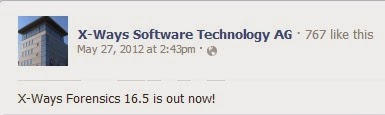
The version of X-Ways used in the book was version 16.5 which according to Facebook, first became available in May, 2012 (see the graphic to the right).  Now, I'm not bringing this up to say that the most up-to-date version of a tool must always be used...not at all.  But this information gives us a time frame to understand when the authors were writing the book.  It also brings into question why some artifacts...in this case, shellbags) were not discussed, as some of the discussions of artifacts were alarmingly light.  For example, on pg 40 (in ch 3), one sentence starts, "References were also found within the UsrClass.dat Registry files..."; clearly, the authors are referring to shellbags, but there was no further discussion of the artifact, nor anything that illustrated the artifact for the reader.  A similar reference to artifacts in the UsrClass.dat Registry hive was made on pg 75 (ch 4) and on pg 105 (ch 5), but again, there were no further details.

What's also curious about the Registry hive file references is that when the client applications are used to access the cloud storage, there is no mention in any of the three instances (mentioned in the previous paragraph) of UserAssist artifacts.  After all, it would stand to reason that when the user accesses the client application, they would most likely double-click an icon on their desktop, or click an entry on their Start menu...doing so would likely create artifacts in the UserAssist key.  The Registry section on pg 105 in particular specifically mentions the use of "keyword searches", which would not locate entries in the UserAssist key, as the value names are ROT-13 encrypted.

Many of the artifacts (RecentDocs listing from the Registry, Recycle Bin, browser artifacts) displayed in figures and tables in the book include time stamps (which allows us to see when the research was conducted), but there are no analysis techniques illustrated beyond simply locating and displaying the contents of the individual data sources.  Specifically, there are no illustrations of timeline analysis to illustrate not just the available artifacts, but how those artifacts might relate to each other.  There were several examples of timelines (figures 3.2, 4.4, etc.), but these were used for presentation of data, not for data analysis.

Summary
The book is very well structured, had a very methodical approach, and as such, it's easy to locate information in the book.  Each section is structured identically...when the Windows 7 PC is used to access SkyDrive or Dropbox, the sections listing the findings of artifacts are the same as when the iPhone 3G is used to access the same storage facilities.  This structure provides a framework for other analysts who want to use updated, more recent versions of the platforms (Windows 8, iPad, iPhone 5+, etc.), as well as of the client applications for the cloud storage facilities.

However, the book was a bit light on the approach to artifacts; rather than taking a targeted approach to artifact (i.e., shellbags, etc.) analysis, and using timelines in the analysis of the systems, the primary means of analysis appears to have been keyword searches and the use of tools such as Magnet Forensics' IEF.  There is nothing inherently wrong or incorrect about this approach, other than that this approach is known to miss certain artifacts (i.e., UserAssist data).  I had hopped that the backgrounds of the authors, particular the number of forensic investigations undertaken by one, would have obviated sections of the book that included, "...keyword was found in the UsrClass.dat file...".

Sunday, February 26, 2012

Stuff

WFAT3e
So far, there are two reviews of WFAT3e posted to Amazon.  That was pretty quick, and I greatly appreciate the effort that went into making that review available.

If you've got a copy of WFAT3e and are considering writing a review, here's what I'd like to humbly ask...please consider doing more than just reiterating the table of contents.   After all, this book isn't just the second edition with some new info added...this is a companion book that should be on your bookshelf right next to the second edition.  In writing this edition, I took out stuff that hasn't really changed (PE file format, etc.) and instead included stuff specific to Windows 7, such as Volume Shadow Copies, and a bunch of new file formats.  I added an entire chapter just on Timeline Analysis, as well as one on Malware Detection.  In the first chapter, I went into more detail regarding what I consider to be core analysis concepts...so getting your thoughts and feedback on those would not only be interesting for me, but also be very valuable for other potential readers who look to your review to help them make up their minds.

Addendum: Keith's review is posted here.  Thanks so much for sharing your review!  Corey's review is posted here. 

Registry Analysis
Speaking of books, I've received a couple of emails asking me when a second edition of Windows Registry Forensics would be available.  While it's much too early to have a second edition at the moment, it's not too early to start thinking about it.  So, I thought I throw this out to the community...is a second edition something that would be of interest?

If so, what would you want to see added or modified in this second edition?

DFIRSummit
The agenda for the SANS Forensic Summit 2012 has been posted and it looks like this year's summit is going to be another outstanding event for DFIR folks.  I've attended all of the summits, which started in 2008, with the exception of last year's event.  These are always really great events, combining quality material and presenters with some excellent networking opportunities.

This time around, I've been selected to give the second keynote presentation on Wed, 27 June, an honor that I greatly appreciate and am humbled by.

For my presentation, I plan to use my CfP material, something I put together that I call, "Intro to Windows 7 Forensic Analysis".  I'll try to pack as much practical, 'you can use this right now' knowledge into the hour that I have available.  Keep in mind that the keynote will be at 8am...for me, that's almost lunch time, but I'm aware that many are still deep in REM (get it...R.E.M.??) sleep at that time of the day.

This year's event has a number of notable DFIR luminaries on the agenda, and the presentations cover a range of topics, including Windows 8, Mac OSX, Android memory analysis, effects of "The Cloud" on the industry, and there's even a SANS 360 event on the agenda.  Chris Pogue (@cpbeefcake) will be presenting "Sniper Forensics v3".

So, keep your eyes open for new developments regarding this event...if you're on Twitter, the hashtag is "#DFIRSummit".

IOCs
I've had a couple of posts recently on IOCs (most recent one here, earlier post here).  Unfortunately, it doesn't look like they've gone over too well...there hasn't been much in the way of discussion.  That's too bad...I can see how properly developed IOCs can be extremely useful, particularly when it comes to sharing threat intelligence.

Good IOCs can be shared by folks within the digital analysis community in order to share information.  Do we really think that things like RAM scrapers and keystroke loggers are isolated only to PCI engagements?  I hope not.  In some cases, I don't think that keystroke loggers are even looked for, because they aren't "on the radar" for the particular analyst.  This may be due to a number of factors...lack of experience, fatigue, too many cases piled up, etc.

Also, I can see some significant value in sharing IOCs across security specialties.  Let's say that you're a malware analyst, and you find something interesting, and decide to share the file name, hash, and interesting output from 'strings'.  Okay, that's great, but you've got a sample on your analysis system and an opportunity to share the data you've already collected with others, such as host- and network-based analysts.  Don't think one sample may be too terribly interesting?  How about if by adding that one sample to an aggregate across a number of samples, trends being to develop?

Something that may be a little bit more concrete for folks, and may turn into an actual IOC, popped up on ForensicArtifacts.com recently thanks to John Lukach.  Apparently, you can run the iCloud Service that you find on iPhones and iPads on Windows...so, if you're working an issue that involves data exfiltration, this may be something that you'll want to look into.

Reporting
I read this post from the HackerAcademy this morning, and I have to say, I agree wholeheartedly!  I started out in infosec performing vulnerability assessments and pen tests, and across the board, I'd rather work with someone who was 80-85% technical, but could produce a deliverable, than someone who was 100% technical, but couldn't (or wouldn't) write.

By itself, writing helps (or should help) us organize our thoughts.  We can start out by writing up a quick analysis plan, and use that as a guide, adding reasons for why we deviated from that plan.  From there, we should be keeping case notes, which have our analysis goals written out right at the top of the page, to keep us on track and on point throughout the analysis.  Finally, when we get to the actual reporting phase, we should have a template that we use, so that by the time that we're finishing up our actual analysis, everything we've written thus far pretty much lets the report write itself.

When performing your analysis, if you don't document something, it didn't happen.  When reporting, you have to keep in mind why you're being paid all the money by a customer...if they could do this work themselves, they wouldn't be paying you.  So...do you give them a three page report (one of which is the cover sheet) that basically says, "we didn't find anything", or do you show them what you did?

Another aspect of reporting is to archive information about the work that's been done by your team.  I was once on a team where our manager told us to put our reports up on a protected file server.  Over time, I found that I was the only one doing this...after every engagement, part of my close-out procedures checklist was to put a copy of the report on the server in the proscribed manner, and securely wipe the data and report off of my analysis system.  Since I wasn't the only one doing analysis work, I believe that a great deal of valuable corporate knowledge was lost because other analysts refused to share their experiences and findings.   We don't all look at or tackle problems in the same way, and someone may have experiences that would greatly benefit your current efforts...if they'd shared them.  Sharing those experiences by posting the reports to the server meant that you could view the final product without having the other analysts do any additional work.

A while (over 2 yrs) ago, I posted a sample report to the Files section of the Win4n6 group.  This report was based on analysis of a sample image downloaded from the Internet.  Of course, I can't be expected to post actual customer reports, and this was the best way I found to go from concept to practice.  I hope that someone who reads it finds it useful.

Monday, December 13, 2010

Book Review: Malware Analyst's Cookbook

Michael Hale Ligh was kind enough to provide me with a review copy of a book he recently co-authored along with Steven Adair, Blake Hartstein, and Matthew Richard, titled Malware Analyst's Cookbook and DVD: Tools and Techniques for Fighting Malicious Code. The book was an excellent read, and is an extremely valuable resource for any analyst in this industry.

First off, I am not a malware reverse engineer. Yes, I do have some experience working with malware, but not to the level that reverse engineers (RE) such as the authors tend to operate. I work with some really smart folks who do malware reverse engineering all the time, and they're very, very good at it. As such, during IR or digital forensics analysis, I tend to exchange information with the RE folks, providing what I've found and then taking what they find, and performing iterative analysis. I've found over time that this approach provides a much more in-depth analysis than the sum of it's parts.

That being said, weighing in at a hefty 18 chapters, the Cookbook covers a wide range of topics specific to reverse engineering and analyzing malware, from anonymizing your research activities to honeypots to malware classification and automated analysis and beyond. Throughout the book, the authors present "recipes" for using various tools (many of which are open-source) to solve specific problems. For example, chapter 3 includes several recipes involving YARA, an open-source, Python-based tool for identifying and classifying malware. Many other popular tools are also used, including ssdeep, Didier's PDF tools, and even RegRipper. Chapter 15 goes discusses effectively using Volatility for memory analysis. Many of the examples provided in the book are based on the real-world experiences of the authors, lending considerable credence and value to the demonstrated skills and information imparted.

Chapter 10 is near and dear to my heart, not only due to the discussion of ADSs, but also due the fact that the authors wrote their own RegRipper plugins! That's right! These guys found some things of value with RegRipper and wrote their own plugins. It brings a tear to my eye to think that my little tool is all grow'd up!

Some of the truly powerful aspects of the book include clear, thorough explanations of the presented topics, as well as easy-to-follow examples that allow the reader to follow along and learn by doing (I tend to learn more by doing than reading). Whether you're an aspiring reverse engineer, incident responder, or forensic analyst, this book will be an extremely valuable resource to you. For example, some of the explanations of how systems get infected with malware (JavaScripts, infectable document formats, HTML injection, etc.), as well as artifacts to indicate a malware infection, will prove extremely valuable to IR/DF folks. Heck, even if you're a somewhat-seasoned malware reverse engineer, it's likely that this Cookbook will show you some things that you haven't seen before, or show you some ways of looking at malware that you haven't thought of before.

Much of what's in the Cookbook goes beyond commercially available applications and clearly demonstrates the use of Python- (or Perl-) based open source tools that accomplish specific objectives. The cookbook even goes so far as to explain and demonstrate how different malware-related activities are performed, as well as how they can be detected.

I have to say that reading through the Cookbook gave me a new appreciation for what malware reverse engineers do. I also walk away from the book with a better understanding, not only of how to look for malware during IR/DF activities, but also how to better provide information and data to our reverse engineer once I've found it. I also walk away from it knowing that I'll be back. With more study and practice, I'm sure I can do some modicum of malware analysis beyond what I already do, and while I know that I'll never be at the level of the authors, I thank them for a truly exemplary and valuable resource. If I didn't already have it, this Cookbook would be on my Christmas wishlist...at the very top!

Tuesday, September 07, 2010

Another WFA 2/e Review

I received the following comments from Allen Wheeler (a Systems Engineer with Troll Systems) today via email, and with his permission, I wanted to share his comments with you:

I just wanted to tell you how impressed I am with how thoroughly you cover the methods covered in your book. Usually when I pick up a book like this I’m prepared for more questions than when I started but that’s not the case with Windows Forensic Analysis. It’s elegantly worded and easy to follow which is hard to find when it comes to technical books. I read for about 8 hours straight yesterday on a trip back from the east coast and I still didn’t want to put it down. As a long time Windows user, you’ve helped fill in a lot of blanks and I feel like I’ll have a lot more flexibility and power by employing many of your tools and techniques as a Systems Engineer who spends a lot of time in this OS. Thank you!

Allen also posted a review of WFA 2/e on Amazon. Thanks, Allen, for your words, and for feeling led to reach out and share your thoughts, not just with me, but with others!

Thursday, June 03, 2010

Book Review

I recently had an opportunity to read through Handbook of Digital Forensics and Investigation (ISBN-10: 0123742676), edited by Eoghan Casey.

One of the first things you notice about the book...aside from the heft and sense that you actually have something in your hands...is the fact that the book actually has 16 authors listed! 16! Many of the names listed are very prominent in the field of digital forensics, so one can only imagine the chore of not only keeping everyone on schedule, but getting the book into an overall flow.

Something I really like about the Handbook is that it starts off with basic, core principles. Digital forensics is one of those areas where folks usually want to dive right into the cool stuff (imaging systems, finding "evidence", running tools, etc.), but as with other similar areas, you're only going to get so far that way. These core principles are presented in an easy-to-understand manner, with little sidebars that illustrate or reinforce various points. Many of these principles are topics that are misunderstood, or talked about but not practiced in the wider community, and having luminaries such as Eoghan and Curtis and others present them in this sort of format brings them home again.

Some of those sidebars I mentioned, in my copy of the Handbook, are heavily highlighted, and the book itself has a number of notes in the margins of several chapters. One of the highlighted gems is in a "Practitioner's Tip" sidebar on page 23, where it says, "...apply the scientific method, seek peer review...". This one struck home, because too often in the community we see where statements are made that are assumptions, not based on supporting fact. IMHO, I think that is is a result of not seeking peer review, not engaging with others, and not having someone who's able to ask the simple question, "why?"

Another aspect of the Handbook that I found very useful was that when a technique or something specific about some data was discussed, several times, there were illustrations using not just commercial forensic analysis applications, but also free and open-source tools. For example, page 55 has an illustration of the use of the SQLite command line utility to examine the contents of the Skype main.db database file. My sense is that the overall approach to the Handbook is to move practitioners away from over reliance on a specific commercial application, and toward an understanding that hey, there are other riches to be discovered if you disconnect the dongle and think for a minute.

I'll admit that I didn't spend as much time on some chapters as I did on others. Chapters 1 and 2 were very interesting for me, but chapter 3 got into electronic discovery. While this really isn't something I do a lot of, parts of the chapter (prioritizing systems, processing data from tapes, etc.) caught my eye. The pace picked back up again with chapter 4, Intrusion Investigation, particularly where there was discussion of "fact versus speculation" and "Reporting Audiences". In my experience, these are just two of the areas where any investigation can easily veer off course. Of course, without question, I spent a great deal of time in chapter 5, Windows Forensic Analysis! However, that doesn't mean that the other chapters don't have a great deal of valuable information.

The real value of the Handbook is that it did not focus on any one platform, or on any one commercial product. Analysis of Windows, as well as *nix/Linux, Mac, and embedded systems are addressed, as was the network (including mobile networks). There was no singular focus on one commercial product, something you see in other books; instead, a combination of commercial, free, and open-source tools were used to illustrate various points. In one instance, three commercial applications were shown side-by-side to illustrate a point about deleted files. Even some of my own tools (RegRipper, wmd.pl, etc.) were mentioned!

Overall, I think that the book is an excellent handbook, and it definitely has a prominent place on my bookshelf. No one of us knows everything there is to know, and I even found little gems in the chapter on Windows forensic analysis. For anyone who doesn't spend much time in that area, or analyzing Macs, those chapters will be a veritable goldmine...and you're very likely to find something new, even if you are very experienced in those areas. The Handbook is going to be something that I refer back to time and again, for a long time to come. Thanks to Eoghan, and thanks to all of the authors who put in the time and effort to produce this excellent work.

Resources
Richard Bejtlich's review @TaoSecurity