Showing posts with label book. Show all posts

Monday, January 20, 2014

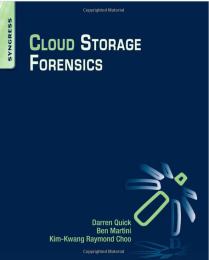
Book Review: Cloud Storage Forensics


I had an opportunity to review Cloud Storage Forensics recently, and I wanted to provide my thoughts on the contents of the book.  I generally don't find book reviews that read like a table of contents (i.e., "...chapter 1 covers...ch 2 covers...") entirely useful, and I'm not sure that others would find them useful, either.  As such, I'm going to approach my review in a different manner.

The book addresses digital forensic analysis of client systems used to connect to and make use of several "cloud storage providers".  This is important to point out, as the terms 'cloud' and 'cloud storage' can so often be misunderstood.  Some may think, for example, that this may have to do with those services available through Amazon Web Services.

The book primarily addresses three cloud storage providers...SkyDrive, Dropbox, and Google Drive...each accessed from a Windows 7 PC and an Apple iPhone 3G.  In both instances, access to the storage facilities were conducted via the browser, as well as the client application for the particular provider.

Brett's review of the book can be found here.  Brett is also the author of the sole review available on the book's Amazon page.  It turns out that Brett was the technical editor of the book (he was also the technical editor for WFA 4/e, and he is the author of Placing the Suspect Behind the Keyboard), and as such, I was able to get a little bit of valuable insight into the process that went into getting this particular book published.  This was as enlightening as it is important, because not all books, even books produced by the same publisher, follow the same process.  A number of years ago, I was reading a book that was very popular at the time on the topic of computer forensics and incident response, and based on something I read, I contacted the authors to ask for clarification.  One of the authors responded with, "...we wrote that section three years ago and didn't touch it before the book was published."  So...not all books follow the "...sit down, write, review, publish..." format that is completed in a year (or less).

Pros
One of the things I liked about the book included the detailed, methodical approach that the authors took to populating their test environment with data, as it not only provides an excellent road map for testing, but also for reasoning during the analysis process.  Too many times in DFIR work, too much is left to assumption, in part because analysts simply receive a hard drive or image, and are not equipped to address potential gaps between the data they observe, and the questions that they need to answer.  One of the very first things I noticed about this book is the thorough approach taken to documenting the testing environment.

Also, the authors clearly stated the tools and versions that they used during their analysis.  Some analysts may not realize it, but this is very important, as tools can very in their capabilities (sometimes, quite significantly) between versions.

Reporting
This aspect of 'full disclosure' (i.e., clearly identifying the tools and versions used) are near and dear to me, as they are a significant aspect of chapter 9, Reporting, of my upcoming book, Windows Forensic Analysis 4/e.

On the subject of the tools used, when I read the tool listing on pg 27 (I was reading the soft cover edition, not the Kindle edition), in ch. 3, I thought back to the "challenges face by law enforcement and government agencies" in ch. 1; it occurred to me that the reason the authors were using the tools on that list was that those are the tools most often used by law enforcement and government agencies.

The authors address a great number of data sources, including not just Prefetch, LNK files, and Event Logs, but also browser artifacts.  The authors also explored (to some extent) what was still available in memory, as well.  This can be very valuable, as analysts should consider parsing available hibernation files, as well as the pagefile.

The chapters that address the actual location of artifacts include additional information regarding the use of anti-forensic techniques (through the use of tools such as Eraser and CCleaner), and illustrate the artifacts that remain.  Further, these chapters also include sections on Presentation, as well as tables that summarize the available artifacts.  I had found this type of summary to be very valuable when teaching courses, and it works equally well in the book.

Cons
The book was published in 2014, and very shortly into chapter 3, it already appears out of date.  For example, one of the tools used is "RegRipper version 20080909".
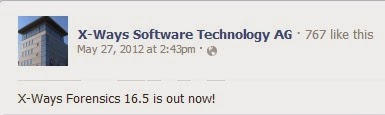
The version of X-Ways used in the book was version 16.5 which according to Facebook, first became available in May, 2012 (see the graphic to the right).  Now, I'm not bringing this up to say that the most up-to-date version of a tool must always be used...not at all.  But this information gives us a time frame to understand when the authors were writing the book.  It also brings into question why some artifacts...in this case, shellbags) were not discussed, as some of the discussions of artifacts were alarmingly light.  For example, on pg 40 (in ch 3), one sentence starts, "References were also found within the UsrClass.dat Registry files..."; clearly, the authors are referring to shellbags, but there was no further discussion of the artifact, nor anything that illustrated the artifact for the reader.  A similar reference to artifacts in the UsrClass.dat Registry hive was made on pg 75 (ch 4) and on pg 105 (ch 5), but again, there were no further details.

What's also curious about the Registry hive file references is that when the client applications are used to access the cloud storage, there is no mention in any of the three instances (mentioned in the previous paragraph) of UserAssist artifacts.  After all, it would stand to reason that when the user accesses the client application, they would most likely double-click an icon on their desktop, or click an entry on their Start menu...doing so would likely create artifacts in the UserAssist key.  The Registry section on pg 105 in particular specifically mentions the use of "keyword searches", which would not locate entries in the UserAssist key, as the value names are ROT-13 encrypted.

Many of the artifacts (RecentDocs listing from the Registry, Recycle Bin, browser artifacts) displayed in figures and tables in the book include time stamps (which allows us to see when the research was conducted), but there are no analysis techniques illustrated beyond simply locating and displaying the contents of the individual data sources.  Specifically, there are no illustrations of timeline analysis to illustrate not just the available artifacts, but how those artifacts might relate to each other.  There were several examples of timelines (figures 3.2, 4.4, etc.), but these were used for presentation of data, not for data analysis.

Summary
The book is very well structured, had a very methodical approach, and as such, it's easy to locate information in the book.  Each section is structured identically...when the Windows 7 PC is used to access SkyDrive or Dropbox, the sections listing the findings of artifacts are the same as when the iPhone 3G is used to access the same storage facilities.  This structure provides a framework for other analysts who want to use updated, more recent versions of the platforms (Windows 8, iPad, iPhone 5+, etc.), as well as of the client applications for the cloud storage facilities.

However, the book was a bit light on the approach to artifacts; rather than taking a targeted approach to artifact (i.e., shellbags, etc.) analysis, and using timelines in the analysis of the systems, the primary means of analysis appears to have been keyword searches and the use of tools such as Magnet Forensics' IEF.  There is nothing inherently wrong or incorrect about this approach, other than that this approach is known to miss certain artifacts (i.e., UserAssist data).  I had hopped that the backgrounds of the authors, particular the number of forensic investigations undertaken by one, would have obviated sections of the book that included, "...keyword was found in the UsrClass.dat file...".

Sunday, February 26, 2012

Stuff

WFAT3e
So far, there are two reviews of WFAT3e posted to Amazon.  That was pretty quick, and I greatly appreciate the effort that went into making that review available.

If you've got a copy of WFAT3e and are considering writing a review, here's what I'd like to humbly ask...please consider doing more than just reiterating the table of contents.   After all, this book isn't just the second edition with some new info added...this is a companion book that should be on your bookshelf right next to the second edition.  In writing this edition, I took out stuff that hasn't really changed (PE file format, etc.) and instead included stuff specific to Windows 7, such as Volume Shadow Copies, and a bunch of new file formats.  I added an entire chapter just on Timeline Analysis, as well as one on Malware Detection.  In the first chapter, I went into more detail regarding what I consider to be core analysis concepts...so getting your thoughts and feedback on those would not only be interesting for me, but also be very valuable for other potential readers who look to your review to help them make up their minds.

Addendum: Keith's review is posted here.  Thanks so much for sharing your review!  Corey's review is posted here

Registry Analysis
Speaking of books, I've received a couple of emails asking me when a second edition of Windows Registry Forensics would be available.  While it's much too early to have a second edition at the moment, it's not too early to start thinking about it.  So, I thought I throw this out to the community...is a second edition something that would be of interest?

If so, what would you want to see added or modified in this second edition?

DFIRSummit
The agenda for the SANS Forensic Summit 2012 has been posted and it looks like this year's summit is going to be another outstanding event for DFIR folks.  I've attended all of the summits, which started in 2008, with the exception of last year's event.  These are always really great events, combining quality material and presenters with some excellent networking opportunities.

This time around, I've been selected to give the second keynote presentation on Wed, 27 June, an honor that I greatly appreciate and am humbled by.

For my presentation, I plan to use my CfP material, something I put together that I call, "Intro to Windows 7 Forensic Analysis".  I'll try to pack as much practical, 'you can use this right now' knowledge into the hour that I have available.  Keep in mind that the keynote will be at 8am...for me, that's almost lunch time, but I'm aware that many are still deep in REM (get it...R.E.M.??) sleep at that time of the day.

This year's event has a number of notable DFIR luminaries on the agenda, and the presentations cover a range of topics, including Windows 8, Mac OSX, Android memory analysis, effects of "The Cloud" on the industry, and there's even a SANS 360 event on the agenda.  Chris Pogue (@cpbeefcake) will be presenting "Sniper Forensics v3".

So, keep your eyes open for new developments regarding this event...if you're on Twitter, the hashtag is "#DFIRSummit".

IOCs
I've had a couple of posts recently on IOCs (most recent one here, earlier post here).  Unfortunately, it doesn't look like they've gone over too well...there hasn't been much in the way of discussion.  That's too bad...I can see how properly developed IOCs can be extremely useful, particularly when it comes to sharing threat intelligence.

Good IOCs can be shared by folks within the digital analysis community in order to share information.  Do we really think that things like RAM scrapers and keystroke loggers are isolated only to PCI engagements?  I hope not.  In some cases, I don't think that keystroke loggers are even looked for, because they aren't "on the radar" for the particular analyst.  This may be due to a number of factors...lack of experience, fatigue, too many cases piled up, etc.

Also, I can see some significant value in sharing IOCs across security specialties.  Let's say that you're a malware analyst, and you find something interesting, and decide to share the file name, hash, and interesting output from 'strings'.  Okay, that's great, but you've got a sample on your analysis system and an opportunity to share the data you've already collected with others, such as host- and network-based analysts.  Don't think one sample may be too terribly interesting?  How about if by adding that one sample to an aggregate across a number of samples, trends being to develop?

Something that may be a little bit more concrete for folks, and may turn into an actual IOC, popped up on ForensicArtifacts.com recently thanks to John Lukach.  Apparently, you can run the iCloud Service that you find on iPhones and iPads on Windows...so, if you're working an issue that involves data exfiltration, this may be something that you'll want to look into.

Reporting
I read this post from the HackerAcademy this morning, and I have to say, I agree wholeheartedly!  I started out in infosec performing vulnerability assessments and pen tests, and across the board, I'd rather work with someone who was 80-85% technical, but could produce a deliverable, than someone who was 100% technical, but couldn't (or wouldn't) write.

By itself, writing helps (or should help) us organize our thoughts.  We can start out by writing up a quick analysis plan, and use that as a guide, adding reasons for why we deviated from that plan.  From there, we should be keeping case notes, which have our analysis goals written out right at the top of the page, to keep us on track and on point throughout the analysis.  Finally, when we get to the actual reporting phase, we should have a template that we use, so that by the time that we're finishing up our actual analysis, everything we've written thus far pretty much lets the report write itself.

When performing your analysis, if you don't document something, it didn't happen.  When reporting, you have to keep in mind why you're being paid all the money by a customer...if they could do this work themselves, they wouldn't be paying you.  So...do you give them a three page report (one of which is the cover sheet) that basically says, "we didn't find anything", or do you show them what you did?

Another aspect of reporting is to archive information about the work that's been done by your team.  I was once on a team where our manager told us to put our reports up on a protected file server.  Over time, I found that I was the only one doing this...after every engagement, part of my close-out procedures checklist was to put a copy of the report on the server in the proscribed manner, and securely wipe the data and report off of my analysis system.  Since I wasn't the only one doing analysis work, I believe that a great deal of valuable corporate knowledge was lost because other analysts refused to share their experiences and findings.   We don't all look at or tackle problems in the same way, and someone may have experiences that would greatly benefit your current efforts...if they'd shared them.  Sharing those experiences by posting the reports to the server meant that you could view the final product without having the other analysts do any additional work.

A while (over 2 yrs) ago, I posted a sample report to the Files section of the Win4n6 group.  This report was based on analysis of a sample image downloaded from the Internet.  Of course, I can't be expected to post actual customer reports, and this was the best way I found to go from concept to practice.  I hope that someone who reads it finds it useful.

Tuesday, January 31, 2012

WFA 3/e

Okay, Windows Forensic Analysis 3/e is out and on it's way to those who've already purchased it through Syngress, as well as on it's way to the Amazon distribution centers.

I've posted previously in this blog regarding WFA 3/e (here, and here...).  As I've written each successive book, I've tried (with the help of folks like Jenn Kolde) to improve my writing and approach to the books, not just in the content, but in how the content is presented.  Sometimes, there just isn't enough time to put all that I would want into the book, and other times, you don't become aware of something until after the manuscript for that chapter is sent to the printer.

This post discusses the chapters and what they cover, so if you're wondering whether this is a book you'd be interested in or need, I hope that post (and this one) help convince you.  I'm linking it here again for those folks who want to know...well...what the chapters are and what they cover.  ;-)  Seriously...I think that this is an important factor to address because WFA 3/e does NOT replace the second edition.  In fact, WFA 3/e is a companion book to the second edition.  That's right...the way I wrote the third edition, you will want to have both editions (as well as Windows Registry Forensics) on your bookshelf.  The third edition doesn't address some of those things that haven't changed from the second edition (for example, the PE file format) and covers things that are specific to Windows 7; for example, StickyNotes and Jump Lists.

There are a couple of minor changes.  For example, chapter 2 is now "Immediate Response" (rather than "Live Response"), and focuses on the need for organizations to organically develop some capability for immediate response.  This is necessary, not only because it's mandated by many of the compliance and regulatory guidelines, but because it just makes sense...the sooner you can start the information collection and the quicker you can react, the better off you'll be during an incident.  Also, I was able to do some additional research and coding regarding Jump Lists after I finished writing, so I included some Jump List parsing code in the archive. 

The companion tools for the book can be found here, in "wfa3e.zip".  Now, I've put the tools together in the archive by chapter, and there isn't a lot of explanation. This isn't because I'm lazy (even though I am, in fact, lazy...); rather, it's due to the fact that the tools are discussed in the book.  Now, I know many folks are going to think, "hey, this is just a ploy to drive up the sales of your book!"  This may be an artifact of my decision, but the reason I didn't provide detailed explanations of the tools is simply because I have already spent a considerable amount of time and effort writing about them once, and I don't want to spend a lot of time doing it again.  So, nothing nefarious or mysterious or under-handed about that...and honestly, folks who write books like these don't make a lot of money, anyway.  And, if I were in it for the money, why would I have retweeted Syngress's discount code to get the book for half off, and re-posted that to every social media site for which I have an account?

Also, there are tools mentioned in chapter 4 of the book that you won't find in that folder within the archive.  This is because the tools are also discussed, albeit in a different capacity, in chapter 7 of the book.  You will find the tools in the ch. 7 folder in the archive.

Finally, now that the book is done and the code is available, there are opportunities to continue to develop and expand on much of what's in the book.  There are RegRipper plugins to be written, and new things to develop with respect to timeline creation and analysis.

Saturday, January 28, 2012

WFA 3/e

While I was in Atlanta recently for the DoD CyberCrime Conference, I received an email telling me that my advance copy of WFA 3/e was available...even though this is my sixth book, I still get excited/nervous/anxious.  After all, you never know how the book is going to be received.  Anyway, I arrived home last night to find a FedEx box sitting on my desk. 

However, I received an email from someone I know who was at ShmooCon...come find out, the books had been printed and several sent to ShmooCon.  So, apparently, I didn't really get an "advance copy".  

I had been informed that the book would not be available until 7 Feb, so I'll be posting the code associated with the book this week, and will provide a link off of the Books page on this blog.  I haven't been holding off on it...I have been adding some things to the distribution.  I'll let everyone know when it's up.

Thursday, July 28, 2011

WFA 3/e

I've mentioned a couple of times, in this blog as well as in a couple of lists, that I'm working on completing Windows Forensic Analysis 3/e, and I thought it would be a good time to give a little bit of information regarding the book. 

First off, while the title includes "third edition", this edition is not one where if you purchased the second edition, you're out of luck.  Rather, the third edition is a companion book to the second edition, so you'll want to have both of them on your shelf (or Kindle).  Where a great deal of 2/e was focused on Windows XP, in 3/e I'm focusing primarily on Windows 7.

The third edition has 8 chapters, as follows:

1. Analysis Concepts - Seeing comments from those who've read DFwOST thus far, and seeing the mileage that Chris Pogue is getting from his Sniper Forensics presentations, it appears that there are a lot of analysts out there who like to hear about the concepts that drive analysis.  It's one thing to say to do timeline analysis and talk about how, but I think that it's something else entirely to discuss why we do timeline analysis, as that's the difference between an analyst who creates a timeline, and one who has a reason, justification and analysis goal for creating a timeline.

2.  Live Response - With this chapter, I wanted to take something of a different approach; rather than writing yet another chapter that gives consultants hints on doing IR, I wanted to provide some thoughts as to how organizations can better prepare for those inevitable DFIR activities.  If 2011 thus far hasn't been enough of an example, maybe it's worth saying again...it's not a matter of if your organization will face a compromise, but when.  I would take that a step further and suggest that if you don't have visibility into your systems and infrastructure, you may have already been compromised.  As a consultant, the biggest issue I've seen during IR is the level of preparedness...there's a huge difference between companies that accept that incidents will occur and take steps to prepare, and those who have "not me" culture/attitude; the latter usually ends up paying out much more, in terms of fees, fines, and court costs.  This is something consultants talk about with their customers, but it's a whole new world when you actually see it in action.

3.  Volume Shadow Copies - This chapter is somewhat self-explanatory.  I was doing some research that involved accessing VSCs, and found pretty much the only way to do what I wanted to do required significant resources (ie, $$).  What I did with this chapter is show how VSCs can be accessed within an acquired image without using expensive solutions, as well as provide some insight into how accessing the VSCs can really provide some very valuable information to an analyst.

4.  File Analysis - This chapter is very similar to the corresponding chapter in WFA 2/e, but focuses on some of the files you're likely to see on Windows 7 systems.  I also reference some of the files that you'll find on Windows XP systems, but are different on Windows 7 systems (ie, format, content).  I cover Jump Lists in this chapter, and not just the LNK-like streams, but also the DestList streams (which appear to be some sort of MRU listing for shortcuts).

5.  Registry Analysis - I know, a lot's been said about Registry analysis, particularly in WRF, but this time, instead of doing a break down of what can be found in the Registry, on a hive-by-hive basis, I'm taking more of a solutions-based approach. For example, I see a LOT of folks in the forums and lists who don't understand the role that the USBStor subkeys play in USB device analysis, so what I've done is take the more common analysis processes (that I see, based on questions asked in lists...) and I'm trying to provide solutions across all hives.

One of the things I face with writing chapters such as this one is that folks will say things like, "I want to know about blah...", and very often, there's already information out there on the subject.  One great example is the Registry ShellBags...Chad Tilbury recently posted on this topic to the SANS Forensic Blog, so given that, I have wonder, "what do you want to know?" and "how much are you willing to support the effort to present/share that topic?"  Now, by "support", I mean through such efforts as providing example hives, or just taking a few minutes to elaborate on your thoughts or questions.

6. Malware Detection - I have had a good number of "here's a hard drive that we think is infected with malware..." exams, and given that there are a number of folks out there who likely get similar cases (LE gets CP cases that evolve into the "Trojan Defense", etc.) I wanted to put together a good resource to help address this issue.  This is not a malware analysis chapter...MHL et al did a fantastic job with this topic in the Malware Analyst's Cookbook, and I'm not about to try to parrot what they've done.  Instead, this chapter addresses the topic of detecting malware within in acquired image, and I even provide a checklist of steps you can use.

Note: Many of the tools mentioned in the book are available online, and those items that are not specifically available now (the malware detection checklist, etc.) will be provided online, as well.  I really don't like the idea of providing a DVD with the book, because there are simply too many issues with getting the materials to people who purchase only the ebook, or leave their DVD at home when they go to work...

7.  Timeline Analysis - In this chapter, I not only present how to create a timeline, but I also discuss the concepts behind why we'd want to create a timeline, as well as some of the uses of timelines folks may not be too familiar with.  I presented these concepts and use case scenarios during a course I taught recently, and they seemed to have been very well received.

8.  Application Analysis - Another class of question I see a lot of in the lists has to do with application artifacts; when you think about it, there isn't too terribly much difference between some classes of dynamic malware analysis, and what you'd do to analyze an application for artifacts.

Now, there are some things that I don't cover in the book, in part because they're covered or addressed through other media or resources.  One example is memory analysis...there are a number of resources already available that cover how to capture physical memory, as well as perform analysis of a Windows memory dump, using the freely available tools. 

I wanted to provide something of a preview, because I do get a lot of those, "...does it cover...??" questions, most often from people at conferences, who are holding a copy of the book while they're asking the question.  The simple fact is that no book can cover everything, and it's especially difficult when analysts don't communicate their needs or desires beforehand.  I've done the best I can to collect up those sorts of things from lists, forums, as well as people I've talked to at conferences...but I know that the question is still going to come up, even after the book is printed.

One thing I would like to add is that, as with my other books, the focus is almost exclusively on free and open source tools to get the job done.  Like I said earlier, many of the tools are already available online, and those other items I've developed and mentioned in the book will be posted to the web when the book goes final.

From the lists and forums, I see a lot of questions regarding Windows 7, specifically, "What has changed from Windows XP?"  Truthfully, this is the WRONG question to ask, albeit a popular one.  But if you really want to know, from an analyst perspective, WFA 3/e goes final (manuscript submitted) in October, so it should be available around the beginning of 2012.

HTH

Friday, April 22, 2011

Updates

 Book Update
 I've received the counter-signed contract from Syngress for Windows Forensic Analysis 3/e, and I'm finishing up a couple of the chapters to get in for review.  This book is NOT the same as 2/e, in that I did not start with the manuscript from that edition (the way I did when I started 2/e).  Instead, 3/e is a companion edition...if you already have 2/e, you will want to have 3/e, as well.  This is because the information in 2/e is still valid, and in many instances (in particular information such as the PE file format, etc.) hasn't changed.  Also, 2/e focused primarily on XP, and those systems are still around...there hasn't been a huge corporate shift to Windows 7 yet.  As such, 3/e will shift focus to Windows 7...it will also focus more on solving problems, rather than simply depositing technical information in your lap and leaving you to figure out what to do with it.

Another new aspect of WFA 3/e is that rather than providing an accompanying DVD, the tools (as with WRF) will be provided online.  Providing the tools in this manner is just so much easier for everyone, particularly when someone purchases the ebook/Kindle version of the book, or leaves their DVD at home.  As with my previous books, I will do my best to provide functioning, tested code along with book, and provide links to other tools mentioned, described, or discussed in the book.

Accessing VSCs
I've posted before on accessing Volume Shadow Copies, but thanks to a recent blog post from Corey Harrell, I thought that it might be a good idea to revive the topic.  In his post, A Little Help with Volume Shadow Copies, Corey walks through a means for automating access to several VSCs, as well as automating the collection of information from each.  Corey does this through the use of a batch file.

Accessing VSCs in this manner is nothing new...it's been around for a while.  This post appeared on the Forensics from the sausage factory blog over a year ago.  In this post, copying of specific files via robocopy is demonstrated, showing how to use batch files to mount VSCs, copy files and then unmount the VSCs.  Corey's script takes a different approach, in that rather than copying files, he rips Registry hives using RegRipper (more accurately, rip.exe).  Corey was kind enough to provide a commented copy of one iteration of his batch file for inclusion in the materials associated with WFA 3/e (see above).

More than anything else, this is just the beginning.  Corey's had a need and used already-available information as a stepping stone to meeting his needs.  Whether you use the VHD method for mounting images, or the VMWare method (described by Rob Lee and Jimmy Weg), or some other method, the fact is that once you mount the VSC, it's simply a matter of getting the job done.  You can either copy out the Registry hives, or do as Corey's done, and run RegRipper (you'll still have the image and VSCs to access if you need the original data) on the hives.  You can copy or query for other files, as well, or use other tools (some I'll mention later).  In fact, with the right tools and a little bit of thought, you can do pretty much anything...compare files by hash, look for specific files, etc.  You may need to build some tools (or reach to someone for assistance), or download some tools, but you can piece some pretty decent automated (and self-documenting) functionality together and achieve a great deal.

Open Source Tools Book
Speaking of books, the book that Cory Altheide wrote (I was a minor co-author), Digital Forensics with Open Source Tools (aka, "DFwOST"), has been published and should be available to those who pre-ordered it soon.  Also, a really good idea is to follow @syngress on Twitter...I've been asked a couple of times if I will be providing a discount; I didn't provide the discount, Syngress did via Twitter.  I simply "RT'd" it.  You should really check this book out.  Cory's goal was to provide a means for folks with a basic understanding of digital forensics (and limited means) with an understanding of some of the open source tools available to them, and how to get them installed and configured.  And he did a great job of it!

My books have focused on the analysis of Windows systems, and have discussed/described free and open source tools that can assist an analyst.  Cory's book focuses on the open source tools, and covers several that you can use to analyze Linux, MacOSX and Windows systems.

SANS Forensic Summit
I don't know if you've seen it, but Rob's posted the agenda for this year's SANS Forensic Summit, to be held on 7 and 8 June, in Austin, TX.  Check it out...there are a number of great speakers, and several panels, which have proven to be an excellent format for conferences, as opposed to just having speaker after speaker.

It looks like Chris is gonna kick right off with his "Sniper Forensics" presentation, which has been getting him a LOT of mileage.  Richard Bejtlich is also presenting, in addition to being on a panel on the second day.  All in all, it looks like this will be another great opportunity to hear some good presentations, as well as to mingle with some of the folks in the business who are right there in the trenches.

OSDFC
I wanted to give another plug for Brian Carrier's OSDFC, the open source conference coming up on 14 June in McLean, VA.  Cory Altheide and I will both be presenting; I'm presenting in the morning, and Cory's got clean-up in the afternoon; that's Brian's tactic to get everyone to stay, by saving the best for last!  ;-)  I hope that this will be another great opportunity to mingle with others in the community...I had several interesting conversations with attendees at last year's conference.  Also, don't forget...DFwOST is out!  Bring your copy and get both of us to sign it...although you may have to wait for the cocktail reception at the end for that! 

Scalpel
There's an announcement over at the DFS Forensics blog that scalpel 2.0 is available.  There are some interesting enhancements, and the download contains pre-compiled Windows binaries and the source code.

USBStor
I received another question today that I see time and again, via email and in the lists/forums, having to do with LastWrite times on the USBStor subkeys and how they apply to the time that a USB device was last connected to the system.

In this particular case, the person who emailed me had confiscated and secured the thumb drive, and then found that the LastWrite time (apparently, the system itself was still active) for the USBStor subkey had been updated recently.

Folks, I really don't understand how this can be written and talked about so much, published in books (WFA 2/e, WRF, etc.) and STILL be so misunderstood.  Rob Lee's even made PDFs available that describe very clearly how to perform USB device analysis (XP, Vista/Win7).

If you want to know more about what may have caused the USBStor subkey LastWrite time to be updated when the device hadn't been connected, or more about why all of the USBStor subkeys have the same LastWrite time, put together a timeline.  Seriously.  I've seen both of these questions (some even include, "...I need to explain this in court..."), and a great way to answer it is to create a timeline of activity on the system and see what occurred around that time.

Wednesday, April 13, 2011

Links

Book Review
Ken Pryor posted a review of Windows Registry Forensics over on his blog...I greatly appreciate the effort folks put into these reviews.  Thanks, Ken, for taking the time to read the book and put your thoughts into a blog post!

If you're thinking about purchasing the book, take a look at Ken's review or any of the reviews on the Amazon site.  I've also been fielding questions, which come in from time to time.

Book Sales Numbers
Speaking of books, I was able to get sales numbers for foreign language editions of Windows Forensic Analysis; of the two editions, the book has been translated into Chinese, French, and most recently Korean.  The numbers may be a bit off, as it took Elsevier (thanks, btw...) some time to get the numbers, but here's how the books are doing so far:

Chinese - 4000 printed, 3281 sold to date
French -  1000 copies printed, 494 sold to date
Korean - 1000 copies printed, 700 sold to date

Pretty nifty.

DFwOST
Speaking of books, a hard copy of Digital Forensics with Open Source Tools showed up on my doorstep today!  Cory Altheide was the primary author...heck, the entire book was his idea...and I have to tell you, he did a great job!  Once, in a galaxy far, far away (actually, it was on the IBM ISS ERS team, but close enough...), I worked with Cory and saw firsthand that he's one of the most knowledgeable and capable forensicy folks I've ever worked with.  Not only is Cory REALLY smart, but he also likes beer!  Actually, I think his preference is single malt scotch...I know that sounds like some kind of personal ad but if you see him at a conference...you know what I'm sayin'! 

At first glance, the book turned our really well.  I was more interested in the formatting and how some of the images turned out more than anything else; spelling issues weren't my primary focus. The book is chock full of some really good information, and the content is mostly directed at beginners; however, I think everyone will find something useful.  For example, one of the open source tools that Cory described was the Digital Forensics Framework; I installed v1.0 on my Windows 7 analysis system today, and it fired up quite nicely (I'll be discussing DFF more in a later post).

Carbon Black
The guys over at Kyrus Tech are really moving along with Carbon Black.  If you haven't heard of this product, you really should check it out!  Cb is a lightweight sensor that monitors execution on systems, watching for new stuff being launched.

Kyrus recently sent out invitations to folks to download their latest version of Cb, and they've also set up a user forum (on Ning) for folks to engage with Kyrus and each other regarding the use of the sensor, and the resulting data.

Here's a good read on Cb vs. the RSA hack...

But Cb isn't just about security and IR...one of Kyrus' case studies involved cost reduction across an enterprise by determining how many employees were actually using the full breadth of an office application suite; by reducing the licenses in accordance with actual usage, and purchasing separate copies of the component applications for the employees who actually used them, the organization was able to realize a significant cost savings.

OMFW
Aaron Walters is back at it again!  Prior to DFRWS 2008, Aaron had the first Open Memory Forensics Workshop, and I have to say, the format was a welcome change to many of the conferences I'd attended in the past.  Having short talks followed by panels was a great way to break up the long periods of sitting and listening, and I found the format engaging and stimulating.  Even better was the technical content based on who was there and presenting...all of the big names (Aaron, Moyix/Brendan, George M. Garner, Jr., etc) in memory acquisition and analysis were there, and it looks like Aaron's planning another OMFW soon!

Thursday, January 27, 2011

WRF book available!!

It seems that the Windows Registry Forensics book is available, as it was shipped to the DoD CyberCrime Conference. I'm looking forward to getting my copy!

If you have the Kindle edition of this book, and want the DVD contents, go here. Also, I've added a Books page to the blog, so check there in the future.

Addendum: Reviews!
Brad and Dave have been nice enough to post reviews of the book thus far! Thanks so much, guys...your efforts are greatly appreciated!

Now, they're both up on the Amazon page for the book, as well...

Speaking of reviews, but specific to WFA 2/e, Eric Huber posted this So You'd Like to...Learn Digital Forensics page on Amazon. In it, he says:

Harlan Carvey's Windows Forensic Analysis DVD Toolkit, Second Edition is the best book available on Windows digital forensics.

Thanks, Eric!!

Monday, December 13, 2010

Book Review: Malware Analyst's Cookbook

Michael Hale Ligh was kind enough to provide me with a review copy of a book he recently co-authored along with Steven Adair, Blake Hartstein, and Matthew Richard, titled Malware Analyst's Cookbook and DVD: Tools and Techniques for Fighting Malicious Code. The book was an excellent read, and is an extremely valuable resource for any analyst in this industry.

First off, I am not a malware reverse engineer. Yes, I do have some experience working with malware, but not to the level that reverse engineers (RE) such as the authors tend to operate. I work with some really smart folks who do malware reverse engineering all the time, and they're very, very good at it. As such, during IR or digital forensics analysis, I tend to exchange information with the RE folks, providing what I've found and then taking what they find, and performing iterative analysis. I've found over time that this approach provides a much more in-depth analysis than the sum of it's parts.

That being said, weighing in at a hefty 18 chapters, the Cookbook covers a wide range of topics specific to reverse engineering and analyzing malware, from anonymizing your research activities to honeypots to malware classification and automated analysis and beyond. Throughout the book, the authors present "recipes" for using various tools (many of which are open-source) to solve specific problems. For example, chapter 3 includes several recipes involving YARA, an open-source, Python-based tool for identifying and classifying malware. Many other popular tools are also used, including ssdeep, Didier's PDF tools, and even RegRipper. Chapter 15 goes discusses effectively using Volatility for memory analysis. Many of the examples provided in the book are based on the real-world experiences of the authors, lending considerable credence and value to the demonstrated skills and information imparted.

Chapter 10 is near and dear to my heart, not only due to the discussion of ADSs, but also due the fact that the authors wrote their own RegRipper plugins! That's right! These guys found some things of value with RegRipper and wrote their own plugins. It brings a tear to my eye to think that my little tool is all grow'd up!

Some of the truly powerful aspects of the book include clear, thorough explanations of the presented topics, as well as easy-to-follow examples that allow the reader to follow along and learn by doing (I tend to learn more by doing than reading). Whether you're an aspiring reverse engineer, incident responder, or forensic analyst, this book will be an extremely valuable resource to you. For example, some of the explanations of how systems get infected with malware (JavaScripts, infectable document formats, HTML injection, etc.), as well as artifacts to indicate a malware infection, will prove extremely valuable to IR/DF folks. Heck, even if you're a somewhat-seasoned malware reverse engineer, it's likely that this Cookbook will show you some things that you haven't seen before, or show you some ways of looking at malware that you haven't thought of before.

Much of what's in the Cookbook goes beyond commercially available applications and clearly demonstrates the use of Python- (or Perl-) based open source tools that accomplish specific objectives. The cookbook even goes so far as to explain and demonstrate how different malware-related activities are performed, as well as how they can be detected.

I have to say that reading through the Cookbook gave me a new appreciation for what malware reverse engineers do. I also walk away from the book with a better understanding, not only of how to look for malware during IR/DF activities, but also how to better provide information and data to our reverse engineer once I've found it. I also walk away from it knowing that I'll be back. With more study and practice, I'm sure I can do some modicum of malware analysis beyond what I already do, and while I know that I'll never be at the level of the authors, I thank them for a truly exemplary and valuable resource. If I didn't already have it, this Cookbook would be on my Christmas wishlist...at the very top!

Links, Thoughts...

What's good and what's been going on lately in the world of Windows IR/DF? I think maybe things are slowing down around the holidays, as it seems that many of us who are blogging are simply sharing the same links that everyone else is blogging...kind of circular, and when you poke your head up, you realize that you've been reading the same half dozen stories for the past week.

Maybe there really isn't a whole lot going on at the moment...maybe adding something a little bit different, perhaps a different angle, will change things up just a bit.

Books
Many of you know that I've had a couple of books published, and number 5...Windows Registry Forensics...will be out shortly. WFA 2/e has been pretty successful so far, and a number of folks have sort of off-handedly asked me about a third edition. To be honest, this is something that's up to the publisher...WFA 2/e may be successful enough for a third edition, or the publisher may decide that the title and subject have run their course....who knows?

However, the question itself got me thinking along a different road...that is, what does it take to write a book? In exploring material for a third edition, I took an opportunity to ask some folks what they thought should be included in that edition, only to get some very interesting responses. Those responses then got me to thinking, "here's someone who does a lot of work...why doesn't he write a book?" I then thought, what is it that's holding folks back? There are a number of folks out there who likely have the necessary background to write a book...I mean, based on some of the books that have been written over the years, a solid background in ediscovery or digital forensic analysis should be enough to write a solid book, right?

If you're looking for a particular topic, my publisher has a page up called "Write for Syngress" for those who may be thinking about writing a book, or just tossing the idea around.

I think that a lot of folks look for someone to write a book for them, without ever thinking that maybe they could write that book themselves. Time is always a factor, but based on my experience, there are a number of decisions that need to be made, and sometimes thinking through those things can actually get you over that hump.

As such, what I'm going to be doing over time is writing a series of blog posts about writing books. I'm going to offer up my thoughts and experiences, and hope that someone out there decides to put pen to paper (figuratively, or literally) and step out and just do it. Yes, writing a book is time consuming and it can be arduous, but it can also be very rewarding.

Prefetch Files
Mark Wade recently had an article published in the DFI News regarding Prefetch file analysis. The article is a good resource for those not familiar with Prefetch files and how they might be used. I do, however, have a question about one statement made in the article:

For instance if the Standard Information Attribute (SIA) and File Name Attribute (FNA) timestamps are modified in the Master File Table (MFT) to impede analysis...

In light of what's available in Brian Carrier's File System Forensic Analysis book, I'm a bit unclear as to how FNA timestamps would be purposely modified. Does anyone have any input on that? Is anyone seeing FNA timestamps being purposely and maliciously modified in the same manner as SIA timestamps?

That question aside, I think that Mark makes a number of excellent points and observations in his article, particularly that data embedded within the Prefetch files can be used to determine a number of interesting artifacts, such as errant removable storage devices or paths, "abnormal" or deleted user accounts, etc.

Imaging Systems
Lance recently posted a "hard drive imaging process tree for basic training"; keeping in mind that it's for basic training, it's an excellent resource to look to and use.

There are a couple of things that you should consider adding if you're planning to use this decision tree for your own training purposes. For example, the first comment talks about adding chain of custody documentation...this is something that should definitely be done. Several other comments refer to collecting volatile memory...while Lance's responses are that this is covered in other modules, I tend to agree with Rob and Andrew...this is something that needs to be included at the basic level; we can no longer leave this to the advanced level.

The thing I am glad to see at the end of the entire process is "Verify Image". I can't say that it's happened too many times, but I do know of analysts who have gone on-site, acquired images, documented everything, and not verified their images. When they got back to the lab, they found that for some reason, they did not have valid images. This must be part of the process.

Great job, Lance, on producing an excellent resource! Thanks!

Oh, hey, almost forgot...thanks for updating the post to include volatile data collection!

Memory Analysis
Gl33da's got a new blog post up, this one on identifying memory images. If you do memory analysis, but don't actually perform the memory acquisition, this is an excellent post that's chock full of great information, in that she not only points out a method for determining the version of Windows of a memory image, but points out that it's already been incorporated into Volatility 1.4. Shoutz to gl33da for sharing!

If you are performing memory acquisition, are you using windd? Or are you using the MoonSols Windows Memory Toolkit Community Edition?

Addendum: Russ McRee pointed me to an article he wrote for InfoSecInstitute, titled "Security Incident Response Testing To Meet Audit Requirements". The article focuses primarily on the PCI DSS v2.0, specifically para. 12.9, which mandates the requirement for an IR capability, in addition to providing specifications. Overall, I think that the article is very good, and includes a good deal of the things I would do or recommend when writing or evaluating an IR plan.

The only real issue I have with Russ's article...and this comes from being QSA certified and on a QIRA team for far too long...is that the majority of organizations that I investigated had enough trouble just getting something down on paper, let alone a coherent IR plan. The likelihood of a comprehensive plan that was tested, and an IR team that is trained and drilled on a regular basis was slim to none. Now, this isn't all organizations obviously...this is simply based on my experience and the responses I performed.

I will say that Russ does have some very interesting information in the article that will no only benefit responders, but forensic analysts, as well as those who provided training to responders and analysts. Thanks, Russ, for pointing me to the article.

Wednesday, November 03, 2010

Randomness

Writing Books...and whatnot...
As I've mentioned, Windows Registry Forensics is nearing completion (I'm reviewing the proofs now...) and according to Syngress, will be available in January. When something like this is coming out, as with WFA 2/e, the biggest question I tend to get is, "Did you cover the differences/changes in Windows versions?"

Most times, I'm taken aback by this question. I was at the CSI 2010 conference recently, and went by the Syngress table. I talked to someone who was looking at a copy of WFA 2/e, and once he realized that I was the author, he asked me that question. In order to get a better idea how to answer that question, I turned it around and asked him, "...like what?" To that, I got a blank stare in response.

I think...and please, correct me if I'm wrong here...but the real, underlying question is, what are the new sources and locations of potentially valuable data?

In many ways, this is something of a loaded question...because, yes, there are some things that are different between versions of Windows, and in particular between the venerable Windows XP and the shiny new Windows 7. But I could sit here for the better part of the day talking about the differences and never, not once, hit on anything of value to you or to your examinations. Some file paths and Registry locations have changed...while some haven't. Some file formats have changed, while new ones have been added. Some of the new file types in Windows 7...for example, sticky notes...are a bit questionable when it comes to their potential value as evidence.

My suggestion to the community is that if you want to see this kind of thing, start talking. What good does it do to stand there asking "...did you cover all of the changes?" AFTER the book has been written and published, and you're holding it in your hands (with your thumb on the table of contents)? Seriously. If you've got a concern, ask someone. I think you'll be surprised...if nothing else, that you're not the only person with that question. Sometimes, that's all it takes...

Registry Analysis
Speaking of working on the book (the proofs, really), one of the things that really intrigues me about Registry analysis is...well...Registry analysis.

One of the most valuable uses for Registry analysis that I've found is that you can go into the Registry and see historical access to a range of resources...USB removable storage devices (thumb drives, digital cameras, etc.), network shares, remote systems (via RDP or VNC), files that no longer exist on the system, etc. In many cases, you can tie a good deal of this activity to a user, as well as to a specific time frame. You can see what a user searched for on the system.

I've performed examinations of systems where there was a question regarding digital images...we'll just leave it at that (most of us know where I'm going with this...). Someone had claimed that the images had been put on the system by malware, and yet the Registry clearly showed not only access to the files in question, but also showed an association with a specific viewing application, and time stamps indicating when the files had been accessed. These time stamps from the Registry corresponded to file system metadata, as well as metadata from Prefetch files associated with the viewing application(s) (think multiple data sources for timelines). The Registry also indicated access to files no longer on the system, as well as files that were on other media.

I'm really looking forward to the book coming out for two reasons...one is to see it and hold it. The other is to see what folks think, in hopes that the content will spur discussion (what else is needed) as well as a greater move toward recognizing the Registry as a valuable forensic resource.

FIRST
I recently attended a portion of a FIRST technical colloquium put on by IBM. Thanks to Richard Bejtlich for sponsoring me so I could attend.

I saw David Bianco (I'd swear that David is Cory Altheide's fraternal twin...) from Richard's team at GE talk about what they were doing, and the biggest take-away for me was the fact that they collect what's practical, as opposed to everything that's possible. They've got a phased approach to their network monitoring coverage, which has been prioritized; much like the Great Wall, they don't so much look at what's coming in as what's trying to go out of their infrastructure in the first phase of their rollout. This clearly demonstrates considerable thought having been put into their approach, taking into account what needs to be covered, staffing levels, etc., and coordinating all of these resources.

In part, this is something of a breath of fresh air when applied to the IR/DF communities. Too often, I think, we tend to take an "I need EVERYTHING possible" approach, and end up losing site of our goals. I really liked what David said about getting everything practical, as I can really see how it applies to the IR/DF field. Have you ever seen someone who will arrive on-site as a responder and state their strategy is to image everything? By the time you're done imaging, the customer is no longer interested in your findings, as they're likely fined or out of business.

Another thing that came out of the discussion surrounding the presentation was that they have a tiered approach for their analysts, with a progressive career path, so that analysts coming in at a particular level have goals that they can strive for in order to progress to the next level. This is a different view than what I had seen when I got into the security industry in 1997, and I think that its an excellent approach.

Again, thanks, Richard. I was saddened to not see Eoghan Casey at the colloquium.

Monday, September 27, 2010

Updates

I know, I haven't posted in a while...but then, I haven't really had a lot to post about, as I've been busy completing one project (book) and getting kicked off on another one...

Speaking
I've got a couple of upcoming speaking engagements in the next couple of months...

WACCI - I think I'm giving keynote 2 on Tues; I'm strongly considering using a discussion-style approach (as in "no PPT"), and broaching the subject of engaging and sharing between LE and the private sector in some manner. This is a bit of a sticky wicket, as one cannot simply pontificate on the need for LE to reach to the private sector to engage and share; without being LE, I'm afraid that I'd have little credibility in the matter.

PFIC2010 - I'll be heading to Utah in Nov for a couple of days, to present on "Windows System Forensics". Yeah, I know...lots of room there for me to mess this one up! ;-)

Windows Registry Forensics
I recently finished work on the Windows Registry Forensics book, including sending in the DVD master.

Here's a short description of the chapters:
Ch 1 - This chapter addresses some of what I consider to be the basic concepts of "analysis"; this book is about Registry analysis and as such, I thought it was important to lay out what I see to constitute Registry analysis. This chapter also goes into the purpose and structure of the Registry, in order to build a foundation for the analyst, for the rest of the book.

Ch 2 - This chapter addresses the tools that can be used to perform analysis of the Registry, in both live and post-mortem situations. This is kind of important, I think, because there are issues such as malware infections that really overwhelm both IT admins and responders; identifying Registry artifacts of an infection can allow you to comb the infrastructure using native or custom tools for other infected systems.

Note: This chapter does not address any commercial forensic analysis applications, for the simple reason that I did not have access to any of them, beyond Technology Pathways' ProDiscover.

Ch 3 - This chapter addresses Registry analysis from a system-wide perspective; that is, it addresses the files that compromise the system hives, and what information that is of value to an analyst that can be extracted from the hives. For example, I discuss what information is available from the SAM hive, and also include some tools that you can use to determine if a user has a password, and how you can crack it.

Ch 4 - This chapter addresses analyzing the user's hives.

With chapters 3 and 4, I took a bit of a different approach than I have in the past. Rather than listing key and value after key and value, I provided examples of how the information (key name, key LastWrite time, values, data, etc.) could be and have been used during incident response or during an examination.

The DVD includes a copy of the RegRipper tools (including the Plugin Browser), as well as all of the latest plugins that I've written, as of mid-Sept, 2010.

Open Source
Having finished the Registry book, I'm working diligently on my chapters of Digital Forensics with Open Source Tools, which I'm co-authoring with Cory Altheide (it was Cory's idea, and he's handling the lion's share of the writing).

Projects
I've run across a couple of interesting issues during analysis recently that I wanted to document, and the best way I found to do was to create what I'm referring to as a forensic system scanner, based on tools such as RegRipper and Nessus. The idea is that rather than memorizing the various things I've looked for or found, I can now mount an acquired image as a drive letter, and then run a number of plugins across the image. Much like RegRipper, the plugins can parse the Registry, but what I've done now is included checks for the file system, as well.

I'm designing/writing this scanner to be run against a mounted (via ImDisk, etc.) image, or against a system accessed via F-Response. Given this, it will also work with other mounting methods, such as Windows 7's ability to mount .vhd files. If you have a method for mounting .vmdk files, you could also use that. At this point, I've got a couple/half dozen or so working plugins and things seem to be moving smoothly in that regard. One plugin looks for .tmp files with 'MZ' signatures in the user profiles "Local Settings\Temp" directories...it gets the information about the profile paths from the ProfileList key. That plugin also checks for .exe files with 'MZ' signatures, as well. In both cases, if it finds any such files, it also computes an MD5 hash for each file.

Another plugin checks for a Zeus/Zbot infection. This plugin checks the UserInit value in the Software hive for the addition of "sdra64.exe", as well as checks the system32 directory within the image for the existence of the file. This plugin can be expanded to include any of the other file names that have been used, as well.

Chris Pogue has mentioned seeing the Perfect Key Logger in a number of exams; it is pretty simple and straightforward to write a plugin that checks for this, as well.

As with RegRipper, I can run either individual plugins, or lists of plugins, which I've taken to calling "profiles".

My overall thinking is that there can be a lot of things to look for out there, and if I can codify a check, I don't have to keep trying to remember all of them. God knows I'll get through an exam, deliver the final report, and think, "wow, I forgot to check for this...".

This scanner is NOT meant to completely comprehensive, nor is it meant to replace deep analysis. My goal here is to produce something that can be used as part of an in-processing procedure; get an image, verify it, copy it, then run the scanner against the working copy of the image. The report can then be provided along with either the image, or with selected files extracted from the image, to an analyst. This is intended to be more of a sweeper, but also a force multiplier...think of it; someone writes a check or plugin, and provides it to their team. Now, everyone on the team has the ability to run the same check, even though they don't all see the same thing on every engagement. With a central repository of well-documented plugins, we now have retention of corporate knowledge from each analyst.

Addendum: I was reading this MMPC post regarding Camec.A (they should have entitled the post "Getting a Brazilian"), and it occurred to me that this would be a great example of using the scanner I mentioned above. Specifically, you could easily write a plugin to check for this issue; one way to write it would be to simply check for the DLL files mentioned in the post, and if you find them, get and compare their hashes. Another way to write the plugin would be to add a Registry query for BHOs (RegRipper already has such a plugin), and then check for the files.

Again, once the plugin is written and added to the tool's plugins directory, every system that this is run against would be checked; the analyst running the scan would not need to know (or have memorized) the specifics indicators of the malware.

Friday, October 16, 2009

Book news and Registry research

I've recently exchanged a number of emails with my editor at Syngress, and opted to put of working on a book on Registry analysis until next year.

Well, more accurately, I won't be submitting a manuscript until after the summer of 2010. One reason for this is because I want to have the time to really dig into the Windows 7 Registry and do some in-depth analysis (and thoroughly document it) to be included in the book. I also need to refine some of the updates I have planned for RegRipper and that set of tools.

However, there were other reasons for putting this project off, as well. I submitted my proposal for the book, and got back almost a dozen reviews...all anonymous. Many of the comments were interesting, but one of the common threads throughout the reviews was a need to compare commercial tools. Sadly, this isn't something I have access to...while some vendors have offered me trial versions of tools, this hasn't been the case with tools that deal with the Registry. I simply don't have access to such tools. Further, these tools are largely just Registry viewers, and don't offer the same sort of functionality or flexibility as RegRipper. I'm not sure, but this may end up being the biggest obstacle to the book.

Finally, I have to come up with a way to present the information I have and develop in the book without making it just a big, long, boring list of Registry keys and values. That'll take some time to develop...

Saturday, July 11, 2009

Windows Registry Forensic Analysis

Based on some comments I received from folks who reviewed WFA 2/e, I am strongly considering writing a book on Windows Registry Forensic Analysis...and I'll probably use that as the title! ;-)

I'm working on a proposal now, and one of the things I'm doing is including those things from previous books that have been successful...in particular, writing style, use of demonstrations, short case studies, and generally trying to show how this information can be used to further an investigation. My goal is to be a thorough as possible, providing information on format and structure, how to monitor the Registry, and provide as much information as I can with respect to keys and values that are (should be) of interest for examinations.

One of the issues I'm sure I'll run into is that same one I've run into with respect to WFA 2/e...there are folks out there who expect certain things to be in the book, but don't (a) realize that I can't do everything without assistance, or (b) don't voice that expectation until after the book is published.

So, here's your chance...if you were shopping for a book on Registry Analysis, what would you be looking for with respect to content?

I've already received emails from folks who say that they're looking for information on P2P applications, without saying which ones. There's already information available on a lot of topics such as P2P artifacts, and I understand that part of the problem is that this information isn't all in one place...but the way to make things like this a real success is to get input from folks in the community. As was discussed at the Summit last week, there really hasn't been a great number of requests for plugins or anything over at the RegRipper site...

Wednesday, June 17, 2009

#1 on Amazon!

Just today, I found out that WFA 2/e is #1 in the Amazon Sales Rank for Forensics books! Awesome! Thanks to everyone who's reviewed the book and to everyone who's purchased a copy of the book!

Tuesday, June 16, 2009

Buy F-Response, get a free copy of WFA 2/e!

Hey, no kidding! Check it out! Matt's offering a free (as in "beer") copy of WFA 2/e with each purchase or renewel of F-Response CE/EE. Got four consultants? Outfit each of them with a copy of F-Response EE, and they'll each get a copy of WFA 2/e. Sweet! Don't think so? Check out the reviews!

Sunday, June 14, 2009

WFA 2/e eBooks

I've received a number of emails regarding ebook versions of WFA 2/e, and at this point, all I've been able to determine is that Elsevier will NOT be producing a PDF version of the book for sale. No, I don't know why, and to be honest, I'm as mystified as you are.

The information I have from the publisher at this time is that it takes about 1-2 months to produce the ebook version of a book, and multiple ebook versions are produced (Kindle, Safari, etc.). I've been told that while a PDF version will not be produced for sale, that there will be a version produced by Ingram (??) that will be available to be read on a computer, and I'm also told that this reader, like Adobe Reader, allows the ebook to be searched. Other than that, I have nothing...I don't even know where to download the reader just to take a look at it. Nor do I know when the ebook will be available in any version, nor how much it will cost.

That's all I have. Pretty amazing, eh? A large publishing firm like Elsevier, and an author such as myself is having trouble getting basic information.

So, all I can say is sorry (although I'm not sure why I'm the one saying that...), and if you really want to let someone know how you feel about this, email my editor...she's graciously consented to accepting your emails. Or stop by the Syngress table at the SANS Forensic Summit and let her know.

Tuesday, June 02, 2009

WFA 2/e Published!

I caught a note over on Facebook yesterday from Syngress that Windows Forensic Analysis, 2/e was published today! Awesome!

The info posted on Facebook is the same information posted on Elsevier's site. Aside from the "?" where there should be quotes, the information itself looks good...just one of those things I kinda wish the publisher would've picked up on earlier in the game, and corrected.

I'm told that the book is available, right now, at the TechnoSecurity conference in Myrtle Beach, but I haven't received any confirmation of that, nor any feedback from the Syngress marketing folks who are on-site. Speaking of which, the SANS Forensic Summit is rapidly approaching, and I'm trying to get copies of WFA and other books there. Rob Lee has been gracious enough to offer table at the Summit, and I've let the Syngress folks know that I'm not the only author who will be at the Summit.

Speaking of the TechnoSecurity conference, here's a picture of WFA 2/e on sale!

So, if you're going to be at the Summit (or someone you know is going), and you want Syngress to have books there for purchase, either post something publicly (blog) and send me a link, or comment here! Let the Syngress marketing folks know that if a computer conference has the word "forensics" in the title, then they should have books with the same word in the title available...particularly if there are going to be authors at the conference (and speaking)!

Another thing...if you are a college educator who uses WFA in computer forensics courses, or if you know of an academic institution (community college, college, academy, university, etc.) where WFA is part of required or recommended reading...please contact me at keydet89 at yahoo dot com. Thanks!

Tuesday, May 05, 2009

WFA 2/e...proposed cover art

Windows Forensic Analysis 2/e is scheduled (I'm told) to be released on 5 June 2009, and has been available for pre-order on Amazon for some time. For those of you lucky enough to have a Kindle, there's a link just below the cover art (place holder) on the Amazon page where you can tell the publisher that you'd like to read this book on your Kindle.

Yes, the graphic associated with this post is, I'm told, the working cover art for the book. However, it may change...but hey, it does look pretty cool. Right?

For those who are interested in what's in the second edition, I provided an overview of the chapter updates here.

Thanks!

Monday, March 02, 2009

WFA 2/e is on its way!

Windows Forensic Analysis, second edition, is on its way!

Today is the day that everything was due, and for the most part I think that everything is in. At this point, all that's really left to do is for me to wait to see if the publisher sends me any mastered chapters in PDF format to review, but beyond that, it's simply a matter of waiting. As soon as I know when the book will be available, and in what formats, I'll let you know.

Eoghan Casey deserves a great big, huge thanks for his efforts as a technical editor. He put in a lot of work and had a lot of great suggestions, not all of which I had the time to really take advantage of; nonetheless, I greatly appreciate Eoghan's efforts in reviewing the materials, and I'm sure the readers will, too.

Now, a lot of you are going to ask me (and have been asking me) , what's new in this edition? First off, this isn't a new book, it's a second edition, so I used the first edition as a starting point. All of the chapters have been updated to some degree; some just a bit, because the information still holds, and others were pretty heavily updated (ch. 3, 4, and 5) due to changes that have occurred since the first edition was published.

For example, there are a lot of references to and discussion of Matt Shannon's F-Response, particularly the Enterprise Edition. I spent a good deal of time writing a step-by-step process for deploying F-Response EE remotely, and then just as I was getting ready to send that chapter in to the publisher, Matt came up with the FEMC! With the FEMC, any analyst or responder with an F-Response EE dongle now has an enterprise capability that is as easy to deploy remotely (and in a steathy manner) as it is to play Solitaire!

Chapter 3 on Memory Analysis has been heavily updated to include tools such as Volatility, HBGary's Responder and Mandiant's Memoryze. Unfortunately, all three went through some updates fairly recently, after the chapter was sent in to the publisher.

Chapter 4, Registry Analysis, has been very heavily updated, particularly since RegRipper plays such an important part in that chapter. Beware, Eoghan feels that this chapter is a bit of a "marathon" for the reader, and I agree...but there simply wasn't enough time to address that...so consider it a reference tome. ;-)

Chapter 5, File Analysis was pretty heavily updated, to include more information on some topics (such as SQL injection in IIS web server logs), as well as information on files from Vista, etc.

Yes, I've added more information on Vista and even dipped a bit into Windows 7.

I've also added two additional chapters; chapter 8 is Tying It All Together, is meant to bridge the gap imposed by many of the chapters. For example, one chapter talks about memory analysis, another about the Registry, and yet another about files on the system...but chapter 8 is where I've added case studies or war stories, illustrating how these different areas of analysis can be tied together to build a comprehensive picture of your incident or case.

Chapter 9, Performing Analysis on a Budget, isn't meant to tell the reader not to use commercial forensic analysis applications; not at all...I still like ProDiscover. However, the fact is that analysis isn't about the tool, it's about the process. Some folks need to see what tools are out there in order to expand their process...that's cool. Others may want to know what's possible, and then be able to pick from a list of tools (or like me, develop their own...). This chapter is not only meant for hobbyists who want to learn more, university students, and maybe LE, but it's also meant to show everyone that there are other things out there besides...well...fill in the name of your favorite application. ;-)

Now, some of the things that aren't in the book...first, any updates to the material that is in the book that occurred in the last week or so. This includes some of the stuff I've blogged about, such as Moyix's new and amazing feats! Another thing that really isn't in the book is the timeline analysis stuff I've been blogging about...I only got time to work on that after the manuscript was sent in. And finally, the stuff you're just now thinking about isn't in the book...sorry! ;-)

That being said, as soon as I get more information about when the book will actually be available and in bookstores, I'll let you know.