Thursday, January 27, 2011

WRF book available!!

It seems that the Windows Registry Forensics book is available, as it was shipped to the DoD CyberCrime Conference. I'm looking forward to getting my copy!

If you have the Kindle edition of this book, and want the DVD contents, go here. Also, I've added a Books page to the blog, so check there in the future.

Addendum: Reviews!
Brad and Dave have been nice enough to post reviews of the book thus far! Thanks so much, guys...your efforts are greatly appreciated!

Now, they're both up on the Amazon page for the book, as well...

Speaking of reviews, but specific to WFA 2/e, Eric Huber posted this So You'd Like to...Learn Digital Forensics page on Amazon. In it, he says:

Harlan Carvey's Windows Forensic Analysis DVD Toolkit, Second Edition is the best book available on Windows digital forensics.

Thanks, Eric!!

Friday, January 21, 2011

New Tools and Links

ProDiscover
Chris Brown has updated ProDiscover to version 6.8. This may not interest a lot of folks but if you haven't kept up with PD, you should consider taking a look.

If you go to the Resource Center, you'll find a couple of things. First off, there's a whitepaper that demonstrates how to use ProDiscover to access Volume Shadow Copies on live remote systems. There's also a webinar available that demonstrates this. Further down the page, ProDiscover Basic Edition (BE) v 6.8 is available for download...BE now incorporates the Registry, EventLog and Internet History viewers.

Chris also shared with me that PD v6.8 (not BE, of course) includes the following:

Added full support for Microsoft Bitlocker protected disks on Vista and Windows7. This means that users can add any bitlocker protected disk/image to a project and perform all investigative functions provided that they have the bitlocker recovery key.

The image compare feature in the last update is very cool for getting the diff's on volume shadow copies.

Added support for Linux Ext4 file system.

Added a Thumbs.db viewer.


These are just some of the capabilities he mentioned, and there are more updates to come in the future. Chris is really working hard to make ProDiscover a valuable resource.

MS Tool
Troy Larson reached to me the other day to let me know that MS had released the beta of their Attack Surface Analyzer tool. I did some looking around with respect to this tool, and while there are lot of 'retweets', there isn't much out there showing its use.

Okay, so here's what the tool does...you install the tool and run a baseline of the system. After you do something...install or update an app, for example...you rerun the tool. In both cases, .cab files are created, and you can then run a diff between the two of them. I see two immediate uses for something like this...first, analysts and forensic researchers can add this to their bag of tricks and see what happens on a system when an app is installed or updated, or when updates are installed. The second, which I don't really see happening, is that organizations can install this on their critical systems (after testing, of course) and create baselines of systems, which can be compared to another snapshot after an incident.

I'll admit, I haven't worked with this tool yet, so I don't know if it creates the .cab files in a specific location or the user can specify the location, or even what's covered in the snapshot, but something like this might end up being very useful. Troy says that this tool has "great potential for artifact hunters", and I agree.

CyberSpeak is back!
After a bit of an absence, Ovie is back with the CyberSpeak podcast, posting an interview with Mark Wade of the Harris Corporation. The two of them talked about an article that Mark had written for DFINews...the interview was apparently based on pt. 1 of the article, now there's a pt. 2. Mark's got some great information based on his research into the application prefetch files generated by Windows systems.

During the interview, Mark mentioned being able to use time-based analysis of the application prefetch files to learn something about the user and their actions. Two thoughts on this...unless the programs that were run are in a specific user's profile directory (and in some cases, even if they are...), you're going to have to do more analysis to tie the prefetch files to when a user was logged in...application prefetch files are indirect artifacts generated by the OS, and are not directly tied to a specific user.

The second thought is...timeline analysis! All you would need to do to perform the analysis Mark referred to is generate a nano-timeline using only the metadata from the application prefetch files themselves. Of course, you could build on that, using the file system metadata for those files, and the contents of the UserAssist subkeys (and possibly the RecentDocs key) to build a more complete picture of the user's activities.

Gettin' Local
A recent article in the Washington Post stated that Virginia has seen a rise in CP cases. I caught this on the radio, and decided to see if I could find the article. The article states that the increase is a result of the growth of the Internet and P2P sharing networks. I'm sure that along with this has been an increase in the "I didn't do it" claims, more commonly referred to as the "Trojan Defense".

There's a great deal of analysis that can be done quickly and thoroughly to obviate the "Trojan Defense", before it's ever actually raised. Analysts can look to Windows Forensic Analysis, Windows Registry Forensics, and the upcoming Digital Forensics with Open Source Tools for solutions on how to address this situation. One example is to create a timeline...one that shows the user logging into the system, launching the P2P application, and then from there add any available logs of file down- or up-loads, launching an image viewing application (and associated MRU list...), etc.

Another issue that needs to be addressed involves determining what artifacts "look like" when a user connects a smart phone to a laptop in order to copy or move image or video files (or uploads them directly from the phone), and then share them via a P2P network.

Free Stuff
Ken Pryor has posted his second article about doing "Digital Forensics on a (less than) shoestring budget" to the SANS Forensic blog. Ken's first post addressed training options, and his second post presents some of the tools described in the upcoming Digital Forensics with Open Source Tools book.

What I like about these posts is that by going the free, open-source, and/or low cost route for tools, we start getting analysts to understand that analysis is not about tools, it's about the process. I think that this is critically important, and it doesn't take much to understand why...just look around at all of the predictions for 2011, and see what they're saying about cybercrime being and continuing to become more sophisticated.

Tuesday, January 18, 2011

More VSCs

I was doing some writing last night, specifically documenting the process described in my previous blog post on accessing VSCs. I grabbed an NTUSER.DAT from within a user profile from the mounted image/VHD file, as well as the same file from within the oldest VSC available, and ran my RegRipper userassist plugin against both of the files.

Let me say that I didn't have to use robocopy to extract the files...I could've just run the plugin against the mounted files/file systems. However, I had some other thoughts in mind, and wanted the copies of the hive files to try things out. Besides, robocopy is native to Windows 7.

If the value of VSCs has not been recognized or understood by now, then we have a serious issue on our hands. For example, we know that the UserAssist key values can tell use the last time that a user performed a specific action via the shell (ie, clicked on a desktop shortcut, followed the Start->Programs path, etc.) and how often they've done so. So, the 15th time a user performs a certain action, we only see the information about that instance, and not the previous times.

By mounting the oldest VSC and parsing the user hive file, I was able to get additional historical information, including other times that applications (Quick Cam, Skype, iTunes, etc.) had been launched by the user. This provides some very significant historical data that can be used to fill in gaps in a timeline, particularly when there's considerable time between when an incident
occurred and when it was detected.

Here's an excerpt of the UserAssist values from the NTUSER.DAT in the mounted VHD:

Thu Jan 21 03:10:26 2010 Z
UEME_RUNPATH:C:\Program Files\Skype\Phone\Skype.exe (14)
Tue Jan 19 00:37:46 2010 Z
UEME_RUNPATH:C:\Program Files\iTunes\iTunes.exe (296)

And here's an excerpt of similar values from the NTUSER.DAT within the mounted VSC:

Sat Jan 9 11:40:31 2010 Z
UEME_RUNPATH:C:\Program Files\iTunes\iTunes.exe (293)
Fri Jan 8 04:13:40 2010 Z
UEME_RUNPATH:C:\Program Files\Skype\Phone\Skype.exe (8)

Some pretty valuable information there...imagine how this could be used to fill in a timeline.

And the really interesting thing is that just about everything else you'd do with a regular file system, you can do with the mounted VSC...run AV scans, run RegRipper or the forensic scanner, etc.

Thursday, January 13, 2011

More Stuff

More on Malware
No pun intended. ;-)

The MMPC has another post up about malware, this one called Kelihos. Apparently, there are some similarities between Kelihos and Waledac, enough that the folks at the MMPC stated that there was likely code reuse. However, there's quite a bit more written about Waledac...and that's what concerns me. The write-up on Kelihos states that the malware "allows unauthorized access and control of an affected computer", but there's no indication as to how that occurs. The only artifact that's listed in the write-up is a file name and the persistence mechanism (i.e., the Run key). So how does this control occur? Might it be helpful to IT and network admins to know a little bit more about this?

Also, take a close look at the Kelihos write-up...it mentions a file that's dropped into the "All Users" profile and an entry in the HKLM\...\Run key...but that Run key entry apparently doesn't point to the file that's listed.

I understand that the MMPC specifically and AV companies in general aren't in the business of providing more comprehensive information, but what would be the harm, really? They have the information...and I'm not talking about complete reverse engineering of the malware, so there's no need to do a ton of extra work and then post it for free. Given that this affects Microsoft operating systems, I would hope that some organization with MS could provide information that would assist organizations that use those OSs in detecting and reacting to infections in a timely manner.

Interview
Eric Huber posted a very illuminating interview with Hal Pomeranz over on the AFoD blog. Throughout the interview, Hal addresses several questions (from his perspective) that you see a lot in lists and forums...in particular, there are a lot of "how I got started in the business" responses. I see this sort of question all the time, and it's good to see someone like Hal not only discussing what he did to "break into the business", as it were, but also what he looks for with respect to new employees. If you have the time, take a read through the questions and answers, and see what Hal has to offer...it will definitely be worth your time.

Personally, having received an iTouch for Christmas, I think that a podcast would be a great forum for this sort of thing. I'm just sayin'... ;-)

Artifacts
Corey Harrell posted the results of some research on his Journey into Incident Response blog; he's performed some analysis regarding locating AutoPlay and Autorun artifacts. He's done some pretty thorough research regarding this topic, and done a great job of documenting what he did.

Results aside, the most important and valuable thing about what Corey did was share what he found. Have you ever had a conversation with someone where maybe you showed them something that you'd run across, or just asked them a question, and their response was, "yeah, I've been doing that for years"? How disappointing is that? I mean, to know someone in the industry, and to have a problem (or even just be curious about something) and know someone who's known the answer but never actually said anything? And not just not said anything at that moment...but ever.

I think that's where we could really improve as a community. There are folks like Corey who find something, and share it. And there are others in the community who have things that they do all the time, but no one else knows until the topic comes up and that person says, "yeah, I do that all the time."

Process Improvement
I think that one of the best shows on TV now is Undercover Boss. Part of the reason I like it is because rather than showing people treating themselves and each other in a questionable manner, the show has CEOs going out and engaging with front line employees. At the end of the show, the employees generally get recognized in some way for their hard work and dedication.

One topic jumped out in particular from the UniFirst episode...that front line employees who were the ones doing the job were better qualified to suggest and make changes to make the task more efficient. After all, who is better qualified than that person to come up with a way to save time and money at a task?

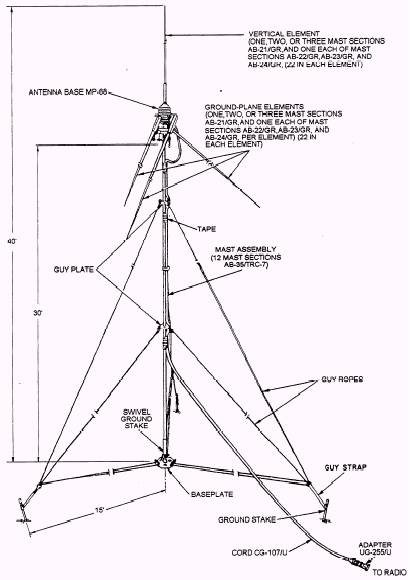
When I was in the military, I was given training in Total Quality Management (TQM) and certified by the Dept of the Navy to teach it to others. Being a Marine, there were other Marines who told me that TQM (we tried to call it "Total Quality Leadership" to get Marines to accept it) would never be accepted or used. I completely agree now, just as I did then...there are some tasks that process improvement won't provide a great deal of benefit, but there others that will. More than anything else, the one aspect I found from TQM/TQL that Marines could use everywhere was the practice of engaging with the front line person performing the task in order to seek improvement. A great example of this was my radio operators, who had to assemble RC-292 antennas all the time; one of my Marines had used wire, some epoxy and the bottom of a soda can to create "cobra heads", or field-expedient antenna kits that could be elevated (and the radios operational) before other Marines could go to the back of the Hummer, pull out an antenna kit, and start putting the mast together. This improved the process of getting communications up and available, and it was a process developed by those on the "front lines" who actually do the work.

So what does that have to do with forensics or incident response? Well, one of the things I like to do now and again is look at my last engagement, or look back over a couple of engagements, and see what I can improve upon. What can I do better going forward, or what can I do if there's a slight change in one of the aspects of the examination?

While on the IBM team and performing data breach investigations, I tried to optimize what I was doing. Sometimes taking a little more time up front, such as making a second working copy of the image, would allow me to perform parallel operations...I could use one working copy for analysis, and the other would be subject to scans. Or, I could extract specific files and data from one working copy, start my analysis, and start scanning the two working images. Chris Pogue, a SANS Thought Leader who was on our team at the time, got really good at running parallel analysis operations, by setting up multiple VMs to do just that.

The point is that we were the ones tasked with performing the work, and we looked at the requirements of the job, and found ways to do a better, more comprehensive job in a more efficient manner, and get that done in fewer ticks of the clock. One thing that really benefited us was collaborating and sharing what we knew. For example, Chris was really good at running multiple VMs to complete tasks in parallel, and he shared that with the other members of the team. I wrote Perl scripts that would take the results of scans for potential credit card numbers, remove duplicate entries, and then separate the resulting list into separate card brands for archiving and shipping (based on the required process). We shared those with the team, and Chris and I worked together to teach others to use them.

So why does any of this matter? When I was taking the TQM training, we were told that Deming originally shared his thoughts on process improvement with his fellow Americans, who laughed him out of the country, but others (the Japanese) absorbed what he had to say because it makes sense. In manufacturing processes, errors in the process can lead to increase cost, delays in delivery, and ultimately a poor reputation. The same is true for what we do. Through continual process improvement, we can move beyond where we are now, and provide a better, more comprehensive service in a timely manner.

In closing, use this as a starting point...a customer comes to you with an image, and says that they think that there's malware on the system, and that's it. Think about what you can provide them, in a report, at the end of 40 hours...5 days, 8 hrs a day of work. Based on what you do right now, and more specifically, the last malware engagement you did, how complete, thorough, and accurate will your report be?

Friday, January 07, 2011

Links and stuff

Windows Registry Forensics
The folks at Syngress tweeted recently that Windows Registry Forensics is due to be published this month! It's listed here on Amazon, along with editorial reviews from Troy Larson and Rob Lee. I, for one, cannot wait! Seriously.

A word about the book...if you're interested in an ebook/Kindle version, or if you have trouble getting the contents of the DVD with your ebook purchase, please contact the publisher first. Once the book has been sent in for printing, I (and authors in general) have very little to do with the book beyond marketing it in ways that the publisher doesn't.

Rules
Jesse Kornblum posted his Four Rules for Investigators recently. I would say that it was refreshing to see this, but I've gotta say, I've been saying most of the same things for some time...I think the big exception has been #2, and not because I disagree, but as a consultant, I generally assume that that's already been addressed and handled.

Jesse's other rules remind me a great deal of some of the concepts I and others have been discussing:

Rule 1 - Have a plan...that kind of sounds like "what are the goals of your investigation and how do you plan to address it with the data you have?"

Rule 2 - Have permission...definitely. Make sure the contract is signed before you forensicate.

Rule 3 - Write down what you do...Documentation! Now, I know some folks have said that they don't keep case notes, as those would be discoverable, and they don't want the defense counsel using their speculation and musings against them. Well, I'd suggest that that's not what case notes are about, or for. Case notes let you return to a case 6 months or a year later and see what you did, and even why. They also let someone else pick up where you left off, in case you get sick, or hit by a bus. What I really don't like seeing is the folks who say that they spent hours researching something that was part of a case, but they didn't document it, so they can't remember it...they then have to re-do all of that research the next time they encounter that issue. Also, consider this...one person on a team conducts research that takes 10 hrs to complete. If they don't document and share the results of the research, then the other 9 people on the team are going to spend a total of 90 hrs doing that research themselves...when the original research could have been shared via email, or in a 1/2 hr brown bag training session.

Rule 4 - Work on a copy...Always! Never work on the original data. I've had instances where immediately after I finished making copies of the images, the original media (shipped by the customer) died. Seriously. Now, imagine where I'd've been had I not followed procedure and made the copies...my boss would've said, "...that's okay, because you made copies...right?" I'm generally one of those folks who follows procedure because it's the right thing to do, and I tend not to make arbitrary judgments as to when I will or won't follow the procedure.

Jesse isn't the only one saying these things. Take a look at Sniper Forensics: Part 1 over at the SpiderLabs Anterior blog. Chris has gotten a lot of mileage out of the Sniper Forensics presentations, and what his talks amount to include putting structure around what you do, and the KISS principle. That's "keep it simple, stupid", NOT listening to Love Gun while you forensicate (although I have done that myself from time to time).

Is it StuxNet, or is it APT?
I found this DarkReading article about targeted attacks tweeted about over and over again. I do agree with the sentiment of the article, particularly as the days of joyriding on the Information Superhighway are over with, my friends. No one is really deploying SubSeven any longer, just to mess with someone and open and close their CD-Rom tray. There's an economic driver behind what's going on, and as such, steps are being taken to minimize the impact of unauthorized presence on compromised systems. One thing's for sure...it appears that these skilled, targeted attacks are going to continue to be something that we see in the news.

USB Issues and Timelines
Okay, this isn't about the USB issues you might be thinking of...instead, it's about a question I get now and again, which is, why do all of the subkeys beneath the USBStor key in the System hive all have the same LastWrite time? While I have noticed this, it hasn't been something that's pertinent to my exam, so I really haven't pursued it. I have seen where others have said that they've looked into it and found that the LastWrite time corresponded with an update.

Rather than speculating as to the cause, I thought what I'd do is recommend that folks who see this create a timeline. Use the file system metadata, LastWrite times from the keys in the System and Software hives, and Event Log data, to start. This should give you enough granularity to begin your investigation. I'd also think about adding Prefetch file metadata (if you have any Prefetch files...), as well as data from the Task Scheduler log (that is, if it says anything besides the Task Scheduler service starting...).

Tuesday, January 04, 2011

Accessing Volume Shadow Copies

Over the past months, I've had some work that involved Windows systems beyond XP...specifically, one Windows 7 system, and I had some work involving a Vista system. Now, most of what I looked at had to do with timelines, but that got me to thinking...with the number of systems now available with Windows 7 pre-installed (which is pretty much everything that comes with Windows pre-installed), how much do we really know about accessing Volume Shadow Copies (VSCs)?

Troy Larson, the senior forensic-y dude from Microsoft, has been talking about Volume Shadow Copies for quite some time. In his presentations, Troy has talked about accessing and acquiring VSCs on live systems, using George M. Garner, Jr's FAU dd.exe; however, this requires considerable available disk space.

Troy's SANS Forensic Summit 2010 presentation can be found here. In his presentation, Troy demonstrates (among other things) how to access VSCs remotely on live systems, using freely available tools.

ProDiscover - Chris Brown has a presentation available online (from TechnoSecurity 2010) in which he discusses using ProDiscover to access and mount Volume Shadow Copies on live systems...remotely. Pretty cool.

I ran across a QCCIS whitepaper recently that discusses mounting an acquired image using EnCase with the PDE module, accessing the VSCs using the same method Troy pointed out, and then copying files from the VSCs using robocopy. There are also a number of posts over at the Forensics from the sausage factory blog that address VSCs, and a couple that include the use of robocopy. As I often work with acquired images, being able to access VSCs within those images is something I'm very interested in being able to do. However, most of my online research points to folks using EnCase with the PDE module to mount their acquired images when demonstrating how to access VSCs within those images...and I don't have EnCase.

So...what if you don't have access to EnCase or the PDE module? How could you then access Volume Shadow Copies within an acquired image?

Testing
I started out with a host system that is a fresh install of Windows 7 Professional, 64-bit. The acquired image I started with is of a physical disk of from a 32-bit Vista system; as it's an image from the physical disk, it has several partitions, including a maintenance partition. The acquired image is called "disk0.001". I also extracted the active Vista partition as a separate raw/dd image, calling it "system.001". I verified the file systems of both of these images using FTK Imager to ensure that I could 'see' the files.

So here are the tools I installed/used:
FTK Imager 3.0.0.1443
ImDisk 1.3.1
Mount Image Pro 4.4.8.813 (14 day trial)
Shadow Explorer 0.8.430.0

So the first thing I did was mount the image using FTK Imager 3.0, and noted the drive letter for the third partition...in this case, I:\. I opened a command prompt and used the 'dir' command to verify that I could access the volume. I then typed the following command:

vssadmin list shadows /for=i:

This got me an error message:

Error: Either the specified volume was not found or it is not a local volume.

Okay. I fired up ShadowExplorer, but the I:\ drive was not one of the options available for viewing.

I tried mounting the system.001 file, and then tried both image files again using ImDisk, and each time got the same result...running the vssadmin command I got the above error message. I also tried using the "Logical Only" option in FTK Imager 3.0's "Mount Type" option, and that didn't work, either. So, at this point, I was failing to even identify the VSCs, so I could forget accessing them.

I reached out the QCCIS guys and John responded that FTK Imager 3.0 seems to mount images so that they appear as remote/network drives to the host OS; as such, vssadmin doesn't 'see' VSCs on these drives. This also explains why ShadowExplorer doesn't 'see' the volumes, and why I get the same error message when using ImDisk. I also got in touch with Olof, the creator of ImDisk, and he said that ImDisk was written using the method for creating drive letters available in NT 4.0, prior to the Volume Mount Manger being included in Windows; as such, getting ImDisk to mount the volumes as local disks would require a re-write. Thanks to Olof for ImDisk, and thanks to Olof and the QCCIS guys for responding!

I then installed the VMWare VDDK 1.2 in order to get a version of vmware-mount that would run on Windows 7. I had booted the acquired image using LiveView, so I had a .vmdk file on my drive for this image. After installing the VDDK, I ran "vmware-mount /p", and clearly saw the 4 volumes within the image...I knew that I wanted to access volume 3. I then ran the following command:

vmware-mount /v:3 x: f:\vista\disk0.001.vmdk

This resulted in an error message stating that vmware-mount could not mount the virtual disk. Checking the log file that was produced, the first message I see is that the image file, disk0.001, "failed to open (38): AIOMgr_Open failed." I'm still researching this one...

Getting It To Work
So, at this point, I'm stuck...I want to access files within the VSCs in an acquired image, and I don't have EnCase/PDE. So far, my attempts to just see the VSCs have failed. So, I grabbed a copy of vhdtool.exe, which is available from MSDN (it is described as "unmanaged code"). Originally, I wanted to get a copy of this as I have XPMode installed on my Windows 7 Professional system, which means I have Virtual PC...but I don't want to boot the vhd file at this point, so that's not a required component. So I made a copy of system.001 to another storage location and ran the vhdtool.exe with the "/convert" switch. This apparently adds a footer to the file...which I'd read about during my research and is the reason I made a copy of system.001 to work with (don't want to muck up my original in case all of this doesn't work...know what I mean?). I should note here that running the tool adds the VHD footer to the file without changing the file name...so even though I apparently now have a VHD file, I can still see only "system.001".

Next, I opened the Computer Management interface in Windows 7 and fired up the Disk Manager. I then chose Action -> Attach VHD, and browsed to my new VHD file. Before clicking "OK", I made sure to check the "Read-only" box. I then had Disk2 added to Disk Manager, and the Volume listing included a new G:\ volume. In both instances, the drive icon was light blue, as opposed to the grey drive icon for the other drives on my system. When I ran the vssadmin command against the G:\ drive, I could see the VSCs! Oddly enough, the G:\ drive is NOT a visible option in ShadowExplorer.

Next, I ran the mklink command against the last VSC identified on the G:\ drive. To do this, I selected everything on the line following "Shadow Copy Name:"...the stuff that says "\\?\GLOBALROOT\Device\HarddiskVolumeShadowCopy40".

mklink /d c:\vista \\?\GLOBALROOT\Device\HarddiskVolumeShadowCopy40\

Note: The final trailing "\" is EXTREMELY important!

From here, I could now access the files within the VSC. Several folks have mentioned using robocopy to get copies of files from within the VSCs, using something as simple as a batch file. See the QCCIS whitepaper for some good examples of the batch file. This is a great way to achieve data reduction...rather than acquiring an image of the VSC, simply mount it and access the files you need. Another idea would be to use RegRipper (include RegRipper's rip.exe in a batch file) or a forensic scanner to access and retrieve only the data you want. For example, when you access a user's UserAssist key and parse the information, if they've taken an action before (launched an application, etc.), you only see the date/time that they last took that action, and how many times they've done this. By accessing VSCs and running RegRipper, you could get historical information including the previous dates that they took those actions. Let's say that you use something similar to the batch file outlined in the QCCIS whitepaper, and include a command similar to the following (you may need to modify this to meet your environment):

rip.exe -p userassist -r D:\vsc%n\ > user_ua%n.txt

Now, this assumes that your VSCs are mounted with mklink under D:\vsc; %n refers to the VSC number.

Something similar would also be true with respect to MRU lists within the Registry...we know that the LastWrite time for the key tells us when the most recently accessed file (for example) was accessed; accessing VSCs, we can see when the other files in the MRU list were accessed.

When you're done accessing the mounted VSC, simply remove the directory using rd or rmdir. Then go back to your Disk Manager, right-click the box to the left in the lower right pane, and select "Detach VHD".

If you need a command line method for doing this, take a look at diskpart...you can even include the list of commands you want to run in a script file (similar to ftp.exe) and run the script using:

diskpart /s

This, of course, leads to other questions. For example, we've seen how, if you have a full image, you can use vhdtool to convert the image file to a vhd file, or extract the pertinent partition (using FTK Imager) and convert that raw/dd image to a vhd file. But, what if you have a vmdk file from a virtual environment? One option would be to use FTK Imager to re-acquire the file to raw/dd format; FTK Imager opens vmdk files, as well as EnCase format images, just fine.

There's a tool available from the VMToolkit (produced by the VMWare folks) that will reportedly convert vmdk files to vhd format. Apparently, Starwind has a free converter, and some have mentioned that WinImage should work, as well. I haven't tried any of these, so YMMV.

Monday, January 03, 2011

Links and Updates

It's been a while since I posted a list of links and resources from across the Internet. I thought that since things have been quiet toward the end of 2010, I'd post some of the things I'd run across and found interesting...so, here goes...

GSD
Looks like Claus is back with an interesting update to his site. Claus hasn't been updating his site as much as he had done in the past, but it is always good to see is posts. A lot of what Claus posts that is oriented toward forensics is from an admin's perspective, which is great for a guy like me...I'm not an admin (nor do I play one on TV), so I often find that it's good to get a reminder of the admin's perspective. Besides, Claus always seems to be able to find the really good stuff...

One of the interesting things I found in Claus's post was the mention of a new mounting tool, OSFMount, for mounting images. I find it useful to be able to do this, and have been using FTK Imager 3.0. Claus also mentions in his post that ImDisk was updated recently...like OSFMount, it comes with a 64-bit version, in addition to the 32-bit version.

So, what does this tell us about image mounting tools? There are several other free and for-pay tools, some of varying quality, and others with vastly greater capabilities. So why does it seem that there's an increase in the number of tools that you can use to mount images? After all, you can use LiveView to convert a raw dd image to a vmdk and open it in VMPlayer, or you can use vhdtool to convert a raw dd image to a vhd and open it in MS's Virtual PC, which is freely available.

eEvidence
I watched for a long time and didn't see any updates for a while...while I wasn't watching, Christine updated the e-Evidence.info site with a lot of great reading material back in November. This site has always been a great source for information.

VSS
Based on a link from the e-Evidence site, I did some reading about mounting images, and accessing and recovering data from Volume Shadow Copies. The first resource I looked at was from QCCIS.com; the whitepaper provides an explanation of what the Volume Shadow Service does, and provides a simple example (albeit without a great deal of exacting detail) of mounting and extracting data from shadow copies. This is a good way to get started, and I've started looking at ways to implement this...so far, I've used Windows 7 Professional 64-bit as a base system, mounted an image (with FTK Imager 3.0) that includes a Vista 32-bit volume, and not been able to access the shadow copies. I'll be trying some different things to see if I can mount images/volumes in order to access the Volume Shadow Copies.

Malicious Streams
This site isn't strictly Windows-oriented...in fact, it's decidedly focused on MacOSX. However, Malicious-streams.com contains information about PDF malware, a bit of code geared toward Windows systems, and some good overall reading. Also, the author is working on a version of autoruns for MacOSX and I hope that this gets released as a full version early this year, as it would be a great way to start things off in 2011.

Resources
Derek Newton's list of Forensic Tools
Open Source Digital Forensics Site
LNK Parser written in Python

Wednesday, December 29, 2010

Mining MSRC analysis for forensic info

Anyone who's followed this blog for a while is familiar with...call them my "rants"...against AV vendors and the information they post about malware; specifically, AV vendors and malware analysts have, right in front of them, information that is extremely useful to incident responders and forensic analysts, but they do not release or share it, because they do not recognize its value. This could be due to the AV mindset, or it could be due to their business model (the more I think about that, the more it sounds like a chicken-egg discussion...).

When I was on the IBM ISS ERS team, we did a good deal of malware response. In several instances, team members were on-site with an AV vendor rep, whose focus was to get a copy of the malware to his RE team, so that an updated signature file could be provided to the customer. However, in the time it takes to get all this done, the customer is hemorrhaging...systems are getting infected and re-infected, data is/maybe flooding off of the infrastructure, etc. Relying on known malware characteristics, our team members were able to assist in stemming the tide and getting the customer on the road to recovery, even in the face of polymorphic malware.

What I find useful sometimes is to look at malware write-ups from several sites, and search across the 'net (via Google) to see what others may be saying about either the malware or specific artifacts.

I watched this video recently, in which Bruce Dang of Microsoft's MSRC talked about analyzing StuxNet to figure out what it did/does. The video is of a conference presentation, and I'd have to say that if you get get past Bruce saying "what the f*ck" way too many times, there's some really good information that he discusses, not just for malware RE folks, but also for forensic analysts. Here are some things I came away with after watching the video:

Real analysis involves symbiotic relationships. I've found this to be very true in some of the analysis I've done. I have worked very closely with our own RE guy, giving him copies of the malware, dependency files (ie, DLLs), and information such as paths, Registry keys, etc. In return, I've received unique strings, domain names, etc., which I've rolled back into iterative analysis. As such, we've been able to develop analysis that is much greater than the sum of its parts. This is also good reason to keep a copy of Windows Internals on your bookshelf, and keep a copy of Malware Analyst's Cookbook within easy reach.

Malware may behave differently based on the eco-system. I've seen a number of times where malware behaves differently based on the eco-system it infects. For example, Zeus takes different steps if the infected user has Administrator rights or not. I've seen other malware infections be greatly hampered by the fact that the user who got infected was a regular user and not an admin...indicating that the variant does not have a mechanism for check for and handling different privilege levels. Based on what Bruce discussed in his presentation, StuxNet takes different steps depending upon the version of Windows (i.e., XP vs. Vista+) that its running on.

Task Scheduler. I hear the question all the time, "what's different in Windows 7, as compared to XP?" Well, this seems to be a never ending list. Oy. Vista systems (and above) use Task Scheduler 2.0, which is different from the version that runs on XP/Windows 2003 in a number of ways. For example, TS 1.o .job files are binary, whereas TS 2.0 files are XML based. Also, according to Bruce's presentation, when a task is created, a checksum for the task .job file is computed and stored in the Registry. Before the task is run, the checksum is recalculated and compared to the stored value, to check for corruption. Bruce stated that when StuxNet hit, the hash algorithm used was CRC32, and that generating collisions for this algorithm is relatively easy...because that's part of what StuxNet does. Bruce mentioned that the algorithm has since been updated to SHA-256.

The Registry key in question is:

HKLM\Software\Microsoft\Windows NT\CurrentVersion\Schedule\TaskCache

A lot more research needs to be done regarding how forensic analysts (and incident responders) can parse and use the information in this key, and in its subkeys and values.

MOF files. Bruce mentioned in his presentation that Windows has a thread that continually polls the system32\wbem\mof directory looking for new files, and when it finds one, runs it. In short, MOF files are compiled scripts, and StuxNet used such a file to launch an executable; in short, put the file in as a Guest, the executable referenced in the file gets run as System.

Management needs actionable information. This is true in a number of situations, not just the kind of analysis work that Bruce was performing. This also applies to IR and DF tasks, as well...sure, analysts can find a lot of "neat" and extremely technical stuff, but the hard part...and what we're paid to do...is to translate that wealth of technical information into actionable intelligence that the customer can use to make decisions, within their environment. What good does it do a customer if you pile a 70 page report on them, expecting them to sift through it for data, and figure out how to use it? I've actually seen analysts write reports, and when I've asked about the significance or usefulness of specific items, been told, "...they can Google it." Uh...no. So, through experience, Bruce's point is well-taken...analysts sift through all of the data to produce the nuggets, then filter those to produce actionable intelligence that someone else can use to make decisions.

A final thought, not based specifically on the video...it helps forensic analysts and incident responders to engage sources that are ancillary to their field, and not directly related specifically to what we do every day. This helps us to see the forest for the trees, as it were...

Sunday, December 26, 2010

Writing Books, pt IV

Okay, by now, you've probably/likely decided to write that book, and that you've opted to do so through a publisher to get it on the bookshelves and onto Kindles and other ereaders. Remember, this isn't the only way to get something published, but it is one of the only ways to get your book published and have someone else take care of getting it on shelves and in front of your intended audience through Amazon, etc. Your alternatives include self-publishing through sites like Lulu.com, or simply writing your "book" and printing your manuscript to a PDF file, rather than a printer. There are advantages and disadvantages to each approach, but we're going to go with the assumption that you'll be working with a publisher.

Working with the publisher
When you're working with the publisher, don't set your expectations (at all, or too high) of what that's like ahead of time. Remember, the publisher's staff are people, too, and may be working with multiple authors. You very likely won't be the only author that they're working with, nor the only schedule. In addition, remember that in the current economy many people are wearing multiple hats in their jobs...so the editor you're dealing with may not get your email because they're traveling or at a book show. I've worked with staff who, in 2009/2010, do not have remote access to their email (can you imagine that??), so I won't hear back from them for weeks at a time.

While working with the publisher, I've had editors and even editors assistants changed part way through the writing process. The result was that chapters that I had sent in for review could no longer be found. I know this sounds like a bit much, but keep track of what you send in, when, and to whom. This can really help...particularly in instances where you have to resend things.

One of the things I've run into several times is that I've submitted what I thought was everything...DVD contents, revised chapters, etc...and asked the staff I was working with if everything was received, and if I needed to provide anything else. I'd been told, no, that's everything...only to be contacted three weeks later and told that something else was needed (review the proofs, provide a bio, etc.). The key to this is to see what's in other books, and keep a list of what you've provided...have you written a preface yet? A bio? How about that acknowledgment or the dedication page?

In short, be flexible. Focus on meeting your schedule in the contract. If you're not going to meet the schedule for some reason, do the professional thing and let them know ahead of time. Don't worry about what anyone else does or is doing. In the long run, it'll help.

Working with reviewers
When you're working with reviewers, keep in mind what their role is in the process. They're generally there to review your work, so don't take what they say or comment on personally.

There are generally two kinds of reviewers...those who do the grammar, spelling and formatting review for the publisher (they tend to work for the publisher), and those who are supposed to review your work from a technical perspective, to ensure that it's accurate (although why you'd put that amount of time into writing something that is completely off base, I have no idea). Generally speaking, whatever the grammar/spelling reviewer suggests is probably advisable to accept. However, this won't always be the case, particularly when you've written a turn of phrase that you really want to use, or are using acronyms specific to your field. I remember that I had an issue with the acronym "MAC"...did it refer to file "MAC" times, or to a NIC's "MAC" address? Kind of depended on the chapter and context.

As far as your technical reviewers go, that's another story. There's no reason that you have to accept any of their proposed changes, or follow what their comments say. Hey, I know that's kind of blunt, but that's the reality of it. In every book I've worked on, to my knowledge, the technical reviewer has had no prior contact with me, my book proposal, or my thought process prior to getting my draft chapters. Therefore, they are missing a great deal of context...and in some cases, their comments have made little sense when you consider the overall scope and direction of the book.

For some reason, the publishing process seems to be something of a maze of Chinese walls. You get an author who's writing a technical book, working with a publisher who knows publishing, but not the subject that's being addressed. One person reviewing the book and working for the publisher knows spelling, grammar, and formatting, and that's good...but often times, the technical reviewer may not know a great deal about the subject being addressed, and knows nothing at all about the author, the goals and direction of the book, or much in the way of overall context. In my mind, this is just a short-coming of the process, and something that you need to keep in mind. I've worked with a LOT of folks with respect to writing technical reports, and there are generally two things that most folks do with suggested changes and comments...they either accept them all unconditionally, or they delete and ignore them. I would suggest that when you are going through the document that you receive back from the technical reviewer, make your changes and add your own comments to theirs, justifying your actions. Then save the document, copy it, and (if it's written in MSWord) run the copy through the document inspection process, accepting the edits and removing comments. That way, you have a clean copy to send back, but you also have a clear record of what was suggested and what you chose to do about it.

Another thing to keep in mind is that people have varying schedules...if you submit a couple of chapters and you feel that you aren't getting much in the way of a review, or one that's technical, get in touch with the editor and request someone else. Or, suggest someone to them up front...after all, if you really know the subject that you're writing about, you will likely know someone else in the field who (a) knows enough about it to review your work, (b) has the time to do a good review, and (c) has the interest in working with you. I've had folks offer to review my work completely aside from the publisher...that's okay, too, but it also means you may submit a chapter and not hear back at all. Remember, in the technical field, you don't make enough money to support yourself writing books, so neither writing nor reviewing books is a full-time job, and people have day jobs, too.

Working with co-authors

Writing a book as the sole author can be tough, as it is a lot of work...but I think that writing a book as multiple authors, particularly when none of the authors ever actually sit in a room together, is much harder. There are a lot of decisions that need to be made and coordinated ahead of time, and continually revisited throughout the process. Again, writing books in this field is NOT a full-time job...as such, people's day jobs and lives tend to take precedence. Family illness, holidays, vacations, etc., all play a role in the schedule that needs to be worked out ahead of time.

Another thing to consider is that someone has to take the lead on tone...or not. You need to decide early on what the division of labor will be (split up chapters or sections), and whether or not you feel it's important to have a single tone throughout the book. There will be times when it makes sense to have a single tone, and there will be other times when it's pretty clear that you aren't going to have a single tone, as the various authors take the lead on the chapters for which they have the most expertise in the subject matter.

Providing Materials With Your Book
I'm one of those folks who writes some of my own code, and I tend to create my own tools, whether they be a batch file or a Perl script. As such, it's helpful to others if I make those tools available to them in some manner, and this is often done by putting those tools on a CD or DVD included with the book. I think that a lot of times, this increases the value of the book, but it can also be a bit difficult to deal with...so how you provide the materials is something to consider up front. Another item that a lot of folks find interesting and very valuable is "cheat sheets"...if you list or explain a process in your book, and it covers a good portion of a chapter, it might be a good idea to provide a cheat sheet that the reader can print out (perhaps modify to meet their own needs) and use. How you intend to provide these, and other materials (i.e., videos that show the viewer how to do something step-by-step, etc.) is something that you need to consider ahead of time.

The point is that if there are materials you're going to refer to in your book, you have to figure out ahead of time how you're going to provide them. In my experience, there's two ways you can do this...provide the materials on the DVD that comes with the book, or provide them separately. I have usually opted to provide the materials on a DVD, but after having written a couple of books, I think I'm going to move to something completely separate, and provide the materials online.

I have decided to do this for a couple of reasons. One is that there's always someone out there who ends up purchasing a copy of the book that mysteriously doesn't have a DVD. Or they loose the DVD. Or they leave it at home or at work, when they need it in the other location. Then there's the folks who purchase ebooks for their Kindle or other ereader, and never got the email that says, "...go here to download additional content." Or they did, but the publisher modified their infrastructure so now the instructions or path aren't valid. And, of course, there's always the person who's going to contact you directly because they want to ensure that they have the latest copy of the materials.

My thinking is that a lot of these issues can be avoided if you choose a site like Google Code or something else that is appropriate (and relatively stable/permanent) for hosting your additional materials. That way, you can control what's most up-to-date and not have to rely on someone else's schedule for that. You can refer to the actual tools (and other materials) in the book, so that having the book itself makes the tools more valuable, but by providing them on the web, you can include "here are the absolute latest, newest, most up to date copies" on the page where the reader will go to download those tools.


Self-Marketing
Blogging is a great way to get started and get the feel for writing, without the constraints of editing (and things like spelling, grammar, etc.). Face it, some folks don't take criticism of any kind well, and don't put a great deal stock in checking their own spelling and grammar...so blogging is sort of a way to get into writing without having someone looking over your shoulder. It's also a great way for some folks to realize how important that sort of thing is.

Blogging is also a great way to self-market your book, prior to and following publication. It's a great way to start talking about the book, to answer questions that you get about your book and materials, address errata, etc. In some ways, a blog can also lay the groundwork for a second edition, or even just for your next effort, as you get feedback, read reviews, post new ideas, etc. For example, if you start to see that your book on forensic analysis is linked to another blog on malware reverse engineering, with that author making comments about what you've written (positive or negative), that could be a good indicator for you...what do you need to improve on, expand on, and what were you dead on with in your book?

Take the lead on marketing your book. Present the publisher with ideas, and take the lead on getting the word out there (assuming that that's what you want). When WFA 2/e was coming out, I was excited because this was the first book in a new direction that Syngress was going, something that was exemplified by the new cover design. That summer, the SANS Forensic Summit was going to be in Washington, DC, and I was attending as a speaker. As I looked more and more into the conference, and who was speaking and attending, I counted almost half a dozen Syngress authors who would be there, all of whom had the work "forensics" in their book title. I contacted the publisher to find out if they'd have a bookstore...I thought, between sessions I could answer questions about the book. Well, it turns out that they had NO PLANS for a bookstore!! I thought (and said to them), you've GOT to be kidding me! Here's a conference with "forensics" in the title, and all these authors of "forensics" books will be there...to me, it was a total marketing coup. The short story is that the editor was there with books on a table and it was a huge success for everyone.

Final Thoughts...
And now, some final thoughts as I close out this series of posts.

I hope that in reading these posts, you've enjoyed them and at the same time gotten something out of them. I tend to take something of a blunt approach, in part because I don't want to sugarcoat things for someone who's considering writing a technical book. Yes, it is hard...but if you know up front what you may be facing, you're less likely to let it slow you down. One of the hardest things about writing books is that you're rarely, if ever, face-to-face with anyone from the publisher's staff when discussing your book. In fact, you're rarely face-to-face with anyone throughout the process.

One of the misconceptions a lot of folks who have never written a book have about authors is that they retain some modicum of control over what happens with the book once it's submitted to the printer. Nothing could be further from the truth. When WFA 1/e was released by Syngress, a PDF version of the book was available...for the first couple of weeks, it was provided with each copy of the book purchased through the Syngress web site. After that, it was available for purchase. Later, Syngress was purchased by Elsevier, a company out of Europe that produced all e-format versions of its books EXCEPT PDF. The author's role in any of that, particularly in the availability of a PDF version of their book, is zero. And I say that only because there's nothing less than zero.

Another misconception that I've run across is that most folks think that book authors have access to endless resources, or that somehow, the publishing company will provide those resources. This simply isn't the case. When I submitted the proposal for the Registry forensics book, all of the reviews came back saying that I needed to include discussion of the use of commercial tools, such as EnCase and FTK. Well, the short answer was "no"; the long answer was that I neither have access to, nor have I been able to obtain a temporary license for either...and none of the reviewers was offering such a license. In all fairness, I will say that I was offered a temporary license to one of the commercial tools, but by the time that offer was available, I was too far into the writing process to go back and add that work and material into the book. I would have been particularly time consuming because I don't use those tools regularly. Anyway, my point is that when I have written my books, I tend to do so based on my own experiences, or those interesting experiences that others have shared. I tend not to write about ediscovery, because I've never done it. I likely won't be writing about Registry analysis of a Windows-powered car or Windows 7 phone, because I neither own nor have access to either, nor do I have the tools available to work with either. Like most authors, I don't have access to massive data centers for testing various operating systems and application installations across numerous configurations.

Keep in mind that your book is not going to be everything to everyone. You're going to have critics, and you're also going to have "armchair quarterbacks". You're going to have people who post to public forums that you "should've done this...", and not once have a good thing to say about your work. You're going to have folks who will email you glowing commendations for what you've done, but not post them publicly...even when they purchased your book based on a publicly-posted review. Don't let any of this bother you. One of my good friends who's also written a book has received some not-so-glowing criticism, to which he's responded, "...come see me when you've published a book." In short, don't let criticism get you down, and don't let it be an obstacle that prevents you from writing in the first place.

Finally, I want to say once again that writing technical books is tough. It's tough enough if you're a single person and not at all used to writing. If you're married (particularly newly married) and/or have small children, it can be logarithmically harder, and it will require even more discipline to write. However, it can also be extremely rewarding. Seeing your work published and sitting on a bookshelf is very rewarding. Think about it...you've completed and achieved something that few others have attempted. If you've put the effort in and done the best you can, you should take pride in what you've done...and don't let the little things becomes insurmountable obstacles that prevent you from even trying.

Saturday, December 25, 2010

Installing pescanner.py on Windows

I don't often work with Python scripts, but I recently had an instance where, due to advice from a trusted source, I needed to run pescanner.py, mentioned in the Malware Analyst's Cookbook. In short, what I wanted to do was take look at a couple of suspicious executable files, having already run several AV scanners to identify and locate those files. Based on what I learned in setting this up, I wanted to share the steps I used to get this script running on Windows XP SP3.

Pescanner.py is a powerful tool that takes a look into a Windows portable executable (PE) file, and reports on "suspicious" elements of the file, if found, based on heuristics identified within the "Pimp my PE" paper. Pescanner.py can also incorporate YARA functionality so that PEiD and ClamAV signatures can be used, as well. This can be extremely valuable to an analyst, as we're all aware how AV alone often times will not detect malware. I've seen cases where malware was detected by the installed AV, only to have the timeline clearly show that at some point further down the road, another file with the same name was dumped on the system, but NOT detected by the same AV.

Install Python: I opted for ActiveState's ActivePython, but you can also get the current distro for Windows from Python.org.

Install Pefile: Do NOT use the pypm utility that ships with ActivePython to install the pefile module; instead go directly to the source and get the latest version. Download the archive and copy the pefile.py and peutils.py files into the Lib directory for your Python installation.

Download pescanner.py: Go here (this is rev. 18, get the most current one available) and get the file; the easiest thing to do is click on "View raw file" and save it where you want it to go. I had some issues getting the script running on Windows 2003, and it came down to the indentations...if you program Python, you may know what I mean. I had selected and copied the code in my browser, and pasted it into a Notepad window; when I saved the code using "View raw file" from the Google Code site, things worked. On my XP system, I pasted the code into an UltraEdit window and saved it.

Installing python-magic: According to this source, you'll need a couple of files to get python-magic installed on your system. First, go get the GnuWin32 file utility, and download the latest archive. Copy magic1.dll to your system32 directory and put the magic file in the same directory as pescanner.py. You can get regex2.dll from the latest regex archive (copy the file to your system32 dir), and zlib1.dll from the latest zlib archive.

For this one, I contacted MHL (one of the Cookbook authors...) and he sent me the below instructions for installing python-magic on Windows:

Assuming you already have Python from python.org or the ActivePython version...
1) Install
setuptools
2) Get
python-magic
* python setup.py build
* python setup.py install

3) Get the GnuWin32's
File utility
* Place magic1.dll from the Binaries package into your system32 dir

* Place "magic" from the Binaries package into your system32 dir (or anywhere else, just as long as you remember the path)

* Place zlib1.dll and regex2.dll from the Dependencies package into your system32 dir

4) Test your installation

C:\> python

>>> import magic

>>> test = magic.Magic(magic_file='C:\path\to\your\magic')

>>> print test.from_buffer("test") ASCII text, with no line terminators

For more information, go
here and here.

Again, many thanks to MHL for providing those instructions.

Another lesson here is to not stick with one tool or one set of tools, but instead be open to finding and using a tool or technique that works, and incorporating it into your toolkit. While Perl has the Parse::Win32Registry module and Python does not appear to have something comparable, Python does have the pefile module (on which pescanner.py was built) and Perl does not have (to the best of my knowledge) a comparable module. So rather than fitting the case to the tool, it's often a much better idea (albeit not easier) to find a tool or technique that will help you with your case.

Friday, December 24, 2010

Writing Books, pt III

At this point, if you're still following and reading this series, you're likely interested in writing a book, particularly (but not exclusively) in a technical field. Now that we're to the point where we've at least considered a publishing medium...or an actual publisher...let's talk about the actual writing.

Determine your audience and writing style

So, now that you have a topic, and your detailed outline, who are you going to be writing the book for? Who is your intended audience? In many ways, your audience can also dictate your writing style. Are you going write from/to a more academic perspective, or do you want to reach as wide an audience as possible? Do you want to sound more clinical, or do you want to be a bit more free flowing?

From my own perspective, I think that over the books I've published, I've progressed a bit and so far, I've received the most and best comments regarding the writing style with respect to WFA 2/e...keep your eyes out for the Registry book, as I think that you'll notice an improvement along those lines.

One of the best ways to determine your writing style is to read. Seriously. What books have you read that you really enjoyed reading? Now, think about why you enjoyed them? Were the characters authentic, did they seem real? Was the writing and its tone enjoyable and easy to digest, or did the author bore you to death (hey, you should read my master's thesis!)?

Also, what other things do you enjoy? When I was originally working with Syngress to publish WFA 1/e and we were working up the title, I immediately agreed with the publisher that if the title had "Windows" and "forensics" in it, I would immediately pull it off the bookshelf to take a look at it. That made sense to me, because that's exactly what I did when I went to the bookstore. From then on, I started to look at those things that I liked about certain books, or didn't like, and tried to emulate them. Over time, I've tried to add more of those things...sidebars, use cases, etc...that people have told me that they want to see more of, in most cases because I wanted to see more of them, as well.

As to the audience, I would like to reach a wide range of folks within the community. I find a lot of books that aren't specifically about IR and digital forensics to be very valuable (such as the Malware Analyst's Cookbook), so my hope is that besides those directly involved with responding to and analyzing Windows systems, others find my books useful as well. Within the community, I'm hoping to provide something useful or valuable to a wide range of analysts, from those new to the field (or just interested in it) to those who have been in a while, from active responders to those taking university or community college courses, to LE, etc. It's probably something of a lofty goal, I know, but that's the direction I'm going.

Be thorough in your writing
Deciding on your overall audience will also have an impact on the level of technical ability that you assume. For example, when describing a technique that uses an open source tool (say, written in Perl), how far do you want to go in explaining the tool? Do you want to go into detail explaining how to install Perl (or Python, or Cygwin, or whatever), or are you going to assume that reader can figure that out themselves?

Sometimes, writing "run the tool" (in magazines like 2600, you'll see 'run nmap' and little else...) doesn't often work very well. Providing a complete command line and relevant output from the command gives the reader something that they can hold on to. Many times, screen captures also help a great deal. However, the caveat about screen captures is that they have to be clear enough to see and understand...I've opened many books where I couldn't read the screen captures at all.

Also, when providing screen captures, be sure to specify what system or systems you're running the tool on, so that the output makes sense. I've met a LOT of folks who think that the major OSs that they have to address are Linux, MacOSX, and Windows. As someone who works with Windows systems, I'd strongly suggest to you that there's a major difference between Windows XP and Windows 7...but that's something to get into later. The fact of the matter is that in some cases, you're going to get different output based on a number of variables...version of the OS, version of Python or Perl installed, etc. Specify what you're working with when you write your book.

If something's important, it's okay to repeat it
Sometimes, this is the case. You don't have to repeat it verbatim, or even in the same chapter. If there's an important concept or technique that you've presented in your book, returning to it later in the book will help the reader see that its important, and perhaps even understand the importance.

When I was an instructor in the military, we'd do that...a lot. We had things that we did to signify to the (usually dozing) students that something was important. One really easy way to do this is to think about it when you're developing your outline, and find places where you can tie concepts or techniques together, where you expound or expand on something...and if you need to, highlight them on the outline in different colors. Some of us that talk about IR mention things like "Locard's Exchange Principle" (I do, and I know that Chris Pogue does, as well...)...so when you talk about it, find places in the book, such as during exercises or case studies, where you can clearly demonstrate the concept. If it's important, use it.

Be consistent
One of the things I learned about report writing that is also true in books is that you need to be consistent in how you write and present things. For example, lets say you're writing a report based on your analysis of three acquired images. When you discuss the analysis of the first system in your report, you describe the AV scans you ran, the Registry analysis you conducted, etc. Then for the second system, you first discuss AV log analysis, Event Log analysis, and you leave the AV scan results to the end and do not even mention your Registry analysis. The discussion of your analysis of the third system continues to be disjointed.

So, what do you think that the reader will walk away with after reaching the end of your report? Will she think that you did a thorough job in locating the malware? Not likely. It's more likely that she'll remember the inconsistencies, because the technical information you presented was lost in the "noise" of those inconsistencies.

The same can be said about writing books. Let's say you're writing a book on analyzing different image (JPG, TIFF, etc.) formats; providing a consistent structure for each image format will allow the reader to form comparisons and contrasts in their minds, whereas an inconsistent approach will leave the reader's mind similarly tangled and confused. Further down the road, the reader will have to search for important references in your book; however, if you've presented the material consistently, they're more likely to turn right to it, particularly if they're comparing information between two or more formats.

Getting Started
Regardless of the decisions you've made up until now, or how much discussion you've had with others about your ideas, nothing is going to actually happen until you start writing. That's right...write something. Anything. Because it's easier to change something that's already written, whereas if you're just sitting there starting at a blank page, you'll just keep staring...and that's hard.

When I was in the military and was writing fitness reports, I found it much easier to start early, consult my platoon commander's notes, and write something. I've found that 17 yrs later, the same things apply, and apply very well. As I develop my outline, I take notes...in a notebook, on stickie's, etc. I start pulling them all together, and start writing.

You're Not Gonna Be Perfect
What first comes out isn't pretty, and it may not be what I end up going with, but it's something to start with. When I was writing my first book, I sent chapter 1 in for review early on in the process...when it came back, I couldn't believe that I'd actually written what was there, and that it was only 8 pages! I really had to look at it, because in the process of working with one of the reviewers, I'd learned so much about writing from the other chapters that I had a hard time believing that I'd actually submitted what was in chapter 1! In the end, I ended up completely re-doing the entire chapter.

As much as you want what you're writing to be just right, understand that it's not going to be perfect. Sometimes, that becomes the excuse we use for not writing, or not submitting what we've written. Just know that it's not going to be perfect...but if you've put your best effort into it, it will be good and something that you can be proud of. Also, remember that in a group of people, you're never going to please everyone...keep that in mind. You're going to need a tough skin, because whenever you put something out there for public consumption, you're going to get positive as well as negative feedback...you're going to have critics.

All that matters is that you're doing this for the right reasons, and that at the end of the day, how do you feel when you look up at your bookshelf, or at the bookshelf at the bookstore (or on someone's iPad...) and see your book there?

Tuesday, December 21, 2010

Writing Books, pt II

So far, the first post in this series seems to have done well. Next, we'll talk about something that's very important toward getting a book published...the publisher.

Finding/choosing a publisher
Once you've gotten through the recommendations in my first post in this series, it's time to start thinking about a publisher. Remember what I said, though...as much as those of us in technical fields hate writing (some to the point of doing it badly so that they don't have to do it...), doing those things that I mentioned in the previous post are only going to help you in the long run. This is, in part, due to the fact that the publisher is going to make you do it anyway. Now, I'm sure that this is also going to be where most folks falter in their efforts...not realizing how much effort is required (I say "effort" instead of "work", due to the fact that a lot of what goes into this process is outside the norm and comfort zones of what most of us do...), some folks will start down the road and not just stop, however unintentionally, when asked to provide something else. Consider it something akin to special operations forces evaluation or assessment programs...the publishers really want to know who has the desire to stick with the process. They aren't throwing up ridiculous obstacles...they're just stating the needs of their process, and I'm sure it weeds out a lot of the folks that aren't serious and would just consume a great deal of their time and resources.

Some publishers, such as Syngress, actively advertise for authors. When I say "actively", I mean on their web site, as well as on social media sites such as LinkedIn, Facebook, and Twitter. We'll talk later about how you can use those sites, as well...but suffice to say for the moment that some publishing companies are taking full advantage of social media sites.

Now, I've only worked with two publishing companies, and for the most part, there were really no significant differences between the initial contracts (more about that later in the post) for either one of them. The only real difference was in the advance payment amount. Remember, you don't get into writing technical books to make money...and the advances come out of your initial royalties. After publishing my first book, I had another idea (to take the things I learned from writing that first book and write something a bit better), and had to provide my first publisher with their right of first refusal (this was stated in the contract) for the new concept. Once this was done, I moved on to Syngress, and through chance and circumstance, I opted to remain with Syngress in part due to some positive experiences with some of the staff, as well as the fact that by proving I wasn't a one-trick pony, I was able to get a bit better percentages in my royalties.

When looking for a publisher, also consider what you're interested in. Who's going to market your book, and how are they going to do that? Will a marketing campaign consist of some mass emailings, or will there be more involved? What can you do to assist, or pick up the slack? Also, besides the actual book itself, in what other formats will the book be available? When the first edition of Windows Forensic Analysis came out, there was a PDF version of the book available. By the time I had written the second edition, Syngress had been purchased by Elsevier, and the second edition was available in several e-book formats...but not PDF. If this is something important to you, be sure that you ask the questions.

Remember, self-publishing is an option. However, before you go that route, be sure you thoroughly research what is involved. How much will you need to know about desktop publishing? How much effort do you need to put in and what will you get in return?

Another thing to consider if you self-publish is, how do the books get on the shelves? Hey, providing review copies to luminaries in your field is easy, thanks to FedEx. But if you handle the marketing of your book and generate hype, and then get some really amazing reviews from notable people in your profession, how do you then get the book to the people who want to buy it, or to those who don't yet know that they want to buy it?

I know someone who wrote a book, self-published through Lulu.com, and provides all proceeds from the book to benefit a fallen comrade. This was the route he chose, and he's happy with it. This may be a route that you will want to go...or it may not. On another note, I was in one of the Family Christian Bookstores recently and found a pamphlet on one of the shelves for Westbow Press...I know someone who feels led to write about an experience in her life, and this may be an approach that she can use to get her book published and share what she's learned with others.

That being said, let's get on with it...

Working with your publisher
Working with the publisher is going to be a new experience for many, unless you're used to working as a contractor, of sorts. What I'm going to share with you now is some things I saw and learned with respect to working with two specific publishers, in writing technical books. As such, if you're going another route, such as writing children's books or non-technical books, YMMV.

The contract
The contract will usually specify the schedule. This may be an area where you will want to negotiate...take a look at your outline and anything else you've written, and correlate it with the schedule. Is it attainable? Is it something you can manage, or will you have to give up weekends and take a "vacation" to complete the book? This effort is going to be enough of a challenge, without having to meet some arbitrary schedule...so see if what's proposed makes sense, and don't get locked into something that's going be really hard on you.

A word about royalties...again, you're not going to make money to the point of retiring if you're writing for a niche market, like forensics. That's just how it is. Therefore, that's usually not the reason that folks get into writing books, particularly technical books in this market. If your contract specifies an advance, remember that advance means "advance"...which means that whatever you're given in your advance comes out of your royalties checks. So don't get disappointed if during the first quarter or six months your book seems to be doing really well, and your first royalties check is 0, or negative.

The keys to any contract are:
1. Read it thoroughly and make sure you understand it. Discuss anything you don't understand or have a problem with.

2. Don't expect that the publisher has it all locked on and is doing everything right...publishers are people, too, and we all make mistakes, like send the wrong contract or don't include things that had been discussed.

3. Make sure you understand and agree with the schedule. If you don't agree, get on the phone with the publisher and work it out. Publishers have schedules for when they'd like to get the book out, so try to work with them on that.

4. If you have questions about anything, or don't understand something...ask. Before you sign.

Formats/templates
When working with the publisher, you'll likely be provided with a template that specifies how the chapters should look. I've had templates that were really loose, while others were really stringent and specified a certain number of sidebars per chapter (among other things). It will help you a great deal in the long run if you get to know the template up front, and begin using it and abiding by it right away. Believe me, I know from experience that going back and restructuring an 80+ page chapter is NOT a pleasurable experience. Using and following the template from the beginning is going to be helpful to not just your overall writing experience, but also for everyone else involved.

However, that doesn't mean that as you're putting your detailed outline together, you can't start writing. In fact, I highly recommend that you do...start putting something down on paper. Throughout my time in the military...whether I was writing my master's thesis, or fitness reports, or whatever...I always found it much easier to write something and change it as I needed to, rather than sitting there staring at a blank page, waiting for the perfect turn of phrase to come to mind (which is a fancy way of saying "writer's block"). Even now, I have snippets written down for a project I have in mind...returning to those snippets will likely be the push I need to get that project off the ground and completed.

Reviewers and reviews
At some point, your chapters are going to have to be reviewed by someone; in many cases, several someones. There will be a reviewer who works for the publisher who will review your format (to ensure that it is in accordance with the template), grammar, spelling, etc. This reviewer will likely pick up things such as unfinished sentences, your horrific spelling, etc. It usually makes good sense to accept what they say (particularly if you're not too terribly good at spelling or grammar), and make most of the changes that they suggest. However, take a really close look at technical acronyms, and consider the reviewer's suggestions...acronyms specific to your field might be easily confused. I had an issue with "MAC"...depending upon the context, it could refer to the file "MAC" times, or to a "MAC" address.

There will also be someone who is a "technical reviewer", who is perhaps someone in your field and hopefully has some knowledge about your subject matter. Their job is to take a look at what you've written and see if it's correct and makes sense. Now, just because the technical reviewer makes a comment or suggestion, that doesn't mean that you have to make the change. I've had some really good reviewers, and some really bad ones. The bad ones were easy to recognize as they provided nothing of value to what had been written, and I would usually suggest to the publisher that they replace the reviewer. In fact, if you can, and you know someone that you can trust to be honest with you, provide their name to the publisher, rather than letting the publisher pick someone out for you. I've also had really good reviewers who've run every tool and every command I mention, noted differences in platforms, etc. However, if you get technical reviews back that say nothing more than "needs work", or "hey, this is a cool idea...", it's probably best to find someone else.

Once your book is published, getting reviews from folks in the field is a great idea. When WFA 1/e was published, 101 copies were sent to folks deemed by the publisher to be "in the industry" (most of whom I did not recognize) with the expectation that many (or some) of them would write reviews. None did. When WFA 2/e was published, I provided a list of about 25 folks (that I had already contacted) to the publisher, and they were provided copies of the book. Almost all of them have written reviews.

Marketing
Marketing your book yourself is a great idea, and there's nothing to stop you from doing this...in some cases, you may be more familiar with industry and how to get "the word" out better than the publisher's marketing staff. In most cases, they have a set program that they follow, and you can follow a sort of "guerrilla marketing" plan. Using social networking sites and any lists you're on and forums you frequent, talk about your book and what's in it. Reference the publisher's page and the Amazon page for your book, and post the cover art graphic where it makes sense to do so.

Like I said, reviews are good, as they help with marketing your book. If you can get someone well-known and well-respected within the community to write a review of your book, and it's positive (yeah, no kidding, right?), then that's going to be the little push that gets someone who's heard about your book and is sitting on the fence to purchase it. If the reviews are posted to Amazon, that's a great site to reference. Blogging and posting links to reviews on other sites is also good. Several years ago, Richard Bejtlich noted and documented a favorable shift in the "Amazon Bestsellers Rank" for his book following a review being posted on Slashdot.

Think about something that you've been interested in...a car, an e-reader, or anything else. If you have a choice, how does the recommendation of a trusted friend weigh in your decision? This is how reviews work. However, much like the technical review I mentioned above, a review that says, "hey, this is a good book" and little else really isn't much of a help. One way to get some of these really useful reviews is to establish relationships through professional networking before writing your book, or early on in the process of writing your book. Lots of folks out there are known to "trade" books and reviews with other authors...and really, there's nothing wrong with this. In fact, it's a great idea. I recently reviewed the Malware Analyst's Cookbook, which was not only a fount of information, but excellent for cross-pollination between what I do and what the author's do.